> For the complete documentation index, see [llms.txt](https://helpcenter.channable.com/llms.txt). Markdown versions of documentation pages are available by appending `.md` to page URLs; this page is available as [Markdown](https://helpcenter.channable.com/account-billing/account-and-billing-de/verwalte-dein-abo/channables-preisplane/css-pricing.md).
# Boost-CSS-Preise
Erfahre, wie die Boost-CSS-Preise für eigenständige Konten, MCAs, aktive Unterkonten und die Abrechnung von Agenturen funktionieren.
{% hint style="success" %}
Erfahre mehr über die [Vorteile unseres Boost CSS](https://helpcenter.channable.com/css/css-de/bevor-du-beginnst/vorteile-von-channable-css.md).
{% endhint %}
### So funktioniert die Preisgestaltung von Boost CSS
#### Boost-CSS-Tarife
Wähle aus zwei Boost-CSS-Tarifen:
| Tarif | Preis pro Shop und Monat |
| ------------------ | ------------------------ |
| Boost CSS Standard | 29 € (oder 35 $) |
| Boost CSS Pro | 99 € oder (109 $) |
Die Gebühr gilt für jedes eigenständige Merchant-Center-Konto oder aktive Unterkonto innerhalb eines Multi-Client-Kontos (MCA). Für das MCA selbst fallen keine zusätzlichen Kosten an.
| Funktion | Beschreibung | Boost CSS Standard | Boost CSS Pro |
| ------------------------------------ | ------------------------------------------------------------------------------------------------------------------------------------------------------ | :----------------: | :-----------: |
| 20 % Margenvorteil mit Channable CSS | Mit Channable CSS erhältst du einen Margenvorteil von 20 %\*. Das bedeutet mehr Gebotsspielraum, ohne dass deine Kosten steigen. | ✔️ | ✔️ |
| Titeloptimierer | Erhöhe die Sichtbarkeit deiner Produkte mit Keyword-Vorschlägen, die auf Suchverhalten und Produktdaten basieren, und optimiere so deine Produkttitel. | ✔️ | ✔️ |
| Labelizer Lite | Nutze Performance-Labels, um Produkte zu identifizieren, deren Optimierung sich lohnt. | ✔️ | ✔️ |
| Price Benchmark Lite | Beziehe die Wettbewerbsfähigkeit deiner Produktpreise in deine Optimierung und Analyse ein. | ✔️ | ✔️ |
| Labelizer | Segmentiere Produkte für Google-Shopping- und Performance-Max-Kampagnen. | | ✔️ |
| Price Benchmark | Vergleiche Produktpreise mit Marktbenchmarks und verwende Benchmark-Labels in Google Ads. | | ✔️ |
| Manuelles Tagging | Füge Tags für Werbeaktionen, saisonale Kampagnen, Tests oder geschäftliche Prioritäten hinzu. | | ✔️ |
| Products AI | Nutze KI-gestützte Produktfeed-Optimierung für Google Shopping. | | ✔️ |
\*Der 20-prozentige Margenvorteil von Boost CSS gilt nur für Länder des Europäischen Wirtschaftsraums (EWR), die [von Google angegeben werden](https://support.google.com/merchants/answer/12653197?hl=en).
### Preise für eigenständige Konten und Multi-Client-Konten
#### Eigenständiges Konto
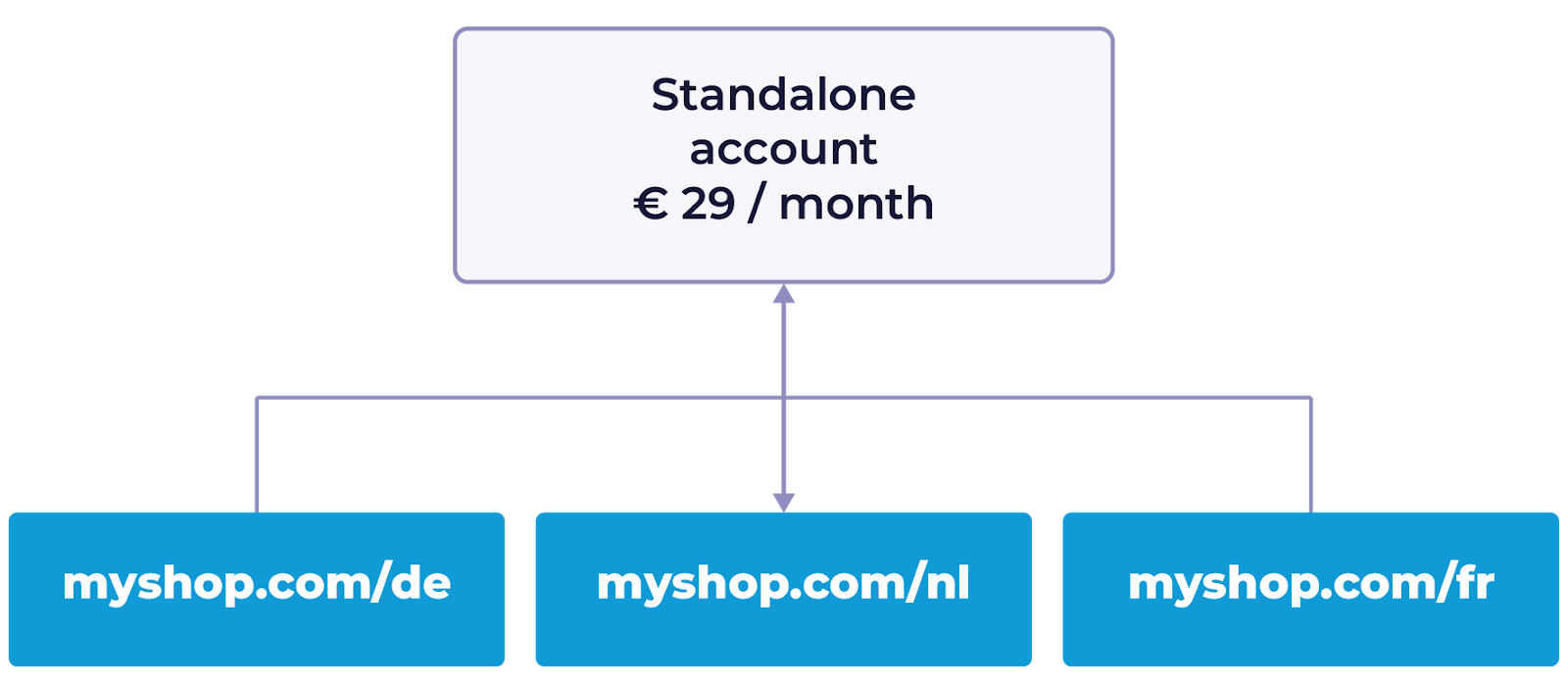
Bei eigenständigen Konten zahlst du für jedes Merchant-Center-Konto, unabhängig davon, in wie vielen Ländern du verkaufst.
Für ein Merchant-Center-Konto kostet Boost CSS Standard 29 € pro Monat. Boost CSS Pro kostet 99 € pro Monat.
* Beispiel: Wenn du ein eigenständiges Merchant-Center-Konto für myshop.com hast, das in den Niederlanden, Deutschland und Frankreich verkauft, zahlst du für einen Shop. In diesem Setup werden üblicherweise eine Merchant-Center-ID und eine Domain verwendet.
#### Multi-Client-Konten (MCA)
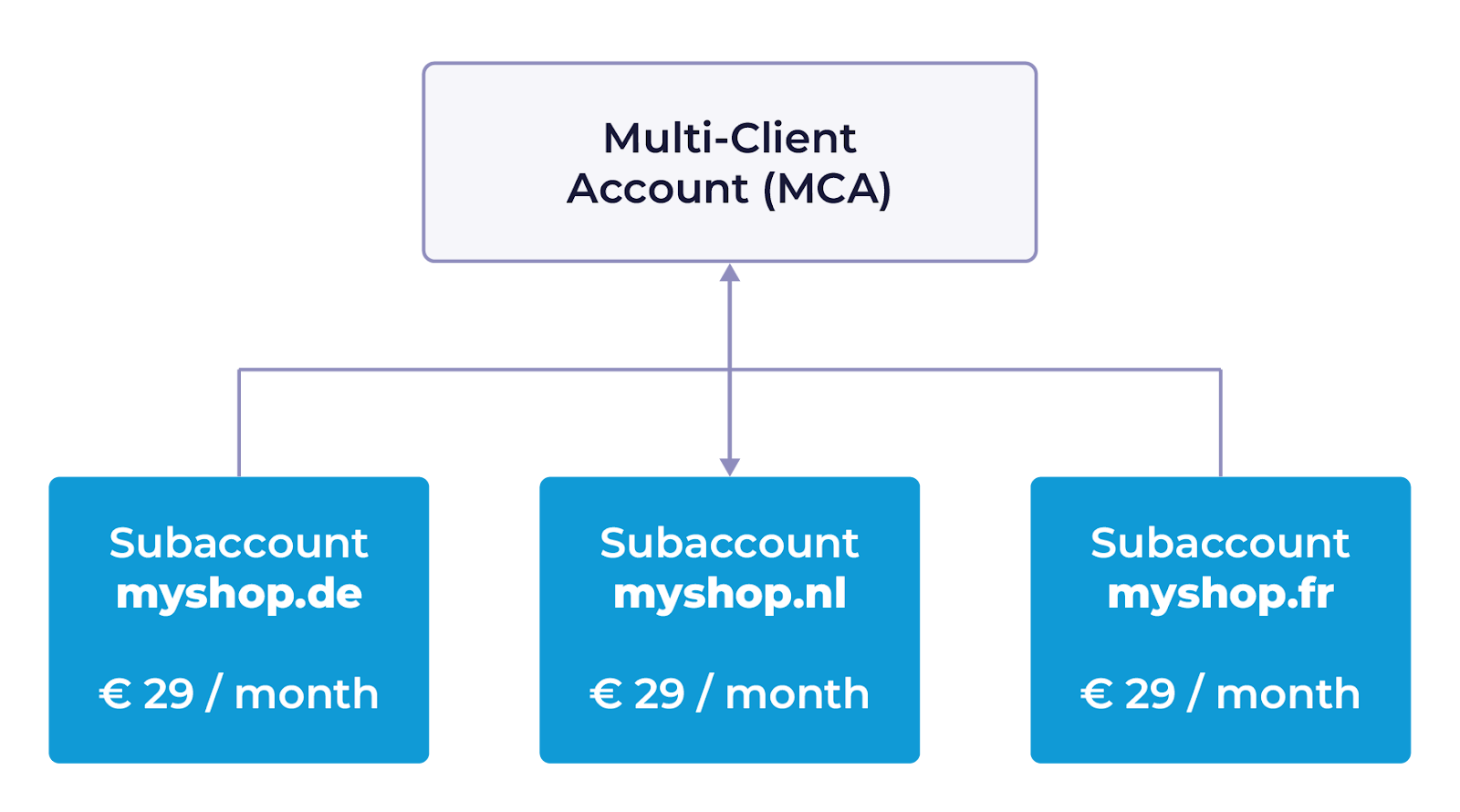
Wenn du ein MCA mit mehreren Unterkonten verwendest, wird jedes aktive Unterkonto separat zum Preis des von dir ausgewählten Tarifs berechnet.
* Beispiel: Wenn dein MCA drei aktive Unterkonten für myshop.nl, myshop.de und myshop.fr umfasst, kostet Boost CSS Standard 3 × 29 € = 87 € pro Monat. Boost CSS Pro kostet 3 × 99 € = 297 € pro Monat. Diese Unterkonten haben unterschiedliche Merchant-Center-IDs und Domains.
{% hint style="success" %}
**Tipp:** Erfahre mehr über [verschiedene Arten von Google-Merchant-Center-Konten](https://helpcenter.channable.com/css/css-de/bevor-du-beginnst/google-merchant-center-account-types.md).
{% endhint %}
#### Preise für aktive und inaktive Unterkonten
Wir berechnen nur aktive Unterkonten innerhalb eines MCA. Ein Unterkonto gilt als inaktiv, wenn es in den letzten 30 Tagen keine kostenpflichtigen Klicks erhalten hat. Diese Aktivitätsdaten erhalten wir direkt von Google.
### Preise für Agenturen, die Multi-Client-Konten verwalten
Channable bietet Agenturen, die mehrere Kunden verwalten, eine flexible Abrechnung. Du kannst die Abrechnung für ein MCA auf verschiedene Unternehmen innerhalb eines einzelnen Kontos aufteilen. Als Agentur kannst du Eigentümerin des MCA sein und einzelne Unterkonten Kunden zuweisen. Diese Kunden erhalten dann separate Rechnungen für ihre jeweiligen Unterkonten.
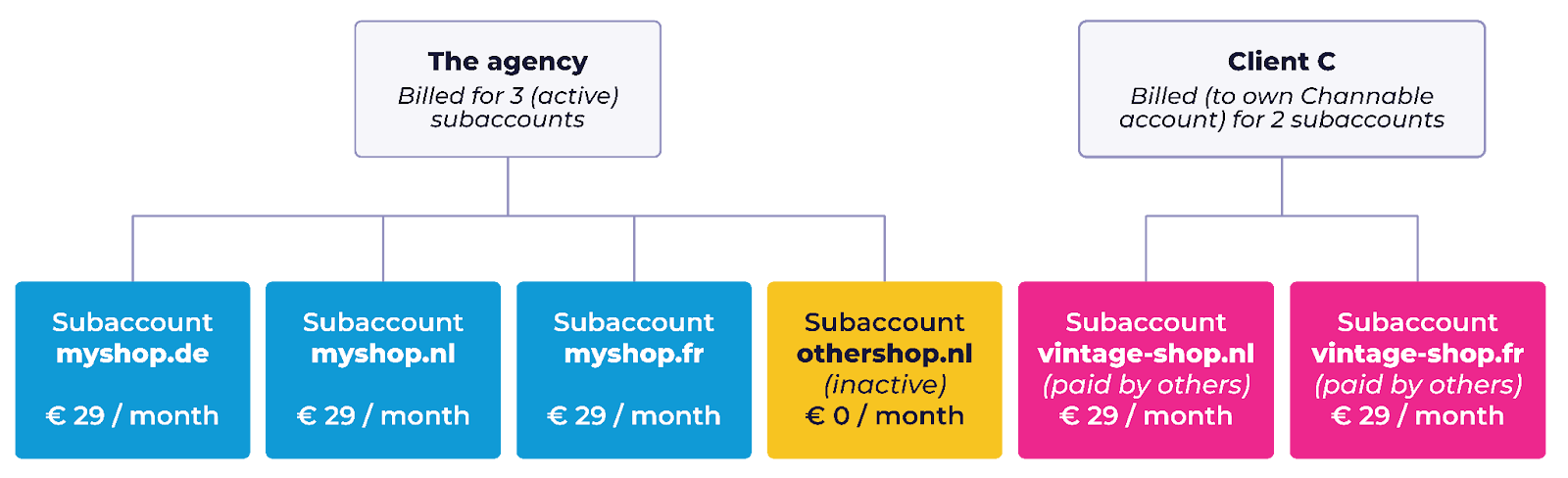
#### Beispiel: Eine Agentur verwaltet ein MCA mit drei Kunden:
* Kunde A (myshop) verkauft über drei Domains (DE, NL, BE).
* Client B (othershop.nl) schaltet derzeit keine Werbung, daher ist sein Unterkonto inaktiv (keine Kosten).
* Client C (vintage-shop) verkauft auf zwei Domains (NL, BE) (Abrechnung über das eigene Channable-Account).
Die Unterkonten werden zwar innerhalb des MCA der Agentur verwaltet, Client C wird jedoch direkt über das separate eigene Channable-Account abgerechnet. Wenn Client C eigene Boost-CSS-Shops im eigenen Account erstellt, ist Client C für die Abrechnung dieser Unterkonten verantwortlich.\
\
Monatliche Abrechnung:
* Die Agentur: Sie hat vier Unterkonten, aber nur drei davon sind aktiv. Boost CSS Standard kostet 3 × 29 € = 87 € pro Monat. Boost CSS Pro kostet 3 × 99 € = 297 € pro Monat.
* Client C (vintage-shop): Im eigenen Unternehmen gibt es zwei aktive Unterkonten. Boost CSS Standard kostet 2 × 29 € = 58 € pro Monat. Boost CSS Pro kostet 2 × 99 € = 198 € pro Monat.
{% hint style="success" %}
**Tipp:** Weitere Informationen findest du zu unserem [Abrechnungszyklus und Zahlungsmethoden](https://helpcenter.channable.com/hc/en-us/articles/360011005859-Billing-and-payment)
{% endhint %}
---
# Agent Instructions
This documentation is published with GitBook. GitBook is the documentation platform designed so that both humans and AI agents can read, navigate, and reason over technical content effectively. Learn more at gitbook.com.
## Querying This Documentation
If you need additional information that is not directly available in this page, you can query the documentation by asking a question.
Perform an HTTP GET request on the following URL with the `ask` and `goal` query parameters:
```
GET https://helpcenter.channable.com/account-billing/account-and-billing-de/verwalte-dein-abo/channables-preisplane/css-pricing.md?ask=&goal=
```
`ask` is the immediate question: it should be specific, self-contained, and written in natural language.
`goal` is what the user is ultimately trying to achieve, the reason they need the answer. Sharing it helps GitBook give you a better, more relevant answer. A goal is most helpful when it describes the outcome the user wants rather than restating the question. For example, with `ask=how do I create an API token`, a goal like `automate deployments from our CI pipeline` lets GitBook tailor the answer to that use case.
The response will contain a direct answer to the question and relevant excerpts and sources from the documentation.
Use this mechanism when the answer is not explicitly present in the current page, you need clarification or additional context, or you want to retrieve related documentation sections.