> For the complete documentation index, see [llms.txt](https://helpcenter.channable.com/llms.txt). Markdown versions of documentation pages are available by appending `.md` to page URLs; this page is available as [Markdown](https://helpcenter.channable.com/account-billing/account-and-billing-es/gestiona-tu-suscripcion/gestiona-tu-suscripcion-de-channable/readme.md).
# Cómo pagar Channable como usuario de Shopify
Descubre cómo funciona la facturación de Shopify en Channable, desde configurar el pago hasta elegir un plan y los cargos mensuales.
### Antes de empezar
#### Bueno saberlo
* **Moneda de la suscripción de Shopify:** Las suscripciones se ofrecen basadas en el modelo de precios en USD de Channable porque Shopify no nos permite cobrar a los clientes en EUR.
* **Proyectos multiplo:** Puedes añadir multiplo Proyectos (tanto de Shopify e no Shopify) A tu compañía de Channable. Sin embargo, el cargo completo di plan de Channable irá A la tienda de Shopify que tienes selezionati In el método de pago. Se prefieres distintos acuerdos de facturación, tendrás que crear compañías separadas de Channable A cada tienda de Shopify.
* **Diferencias en el ciclo de facturación:** Puede diferir da el ciclo de facturación de Channable, e hacer que algunos mese parezcan tener doble cargo, mientras que otros mese no tendrán cargo. Estas irregularidades son normales, e siempre se pueden comparar con las facturas que puedes encontrar In tu Cuenta de Channable.
* **Disponibilidad de las facturas:** Las facturas de Shopify están disponibles dentro de la herramienta, pero no se envían con la ronda habitual de facturación como otras facturas.
### Cómo funciona el proceso
{% stepper %}
{% step %}
### Instala la app de Channable
Sigue las instrucciones proporcionadas In nuestro [artículo del centro de Ayuda de Shopify](broken://spaces/OO5GizCuBcIZ4KzoFoSa/pages/e5dae95019e099b10af1b04faf068a2843ed6be5).
{% endstep %}
{% step %}
### Crea un método de pago de Shopify para tu compañía de Channable
Este paso es crucial e se detalla A continuación.
{% endstep %}
{% step %}
### Seleziona un plan para tu compañía de Channable
[Elige el plan](https://helpcenter.channable.com/account-billing/account-and-billing-es/gestiona-tu-suscripcion/los-planes-de-precios-de-channable.md) que mejor se adapte A tus necesidades.
{% endstep %}
{% step %}
### Facturación mensual
Channable facturará A tu tienda de Shopify mensualmente basándose In tu plan Attuale de Channable.
{% endstep %}
{% endstepper %}
{% hint style="warning" %}
Importante: Se tu suscripción supera los 999 USD, Channable se pondrá In contacto contigo para pedir aprobación para cobrar más por mese. Se esta solicitud no se aprueba In 7 giorni, tu Cuenta se restringirá e tu suscripción terminará se la Cuenta no puede cobrarse (via Shopify).
{% endhint %}
### Crea un método de pago de Shopify In Channable
{% stepper %}
{% step %}
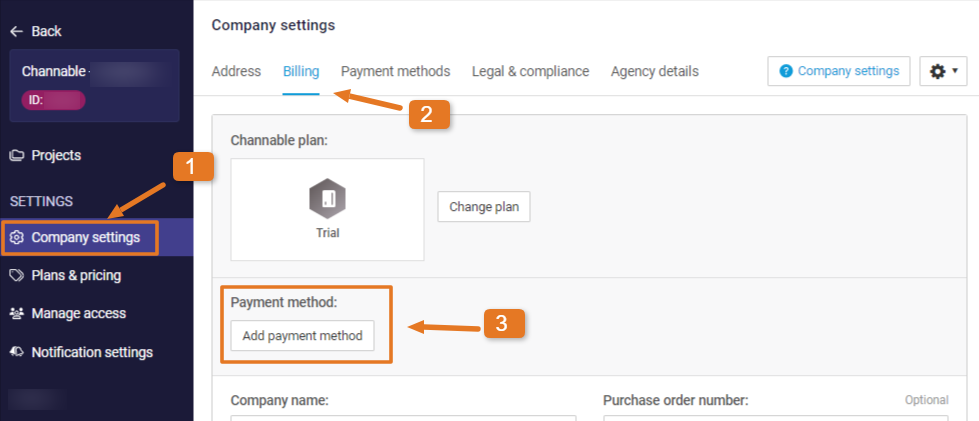
### Ve a Ajustes de compañía
{% tabs %}
{% tab title="Versión heredada" %}
Mientras estás In una compañía, haz clic en **Ajustes de compañía** da la barra lateral.
{% endtab %}
{% tab title="Versión moderna" %}
Abre **Ajustes de compañía** da la barra lateral o del desplegable de la compañía.
{% endtab %}
{% endtabs %}
\[Necesita revisión: la captura puede mostrar navegación de la interfaz antigua]
{% endstep %}
{% step %}
### Añadir método de pago
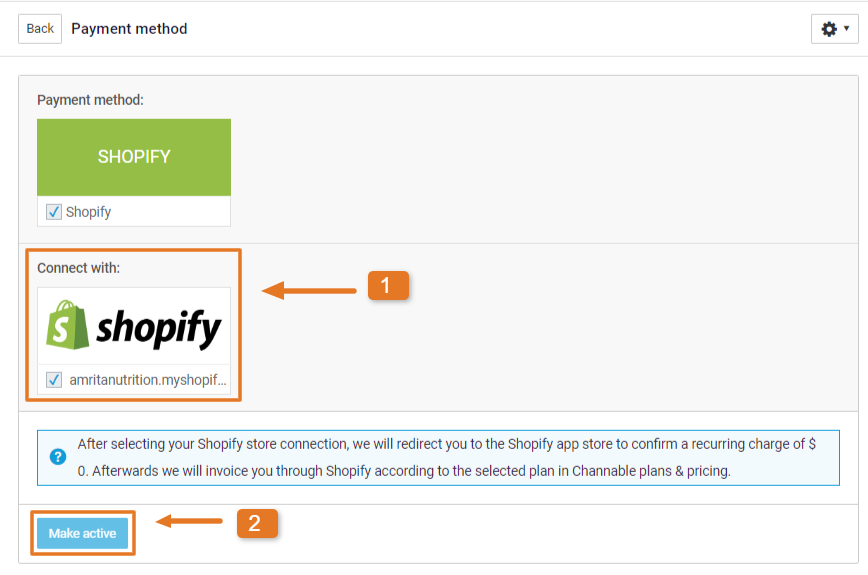
En la **Facturación** pestaña, haz clic en **Añadir método de pago**. Elige tu conexión de Shopify. Esto determina qué tienda de Shopify se cobrará. Ahora haz clic en **Hazlo activo.**
{% endstep %}
{% step %}
### Aceptar cargo recurrente
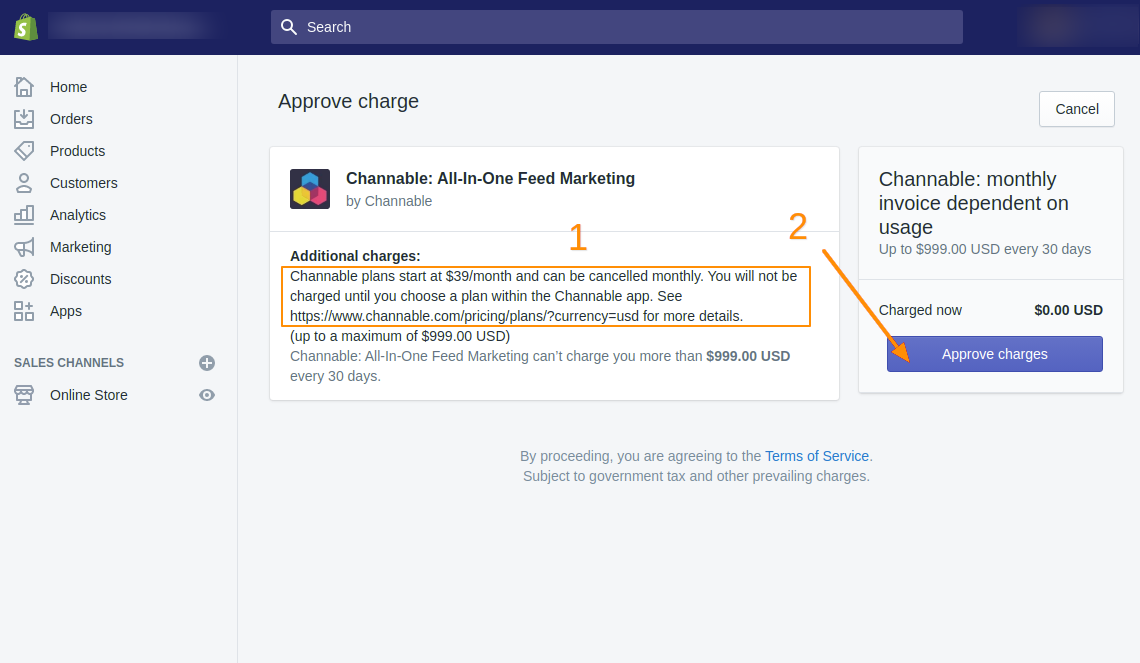
Se te redirigirá a tu tienda de Shopify, donde tienes que aceptar un cargo recurrente de 0 dólares. Esto permite que Channable haga un “cargo por uso” mensual A tu cuenta de Shopify.
{% endstep %}
{% step %}
### Configura tu suscripción de Channable
Después de aprobar el cargo, se te redirigirá a la página de planes de Channable. Seleziona la [suscripción de Channable](https://helpcenter.channable.com/account-billing/account-and-billing-es/gestiona-tu-suscripcion/los-planes-de-precios-de-channable.md) que se cobrará A tu tienda de Shopify.
{% endstep %}
{% endstepper %}
{% hint style="info" %}
**Nota:** Debido a la Configuración de facturación de Shopify, las suscripciones se ofrecen basadas en el modelo de precios en USD de Channable.
{% endhint %}
---
# Agent Instructions
This documentation is published with GitBook. GitBook is the documentation platform designed so that both humans and AI agents can read, navigate, and reason over technical content effectively. Learn more at gitbook.com.
## Querying This Documentation
If you need additional information that is not directly available in this page, you can query the documentation by asking a question.
Perform an HTTP GET request on the following URL with the `ask` and `goal` query parameters:
```
GET https://helpcenter.channable.com/account-billing/account-and-billing-es/gestiona-tu-suscripcion/gestiona-tu-suscripcion-de-channable/readme.md?ask=&goal=
```
`ask` is the immediate question: it should be specific, self-contained, and written in natural language.
`goal` is what the user is ultimately trying to achieve, the reason they need the answer. Sharing it helps GitBook give you a better, more relevant answer. A goal is most helpful when it describes the outcome the user wants rather than restating the question. For example, with `ask=how do I create an API token`, a goal like `automate deployments from our CI pipeline` lets GitBook tailor the answer to that use case.
The response will contain a direct answer to the question and relevant excerpts and sources from the documentation.
Use this mechanism when the answer is not explicitly present in the current page, you need clarification or additional context, or you want to retrieve related documentation sections.