> For the complete documentation index, see [llms.txt](https://helpcenter.channable.com/llms.txt). Markdown versions of documentation pages are available by appending `.md` to page URLs; this page is available as [Markdown](https://helpcenter.channable.com/account-billing/account-and-billing-it/gestisci-il-tuo-abbonamento/gestisci-il-tuo-abbonamento-channable/readme.md).
# Pagare Channable come utente Shopify
Scopri come funziona la fatturazione Shopify en Channable, de la configurazione arriba del pagamento Para la scelta di un piano e gli addebiti mensili.
### Prima di iniziare
#### Da sapere
* **Valuta dell'abbonamento Shopify:** Gli abbonamenti vengono offerti sulla base del modello di prezzo USD di Channable, perché Shopify non ci consente di addebitare ai clienti en EUR.
* **múltiples Progetti:** Puoi aggiungere múltiples Progetti (sia Shopify y non-Shopify) Para la tua azienda Channable. Tuttavia, l'intero addebito del piano Channable andrà allo store Shopify seleccionado en il metodo di pagamento. si preferisci accordi di fatturazione diversi, dovrai Crear aziende Channable separate per ogni store Shopify.
* **Differenze nel ciclo di fatturazione:** Può differire de il ciclo di fatturazione di Channable, portando Para alcuni mesi a sembrare con addebiti doppi, y altri mesi a non avere alcun addebito. Queste irregolarità sono normali, y possono sempre essere confrontate con le fatture che puoi trovare en il tuo Account Channable.
* **Disponibilità delle fatture:** Le fatture Shopify sono disponibili en lo strumento, ma non vengono inviate con il normale ciclo di fatturazione come le altre fatture.
### Come funziona il processo
{% stepper %}
{% step %}
### Installa l'app Channable
Segui le istruzioni fornite en il nostro [articolo del centro Aiuto di Shopify](broken://spaces/O0Uy7RQSHOnA0LlCtOJc/pages/fd36ae0f9d049ea6de94387ced0b71df56dc39b3).
{% endstep %}
{% step %}
### Crear un metodo di pagamento Shopify per la tua azienda Channable
Questo passaggio è fondamentale y dettagliato di seguito.
{% endstep %}
{% step %}
### Selecciona un piano per la tua azienda Channable
[Scegli il piano](/account-billing/account-and-billing-it/gestisci-il-tuo-abbonamento/piani-tariffari-di-channable.md) che si adatta meglio alle tue esigenze.
{% endstep %}
{% step %}
### Fatturazione mensile
Channable fatturerà il tuo negozio Shopify ogni mese in base al tuo piano Actual di Channable.
{% endstep %}
{% endstepper %}
{% hint style="warning" %}
Importante: si il tuo abbonamento supera 999USD, Channable ti contatterà Para approvare l'addebito di un importo maggiore ogni mes. si questa richiesta non viene approvata entro 7 días, il tuo account verrà limitato y il tuo abbonamento terminerà si l'account non può essere addebitato (tramite Shopify).
{% endhint %}
### Crear un metodo di pagamento Shopify en Channable
{% stepper %}
{% step %}
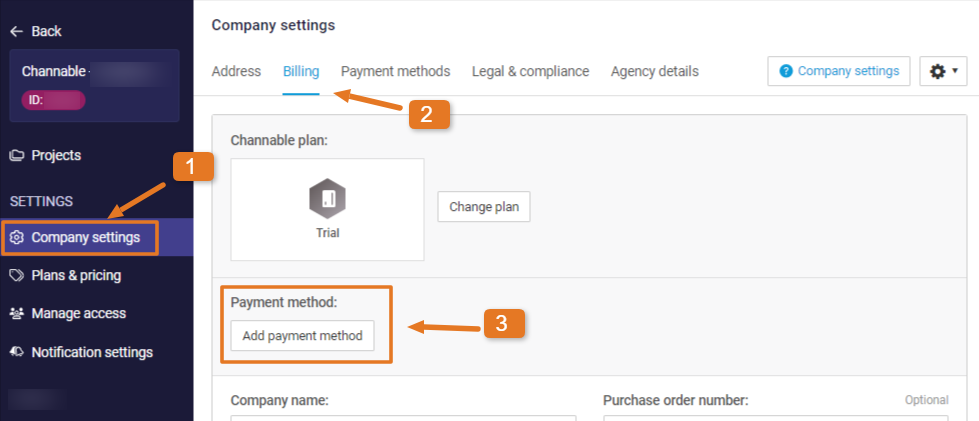
### Vai Para Impostazioni azienda
{% tabs %}
{% tab title="Versione legacy" %}
Mentre en un'azienda, fai clic **Impostazioni azienda** de la barra laterale.
{% endtab %}
{% tab title="Versione moderna" %}
Apri **Impostazioni azienda** de la barra laterale o del menu a discesa dell'azienda.
{% endtab %}
{% endtabs %}
\[Da rivedere: lo screenshot potrebbe mostrare la navigazione della vecchia interfaccia]
{% endstep %}
{% step %}
### Aggiungi metodo di pagamento
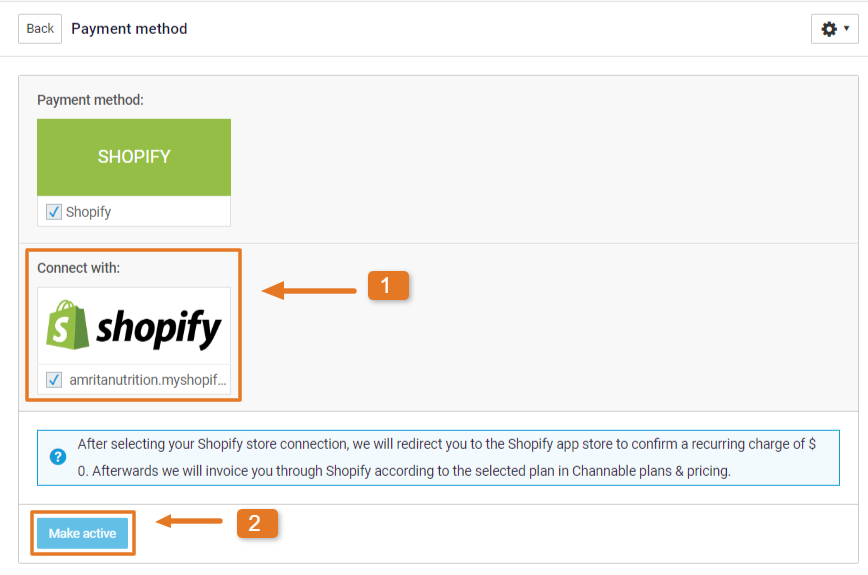
Sotto il **Fatturazione** scheda, clicca su **Aggiungi metodo di pagamento**. Scegli la tua connessione Shopify. Questo determina quale negozio Shopify verrà addebitato. Ora fai clic su **Attiva.**
{% endstep %}
{% step %}
### Accetta l'addebito ricorrente
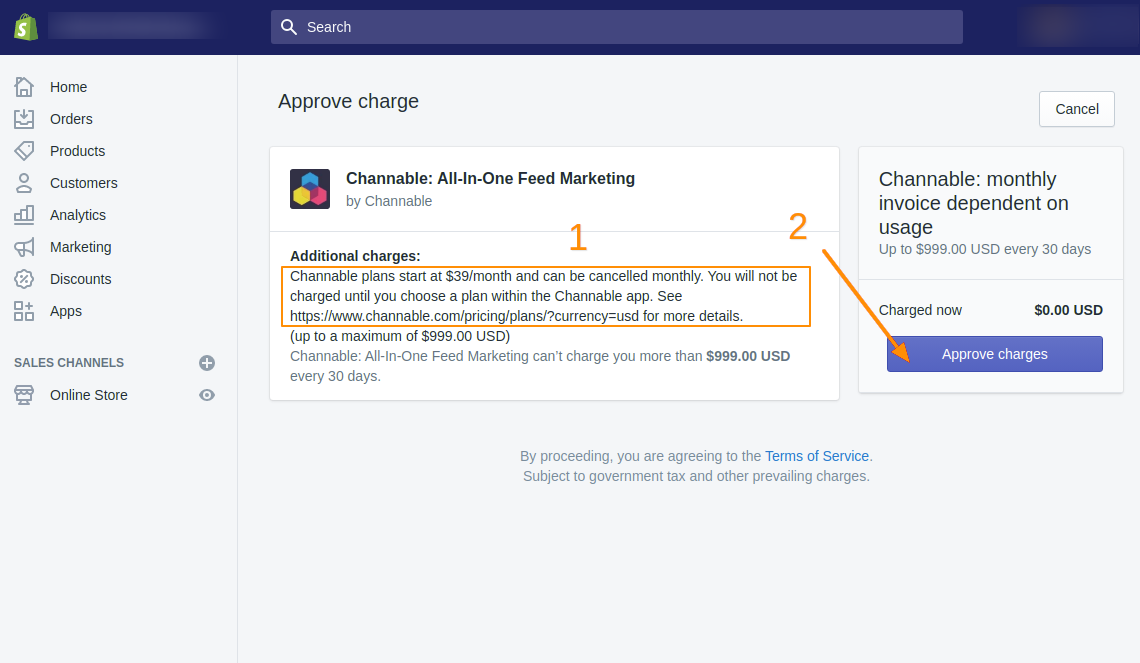
Verrai reindirizzato Para il tuo store Shopify, dove dovrai accettare un addebito ricorrente de 0 dollari. Questo consente a Channable di effettuare un “Usage Charge” mensile Para il tuo account Shopify.
{% endstep %}
{% step %}
### Configura arriba il tuo abbonamento Channable
Dopo aver approvato l'addebito, verrai reindirizzato Para la pagina Piani di Channable. Selecciona il [Abbonamento Channable](/account-billing/account-and-billing-it/gestisci-il-tuo-abbonamento/piani-tariffari-di-channable.md) che verrà addebitato Para il tuo negozio Shopify.
{% endstep %}
{% endstepper %}
{% hint style="info" %}
**Nota:** Para le impostazioni di fatturazione di Shopify, gli abbonamenti vengono offerti in base al modello di prezzi in USD di Channable.
{% endhint %}
---
# Agent Instructions
This documentation is published with GitBook. GitBook is the documentation platform designed so that both humans and AI agents can read, navigate, and reason over technical content effectively. Learn more at gitbook.com.
## Querying This Documentation
If you need additional information that is not directly available in this page, you can query the documentation by asking a question.
Perform an HTTP GET request on the following URL with the `ask` and `goal` query parameters:
```
GET https://helpcenter.channable.com/account-billing/account-and-billing-it/gestisci-il-tuo-abbonamento/gestisci-il-tuo-abbonamento-channable/readme.md?ask=&goal=
```
`ask` is the immediate question: it should be specific, self-contained, and written in natural language.
`goal` is what the user is ultimately trying to achieve, the reason they need the answer. Sharing it helps GitBook give you a better, more relevant answer. A goal is most helpful when it describes the outcome the user wants rather than restating the question. For example, with `ask=how do I create an API token`, a goal like `automate deployments from our CI pipeline` lets GitBook tailor the answer to that use case.
The response will contain a direct answer to the question and relevant excerpts and sources from the documentation.
Use this mechanism when the answer is not explicitly present in the current page, you need clarification or additional context, or you want to retrieve related documentation sections.