> For the complete documentation index, see [llms.txt](https://helpcenter.channable.com/llms.txt). Markdown versions of documentation pages are available by appending `.md` to page URLs; this page is available as [Markdown](https://helpcenter.channable.com/account-billing/account-and-billing-nl/beheer-je-abonnement/beheer-je-channable-abonnement/readme.md).
# Betalen voor Channable als Shopify-gebruiker
Leer hoe Shopify-facturering in Channable werkt, vanuit het instellen van betaling Naar het kiezen van een plan en maandelijkse kosten.
### Voordat je begint
#### Goed om te weten
* **Valuta van Shopify-abonnement:** Abonnementen worden aangeboden op basis van Channable's USD-prijsmodel, omdat Shopify ons niet toestaat klanten in EUR te belasten.
* **Meerderen Projecten:** Je kunt meerderen projecten (zowel Shopify en niet-Shopify) toevoegen aan je Channable-bedrijf. De volledige Channable-planvergoeding gaat Naar de Shopify-winkel die je hebt gekozen in de betaalmethode. Als je liever andere factureringsafspraken hebt, moet je voor elke Shopify-winkel aparte Channable-bedrijven maken.
* **Verschillen in de factureringscyclus:** Kan verschillen vanuit Channable's factureringscyclus, waardoor sommige maanden lijken te worden dubbel gefactureerd, terwijl andere maanden geen kosten hebben. Deze afwijkingen zijn normaal en kunnen altijd worden vergeleken met de facturen die je in je Channable Account kunt vinden.
* **Beschikbaarheid van facturen:** Shopify-facturen zijn beschikbaar in de tool, maar worden niet meegestuurd met de reguliere facturatieronde zoals andere facturen.
### Hoe het proces werkt
{% stepper %}
{% step %}
### Installeer de Channable-app
Volg de instructies in ons [Shopify Helpcentrum-artikel](broken://spaces/t4oTpWbTR7p2cgiE1zRK/pages/c718e73d871b33e6b8dfd055fbb848c59be8721a).
{% endstep %}
{% step %}
### Maak aan een Shopify-betaalmethode voor je Channable-bedrijf
Deze stap is cruciaal en hieronder uitgelegd.
{% endstep %}
{% step %}
### Selecteer een abonnement voor je Channable-bedrijf
[Kies het abonnement](/account-billing/account-and-billing-nl/beheer-je-abonnement/channables-prijsplannen.md) dat het beste bij je behoeften past.
{% endstep %}
{% step %}
### Maandelijkse facturering
Channable factureert je Shopify-winkel maandelijks op basis van je Actueel Channable-plan.
{% endstep %}
{% endstepper %}
{% hint style="warning" %}
Belangrijk: Als je abonnement boven 999 USD uitkomt, neemt Channable contact met je op om goedkeuring te vragen voor een hoger bedrag per maand. Als dit verzoek binnen 7 dagen niet wordt goedgekeurd, wordt je Account beperkt en eindigt je abonnement als je Account niet kan worden belast (via Shopify).
{% endhint %}
### Maak aan een Shopify-betaalmethode in Channable.
{% stepper %}
{% step %}
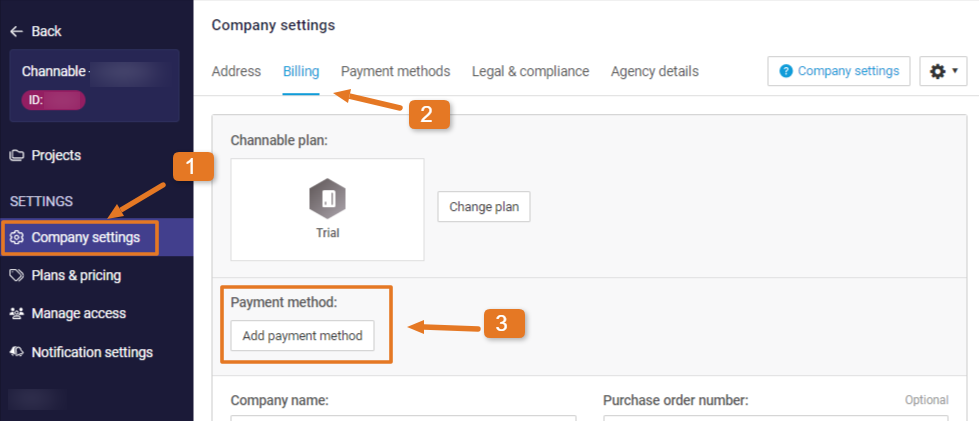
### Ga Naar Bedrijfsgegevens
{% tabs %}
{% tab title="Oudere versie" %}
Terwijl je in een bedrijf bent, klik op **Bedrijfsgegevens** vanuit de zijbalk.
{% endtab %}
{% tab title="Moderne versie" %}
Open **Bedrijfsgegevens** vanuit de zijbalk of bedrijfsdropdown.
{% endtab %}
{% endtabs %}
\[Controle nodig: screenshot toont mogelijk navigatie van de oude UI]
{% endstep %}
{% step %}
### Betaalmethode toevoegen
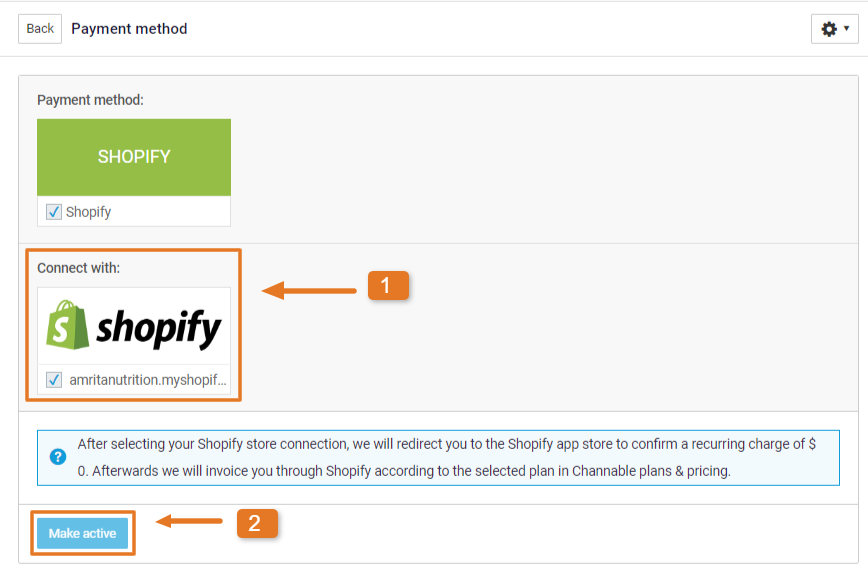
Onder de **Facturering** tabblad, klik op **Betaalmethode toevoegen**. Kies je Shopify-koppeling. Dit bepaalt welke Shopify-winkel in rekening wordt gebracht. Klik nu op **Activeren.**
{% endstep %}
{% step %}
### Accepteer terugkerende kosten
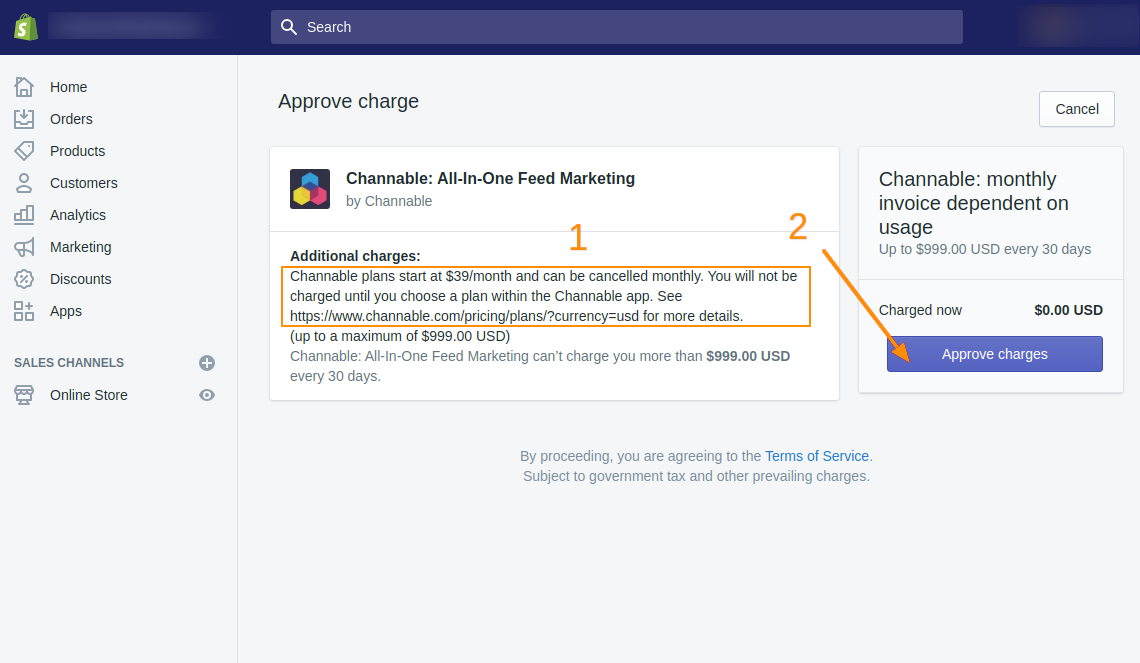
Je wordt doorgestuurd naar je Shopify-winkel, waar je een terugkerende afschrijving van 0 dollar moet accepteren. Hiermee kan Channable maandelijks een “Usage Charge” in rekening brengen op je Shopify Account.
{% endstep %}
{% step %}
### Stel je Channable-abonnement in
Na het goedkeuren van de afschrijving word je doorgestuurd naar de Channable Plans-pagina. Selecteer de [Channable-abonnement](/account-billing/account-and-billing-nl/beheer-je-abonnement/channables-prijsplannen.md) dat in rekening wordt gebracht Naar je Shopify-winkel.
{% endstep %}
{% endstepper %}
{% hint style="info" %}
**Opmerking:** Naar aanleiding van Shopify-factureringsinstellingen worden abonnementen aangeboden op basis van Channable's USD-prijsmodel.
{% endhint %}
---
# Agent Instructions
This documentation is published with GitBook. GitBook is the documentation platform designed so that both humans and AI agents can read, navigate, and reason over technical content effectively. Learn more at gitbook.com.
## Querying This Documentation
If you need additional information that is not directly available in this page, you can query the documentation by asking a question.
Perform an HTTP GET request on the following URL with the `ask` and `goal` query parameters:
```
GET https://helpcenter.channable.com/account-billing/account-and-billing-nl/beheer-je-abonnement/beheer-je-channable-abonnement/readme.md?ask=&goal=
```
`ask` is the immediate question: it should be specific, self-contained, and written in natural language.
`goal` is what the user is ultimately trying to achieve, the reason they need the answer. Sharing it helps GitBook give you a better, more relevant answer. A goal is most helpful when it describes the outcome the user wants rather than restating the question. For example, with `ask=how do I create an API token`, a goal like `automate deployments from our CI pipeline` lets GitBook tailor the answer to that use case.
The response will contain a direct answer to the question and relevant excerpts and sources from the documentation.
Use this mechanism when the answer is not explicitly present in the current page, you need clarification or additional context, or you want to retrieve related documentation sections.