> For the complete documentation index, see [llms.txt](https://helpcenter.channable.com/llms.txt). Markdown versions of documentation pages are available by appending `.md` to page URLs; this page is available as [Markdown](https://helpcenter.channable.com/account-billing/account-and-billing-nl/beheer-je-abonnement/channables-prijsplannen/css-pricing.md).
# Boost CSS-prijzen
Ontdek hoe de prijzen van Boost CSS werken voor zelfstandige accounts, MCA’s, actieve subaccounts en facturering aan bureaus.
{% hint style="success" %}
Lees meer over de [voordelen van onze Boost CSS](https://helpcenter.channable.com/css/css-nl/voordat-je-begint/voordelen-van-channable-css.md).
{% endhint %}
### Zo werkt de prijsstelling van Boost CSS
#### Boost CSS-abonnementen
Kies uit twee Boost CSS-abonnementen:
| Plannen | Prijs per winkel per maand |
| ------------------ | -------------------------- |
| Boost CSS Standard | €29 (of $35) |
| Boost CSS Pro | €99 of ($109) |
De kosten gelden voor elk zelfstandig Merchant Center-account of elk actief subaccount binnen een Multi-Client Account (MCA). Aan het MCA zelf zijn geen extra kosten verbonden.
| Functie | Beschrijving | Boost CSS Standard | Boost CSS Pro |
| ----------------------------------- | ---------------------------------------------------------------------------------------------------------------------------------------------------- | :----------------: | :-----------: |
| 20% margevoordeel met Channable CSS | Channable CSS geeft je een margevoordeel van 20%\*, wat betekent dat je meer biedingskracht hebt zonder dat je kosten stijgen. | ✔️ | ✔️ |
| Titels optimaliseren | Vergroot de zichtbaarheid van je producten met zoeksuggesties op basis van zoekgedrag en productgegevens, zodat je producttitels kunt optimaliseren. | ✔️ | ✔️ |
| Labelizer Lite | Gebruik prestatielabels om producten te vinden die het waard zijn om te optimaliseren. | ✔️ | ✔️ |
| Price Benchmark Lite | Neem de prijsconcurrentiepositie van producten mee in je optimalisatie en analyse. | ✔️ | ✔️ |
| Labelizer | Segmenteer producten voor Google Shopping- en Performance Max-campagnes. | | ✔️ |
| Price Benchmark | Vergelijk productprijzen met marktbenchmarks en gebruik benchmarklabels in Google Ads. | | ✔️ |
| Handmatig taggen | Voeg tags toe voor promoties, seizoenscampagnes, tests of zakelijke prioriteiten. | | ✔️ |
| Products AI | Gebruik AI-gestuurde optimalisatie van productfeeds voor Google Shopping. | | ✔️ |
\*Het margevoordeel van 20% met Boost CSS geldt alleen voor landen in de Europese Economische Ruimte (EER) [die Google heeft opgegeven](https://support.google.com/merchants/answer/12653197?hl=en).
### Prijzen voor zelfstandige accounts en Multi-Client Accounts
#### Zelfstandig account
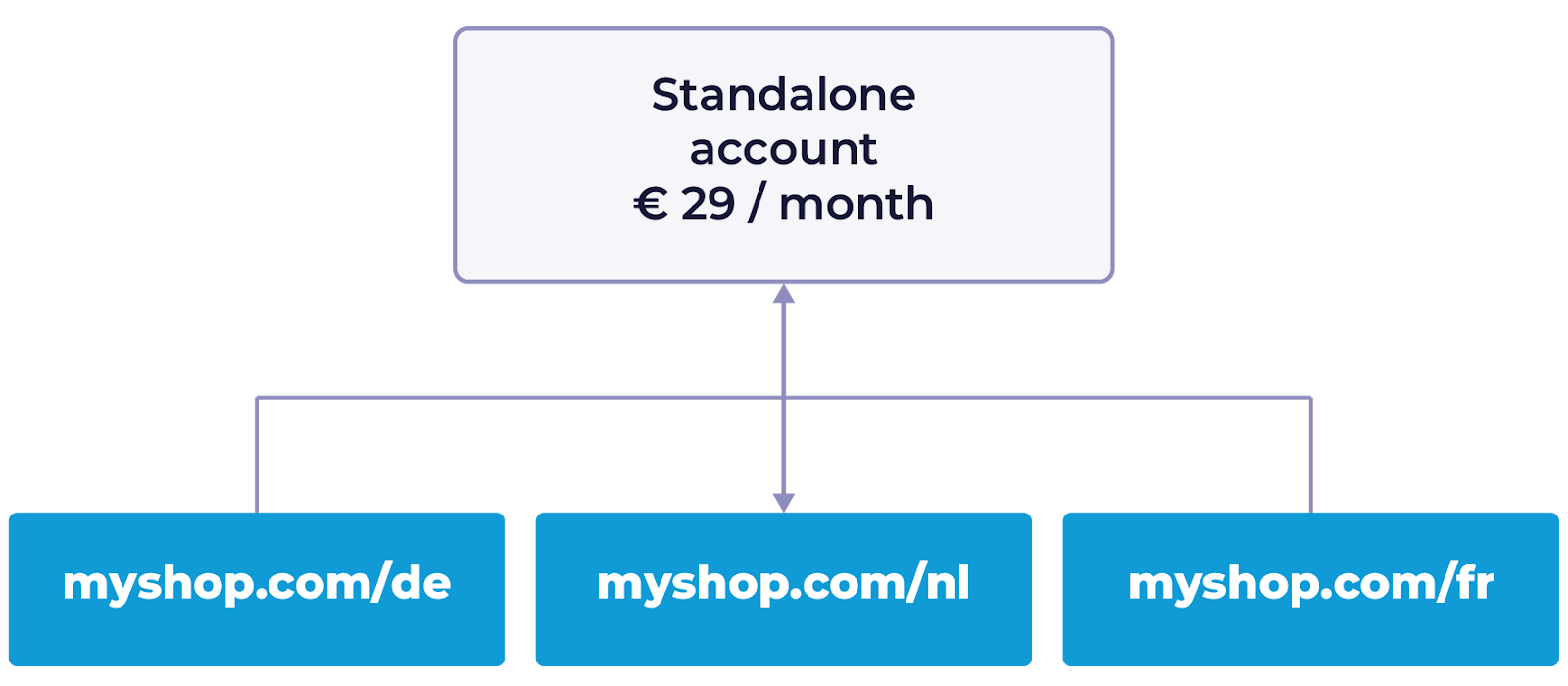
Voor zelfstandige accounts betaal je voor elk Merchant Center-account, ongeacht het aantal landen waarin je verkoopt.
Voor één Merchant Center-account kost Boost CSS Standard €29 per maand. Boost CSS Pro kost €99 per maand.
* Voorbeeld: Als je een zelfstandig Merchant Center-account hebt voor myshop.com, dat verkoopt in Nederland, Duitsland en Frankrijk, betaal je voor één winkel. Deze Setup gebruikt meestal één Merchant Center-ID en één domein.
#### Multi-Client Accounts (MCA)
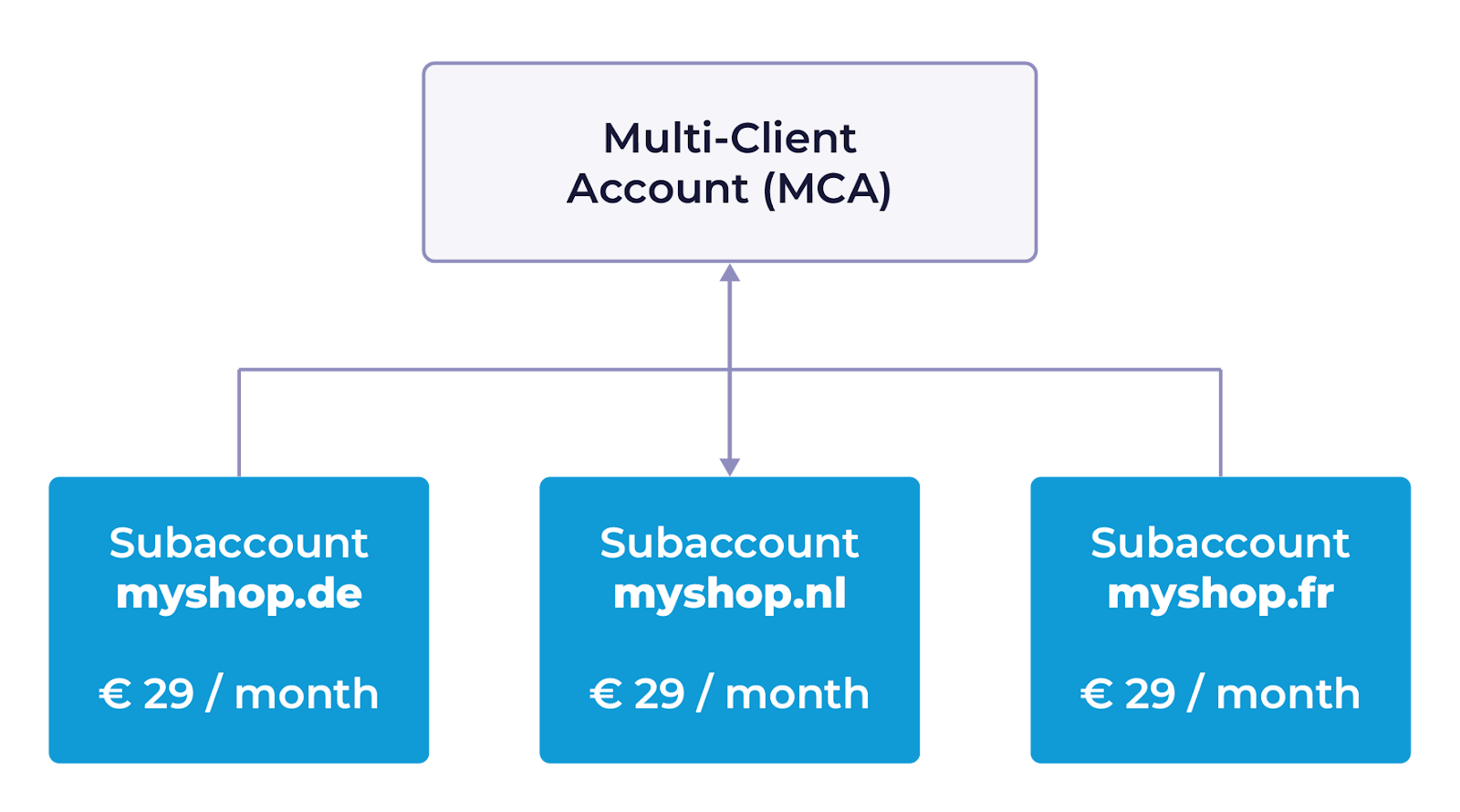
Als je een MCA met meerderen subaccounts gebruikt, worden de kosten voor elk actief subaccount afzonderlijk in rekening gebracht tegen de prijs van het gekozen abonnement.
* Voorbeeld: Als je MCA drie actieve subaccounts bevat voor myshop.nl, myshop.de en myshop.fr, kost Boost CSS Standard 3 × €29 = €87 per maand. Boost CSS Pro kost 3 × €99 = €297 per maand. Deze subaccounts hebben verschillende Merchant Center-ID's en domeinen.
{% hint style="success" %}
**Tip:** Lees meer over [verschillende typen Google Merchant Center-accounts](https://helpcenter.channable.com/css/css-nl/voordat-je-begint/google-merchant-center-account-types.md).
{% endhint %}
#### Prijzen voor actieve en inactieve subaccounts
We brengen alleen kosten in rekening voor actieve subaccounts binnen een MCA. Een subaccount wordt als inactief beschouwd als het de afgelopen 30 dagen geen betaalde klikken heeft ontvangen. We ontvangen deze activiteitsgegevens rechtstreeks van Google.
### Prijzen voor agencies die Multi-Client Accounts beheren
Channable biedt flexibele facturering voor agencies die meerdere klanten beheren. Je kunt de facturering voor een MCA verdelen over verschillende bedrijven binnen één account. Als agency kun je eigenaar zijn van de MCA, terwijl afzonderlijke subaccounts aan klanten kunnen worden toegewezen. Zij krijgen dan afzonderlijk een factuur voor hun eigen subaccounts.
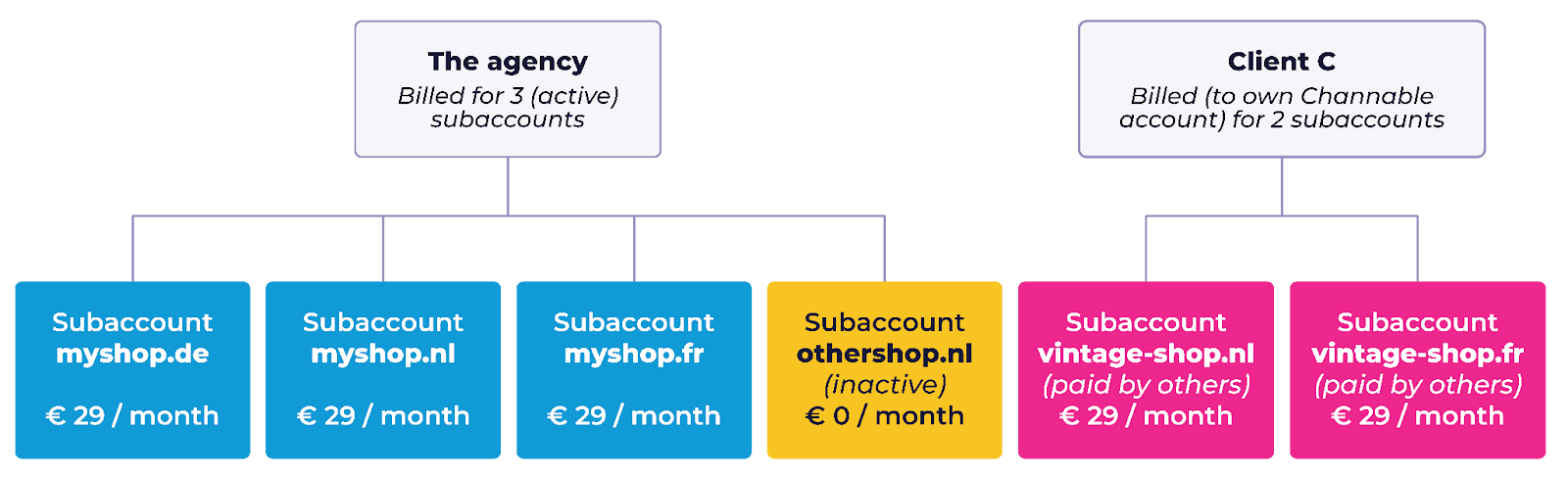
#### Voorbeeld: Een agency beheert een MCA met drie klanten:
* Klant A (myshop) verkoopt op 3 domeinen (DE, NL, BE).
* Client B (othershop.nl) adverteert momenteel niet, dus het subaccount is inactief (geen kosten).
* Client C (vintage-shop) verkoopt via 2 domeinen (NL, BE) (gefactureerd via het eigen Channable-account).
Hoewel de subaccounts binnen de MCA van het bureau worden beheerd, wordt Client C rechtstreeks gefactureerd via het eigen, aparte Channable-account. Door in het eigen account eigen Boost CSS-shops aan te maken, is Client C verantwoordelijk voor de facturering van die subaccounts.\
\
Maandelijkse facturering:
* Het bureau: Het heeft vier subaccounts, maar slechts drie zijn actief. Boost CSS Standard kost 3 × €29 = €87 per maand. Boost CSS Pro kost 3 × €99 = €297 per maand.
* Client C (vintage-shop): Het heeft twee actieve subaccounts binnen het eigen bedrijf. Boost CSS Standard kost 2 × €29 = €58 per maand. Boost CSS Pro kost 2 × €99 = €198 per maand.
{% hint style="success" %}
**Tip:** Lees meer over onze [factureringscyclus en betaalmethoden](https://helpcenter.channable.com/hc/en-us/articles/360011005859-Billing-and-payment)
{% endhint %}
---
# Agent Instructions
This documentation is published with GitBook. GitBook is the documentation platform designed so that both humans and AI agents can read, navigate, and reason over technical content effectively. Learn more at gitbook.com.
## Querying This Documentation
If you need additional information that is not directly available in this page, you can query the documentation by asking a question.
Perform an HTTP GET request on the following URL with the `ask` and `goal` query parameters:
```
GET https://helpcenter.channable.com/account-billing/account-and-billing-nl/beheer-je-abonnement/channables-prijsplannen/css-pricing.md?ask=&goal=
```
`ask` is the immediate question: it should be specific, self-contained, and written in natural language.
`goal` is what the user is ultimately trying to achieve, the reason they need the answer. Sharing it helps GitBook give you a better, more relevant answer. A goal is most helpful when it describes the outcome the user wants rather than restating the question. For example, with `ask=how do I create an API token`, a goal like `automate deployments from our CI pipeline` lets GitBook tailor the answer to that use case.
The response will contain a direct answer to the question and relevant excerpts and sources from the documentation.
Use this mechanism when the answer is not explicitly present in the current page, you need clarification or additional context, or you want to retrieve related documentation sections.