> For the complete documentation index, see [llms.txt](https://helpcenter.channable.com/llms.txt). Markdown versions of documentation pages are available by appending `.md` to page URLs; this page is available as [Markdown](https://helpcenter.channable.com/account-billing/manage-your-subscription/channables-pricing-plans/css-pricing.md).
# CSS pricing
Learn how CSS pricing works for standalone accounts, MCAs, active subaccounts, and agency billing.
{% hint style="success" %}
Learn more about the [benefits of our CSS](/css/readme/benefits-of-using-channable-css.md).
{% endhint %}
### How CSS pricing works
#### CSS plans
Choose from two CSS plans:
| Plan | Price per shop each month |
| ------------ | ------------------------- |
| CSS Standard | €29 (or $35) |
| CSS Pro | €99 |
The fee applies to each standalone Merchant Center account or active subaccount within a Multi-Client Account (MCA). The MCA itself has no extra cost.
| Feature | Description | CSS Standard | CSS Pro |
| ------------------------ | --------------------------------------------------------------------------------------------------------------------------- | :----------: | :-----: |
| CSS 20% margin advantage | Channable CSS gives you a 20% margin advantage\*, which means more bidding power without increasing costs. | ✔️ | ✔️ |
| Title Optimizer | Increase product visibility using keyword suggestions based on search behavior and product data to optimize product titles. | ✔️ | ✔️ |
| Labelizer Lite | Leverage performance labels to identify products worth optimizing. | ✔️ | ✔️ |
| Price Benchmark Lite | Incorporate product price competitiveness into your optimization and analysis. | ✔️ | ✔️ |
| Labelizer | Segment products for Google Shopping and Performance Max campaigns. | | ✔️ |
| Price Benchmark | Compare product prices with market benchmarks and use benchmark labels in Google Ads. | | ✔️ |
| Manual tagging | Add tags for promotions, seasonal campaigns, testing, or business priorities. | | ✔️ |
| Products AI | Use AI-powered product feed optimization for Google Shopping. | | ✔️ |
\*The CSS 20% margin advantage applies only to European Economic Area (EEA) countries [specified by Google](https://support.google.com/merchants/answer/12653197?hl=en).
### Pricing for standalone accounts vs Multi-Client Accounts
#### Standalone account
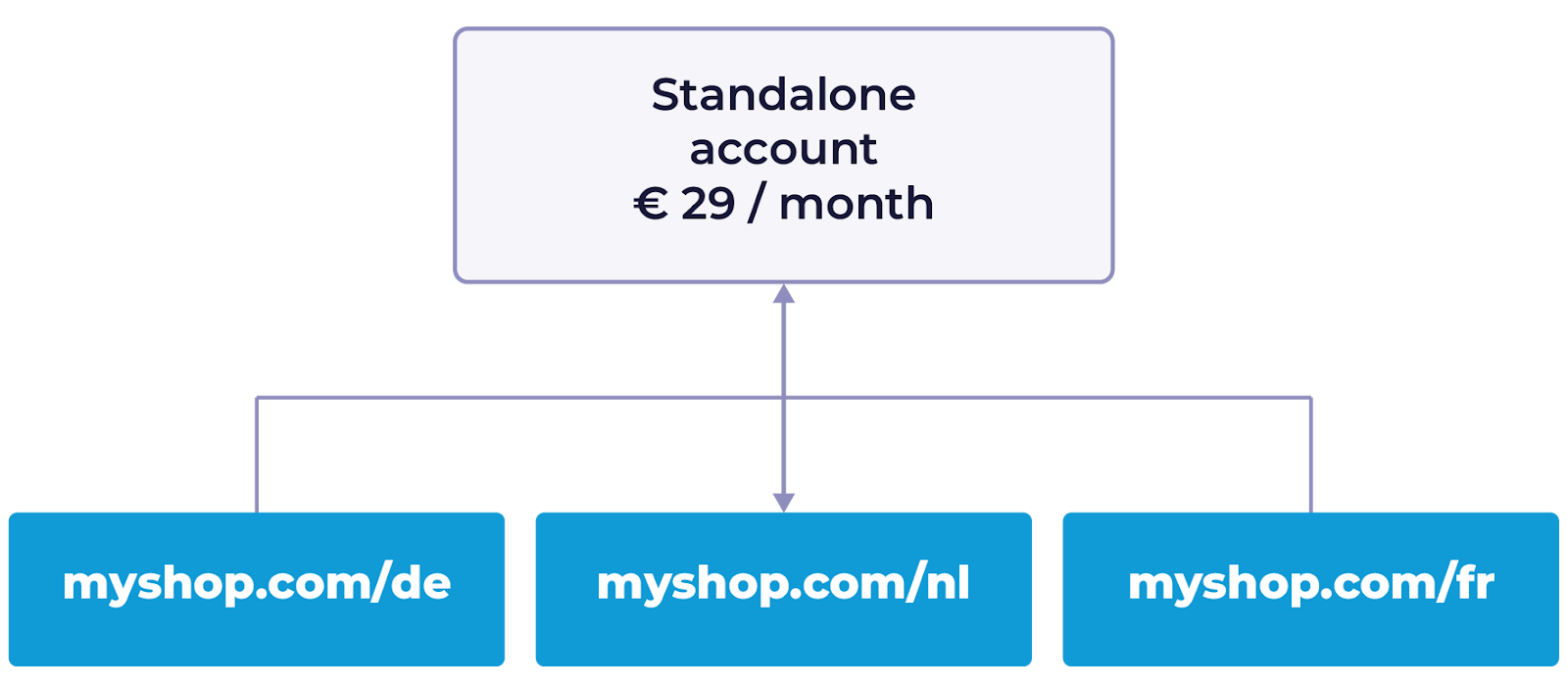
For standalone accounts, you pay for each Merchant Center account, regardless of the number of countries you sell in.
For one Merchant Center account, CSS Standard costs €29 per month. CSS Pro costs €99 per month.
* Example: If you own a standalone Merchant Center account for myshop.com, which sells in the Netherlands, Germany, and France, you pay for one shop. This setup typically uses one Merchant Center ID and one domain.
#### Multi-Client Accounts (MCA)
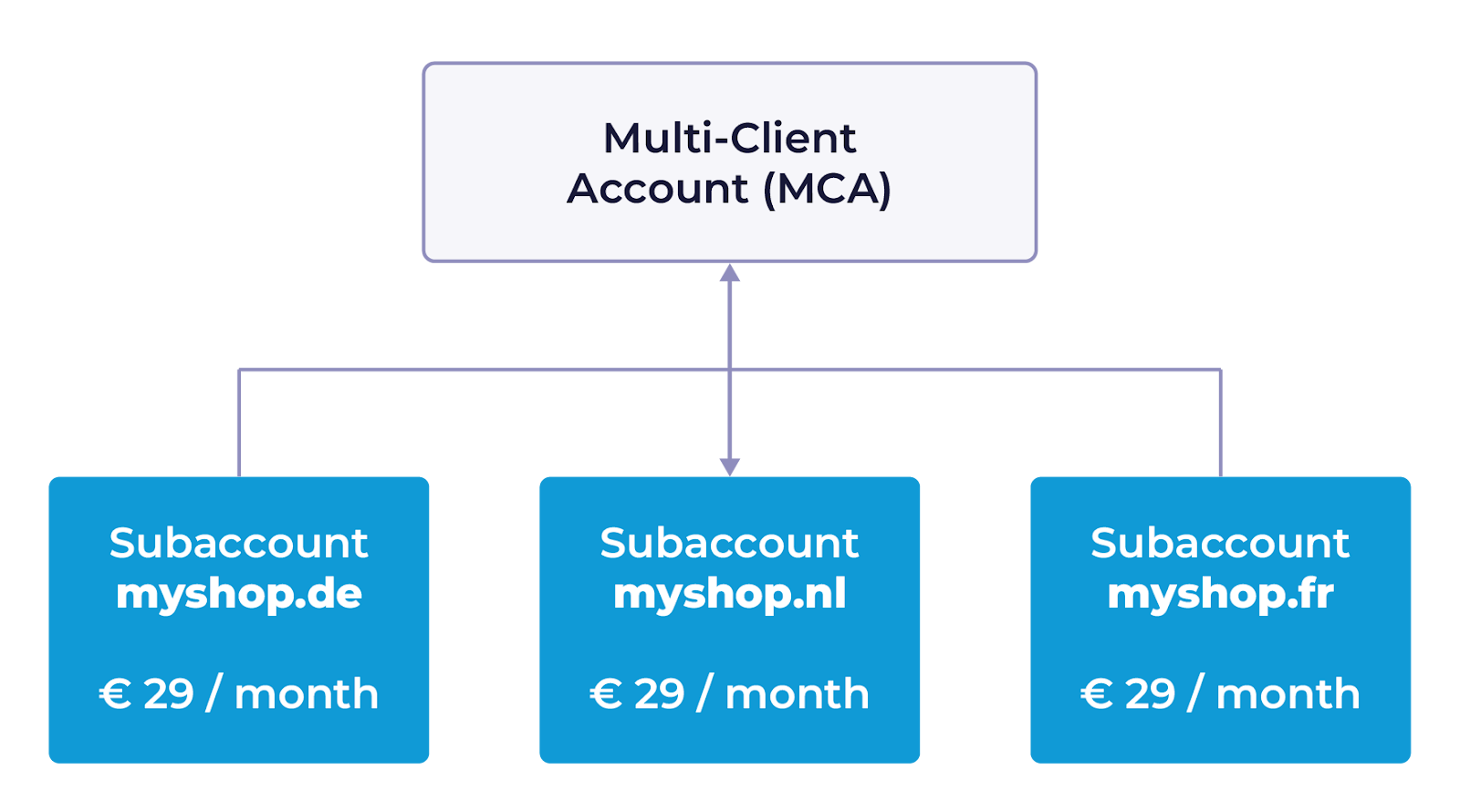
If you use an MCA with multiple subaccounts, each active subaccount is charged separately at your selected plan's price.
* Example: If your MCA includes three active subaccounts for myshop.nl, myshop.de, and myshop.fr, CSS Standard costs 3 × €29 = €87 per month. CSS Pro costs 3 × €99 = €297 per month. These subaccounts have different Merchant Center IDs and domains.
{% hint style="success" %}
**Tip:** Learn more about [different types of Google Merchant Center accounts](/css/google-merchant-center-account-types.md).
{% endhint %}
#### Pricing for active and inactive subaccounts
We only charge for active subaccounts within an MCA. A subaccount is considered inactive if it has not received any paid clicks in the last 30 days. We receive this activity data directly from Google.
### Pricing for agencies managing Multi-Client Accounts
Channable offers flexible billing for agencies who manage multiple clients. You can divide the billing for an MCA between different companies in a single account. As an agency, you can own the MCA, but individual subaccounts can be assigned to clients, who are billed separately for their own subaccounts.
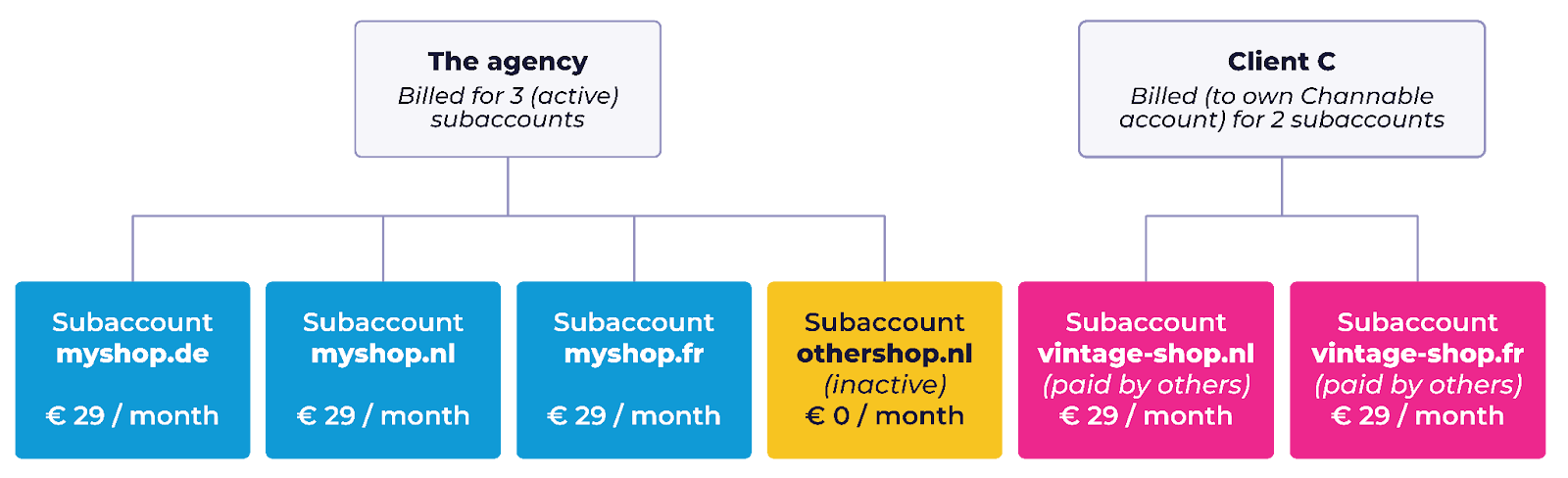
#### Example: An agency manages an MCA with three clients:
* Client A (myshop) sells on 3 domains (DE, NL, BE).
* Client B (othershop.nl) is not currently advertising, so their subaccount is inactive (no charge).
* Client C (vintage-shop) sells on 2 domains (NL, BE) (billed to their own Channable account).
While their subaccounts are managed within the agency's MCA, Client C is billed directly to their own separate Channable account. By creating their own CSS shops in their own account, they are responsible for the billing of those subaccounts.\
\
Monthly billing:
* The agency: It has four subaccounts, but only three are active. CSS Standard costs 3 × €29 = €87 per month. CSS Pro costs 3 × €99 = €297 per month.
* Client C (vintage-shop): It has two active subaccounts in its own company. CSS Standard costs 2 × €29 = €58 per month. CSS Pro costs 2 × €99 = €198 per month.
{% hint style="success" %}
**Tip:** Learn more about our [billing cycle and payment methods](https://helpcenter.channable.com/hc/en-us/articles/360011005859-Billing-and-payment)
{% endhint %}
---
# Agent Instructions
This documentation is published with GitBook. GitBook is the documentation platform designed so that both humans and AI agents can read, navigate, and reason over technical content effectively. Learn more at gitbook.com.
## Querying This Documentation
If you need additional information that is not directly available in this page, you can query the documentation dynamically by asking a question.
Perform an HTTP GET request on the current page URL with the `ask` query parameter, and the optional `goal` query parameter:
```
GET https://helpcenter.channable.com/account-billing/manage-your-subscription/channables-pricing-plans/css-pricing.md?ask=&goal=
```
`ask` is the immediate question: it should be specific, self-contained, and written in natural language.
`goal` is optional and describes the broader end goal you are ultimately trying to accomplish on behalf of the user. GitBook uses it to tailor the answer towards what is most useful for that goal.
The response will contain a direct answer to the question and relevant excerpts and sources from the documentation.
Use this mechanism when the answer is not explicitly present in the current page, you need clarification or additional context, or you want to retrieve related documentation sections.