> For the complete documentation index, see [llms.txt](https://helpcenter.channable.com/llms.txt). Markdown versions of documentation pages are available by appending `.md` to page URLs; this page is available as [Markdown](https://helpcenter.channable.com/account-billing/manage-your-subscription/manage-your-channable-subscription/readme.md).
# Paying for Channable as a Shopify user
Learn how Shopify billing works in Channable, from setting up payment to choosing a plan and monthly charges.
### Before you start
#### Good to know
* **Shopify Subscription currency:** Subscriptions are offered based on Channable's USD pricing model because Shopify does not allow us to charge customers in EUR.
* **Multiple projects:** You can add multiple projects (both Shopify and non-Shopify) to your Channable company. However, the full Channable plan charge will go to the Shopify store you selected in the payment method. If you prefer different billing arrangements, you will need to create separate Channable companies for each Shopify store.
* **Billing cycle differences:** Can differ from Channable's invoicing cycle, leading to some months appearing to have double charges, whereas other months will have no charge. These irregularities are normal, and can always be compared with the invoices you can find in your Channable account.
* **Invoice availability:** Shopify invoices are available within the tool but are not sent out with the regular invoicing round as other invoices.
### How the process works
{% stepper %}
{% step %}
### Install the Channable app
Follow the instructions provided in our [Shopify help center article](broken://spaces/UAGSVlvcNsqEqVUgr0tD/pages/1e05c5c68fe090c9b77591eb545e500ab4800965).
{% endstep %}
{% step %}
### Create a Shopify payment method for your Channable company
This step is crucial and detailed below.
{% endstep %}
{% step %}
### Select a plan for your Channable company
[Choose the plan](/account-billing/manage-your-subscription/channables-pricing-plans.md) that best fits your needs.
{% endstep %}
{% step %}
### Monthly invoicing
Channable will invoice your Shopify store monthly based on your current Channable plan.
{% endstep %}
{% endstepper %}
{% hint style="warning" %}
Important: If your subscription exceeds 999USD, Channable will contact you for approval to charge more per month. If this request is not approved within 7 days, your account will be restricted and your subscription will end if the account cannot be charged (via Shopify).
{% endhint %}
### Create a Shopify payment method in Channable
{% stepper %}
{% step %}
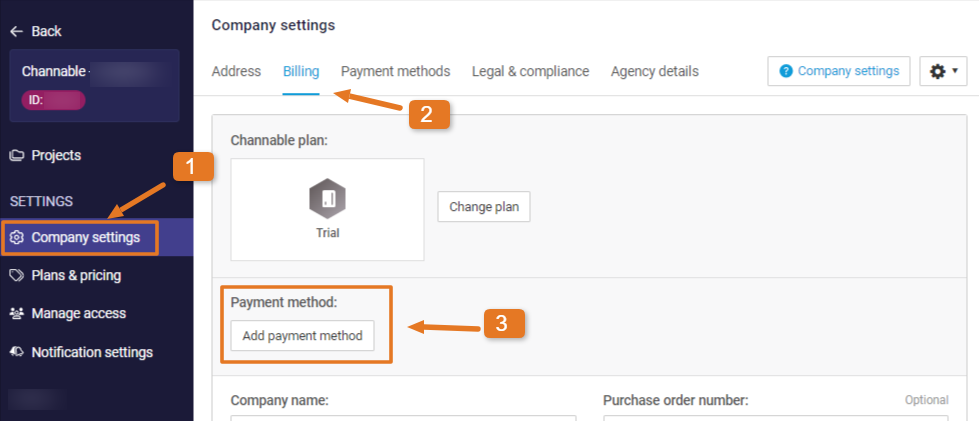
### Go to Company settings
{% tabs %}
{% tab title="Legacy version" %}
While in a company, click **Company settings** from the sidebar.
{% endtab %}
{% tab title="Modern version" %}
Open **Company settings** from the sidebar or company dropdown.
{% endtab %}
{% endtabs %}
\[Needs review: screenshot may show Old UI navigation]
{% endstep %}
{% step %}
### Add payment method
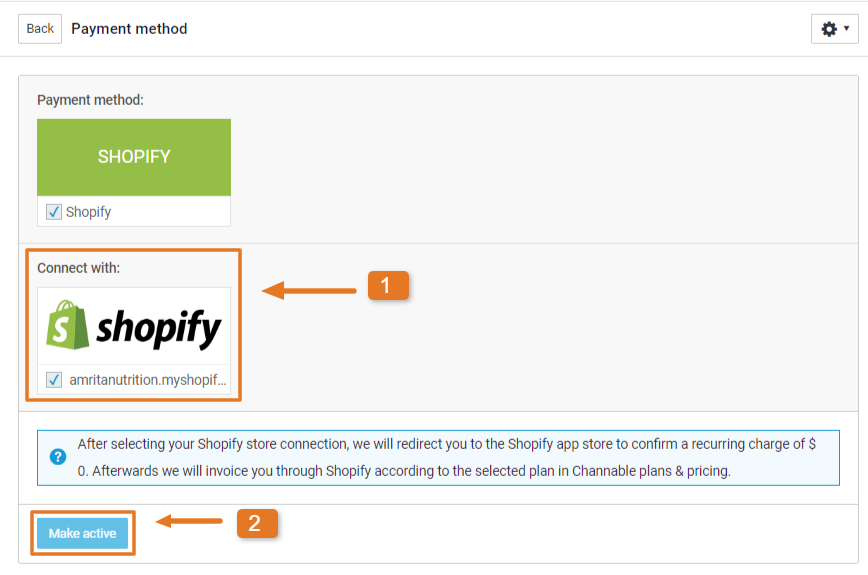
Under the **Billing** tab, click on **Add payment method**. Choose your Shopify connection. This determines which Shopify store will be charged. Now click on **Make active.**
{% endstep %}
{% step %}
### Accept recurring charge
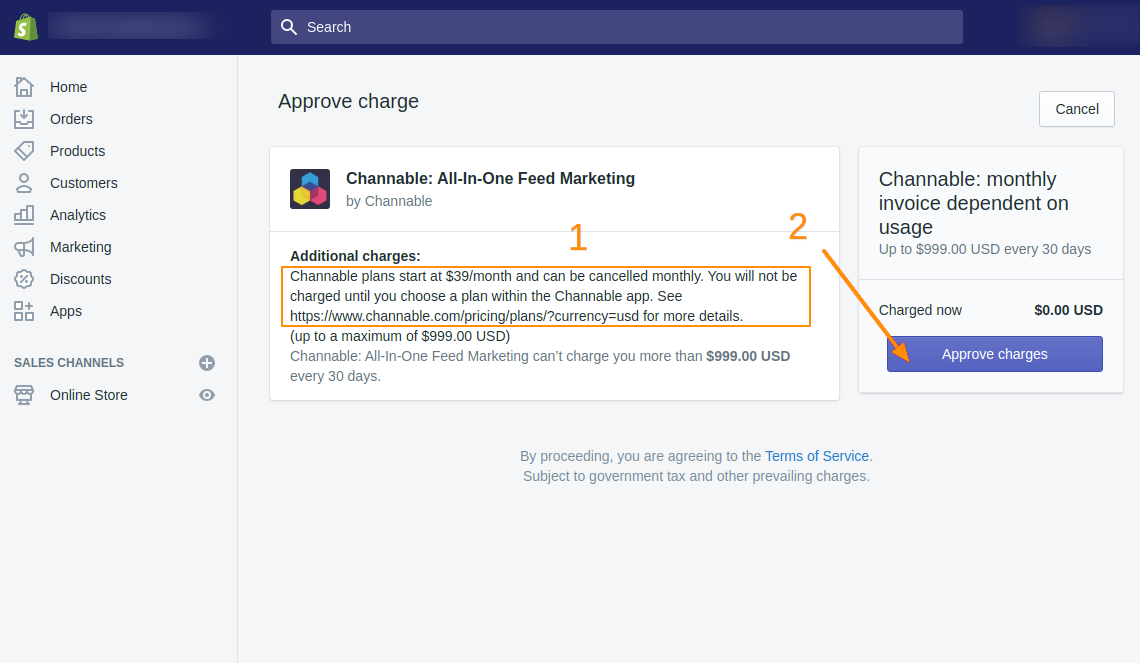
You’ll be redirected to your Shopify store, where you need to accept a recurring charge of 0 dollars. This allows Channable to make a monthly “Usage Charge” to your Shopify account.
{% endstep %}
{% step %}
### Set up your Channable subscription
After approving the charge, you’ll be redirected to the Channable Plans page. Select the [Channable subscription](/account-billing/manage-your-subscription/channables-pricing-plans.md) that will be charged to your Shopify store.
{% endstep %}
{% endstepper %}
{% hint style="info" %}
**Note:** Due to Shopify billing settings, subscriptions are offered based on Channable's USD pricing model.
{% endhint %}
---
# Agent Instructions
This documentation is published with GitBook. GitBook is the documentation platform designed so that both humans and AI agents can read, navigate, and reason over technical content effectively. Learn more at gitbook.com.
## Querying This Documentation
If you need additional information that is not directly available in this page, you can query the documentation by asking a question.
Perform an HTTP GET request on the following URL with the `ask` and `goal` query parameters:
```
GET https://helpcenter.channable.com/account-billing/manage-your-subscription/manage-your-channable-subscription/readme.md?ask=&goal=
```
`ask` is the immediate question: it should be specific, self-contained, and written in natural language.
`goal` is what the user is ultimately trying to achieve, the reason they need the answer. Sharing it helps GitBook give you a better, more relevant answer. A goal is most helpful when it describes the outcome the user wants rather than restating the question. For example, with `ask=how do I create an API token`, a goal like `automate deployments from our CI pipeline` lets GitBook tailor the answer to that use case.
The response will contain a direct answer to the question and relevant excerpts and sources from the documentation.
Use this mechanism when the answer is not explicitly present in the current page, you need clarification or additional context, or you want to retrieve related documentation sections.