> For the complete documentation index, see [llms.txt](https://helpcenter.channable.com/llms.txt). Markdown versions of documentation pages are available by appending `.md` to page URLs; this page is available as [Markdown](https://helpcenter.channable.com/css/css-es/datos-de-referencia-de-precios.md).
# Datos de referencia de precios
Compara los precios de tus productos A los puntos de referencia del mercado de Google Shopping e utiliza los datos A detectar oportunidades de precios.
Los datos de Price Benchmark muestran cómo el precio de tu producto se compara con el promedio del mercado para el mismo producto In Google Shopping Ads.
* El benchmark es un **precio promedio ponderado por clics** calculado por Google entre anunciantes que venden el mismo Articolo. Esto significa que los precios da anuncios que reciben más clics tienen un mayor impacto en el benchmark.
* Con [Channable CSS Standard](/account-billing/account-and-billing-es/gestiona-tu-suscripcion/los-planes-de-precios-de-channable/precios-de-css.md), estos datos están disponibles a nivel de producto e pueden usarse para análisis detallado e optimización de campañas.
#### ¿Da dónde vienen los datos?
Los datos provienen directamente da Google Merchant Center, específicamente da la [**Precios** pestaña In Merchant Center Analytics](https://support.google.com/merchants/answer/13798101?hl=en). Google calcula el benchmark basándose en la actividad real de Shopping Ads, usando los precios enviados In subastas activas e, además, el precio real mostrado In el anuncio cuando un usuario hace clic.
A comparar los mismos productos entre anunciantes, Google empareja los listados principalmente usando el GTIN (Global Trade Articolo Número). Se un GTIN no está disponible, Google usa una combinación di Brand e MPN (Manufacturer Part Número) A identificar el producto.
#### Clasificaciones del benchmark
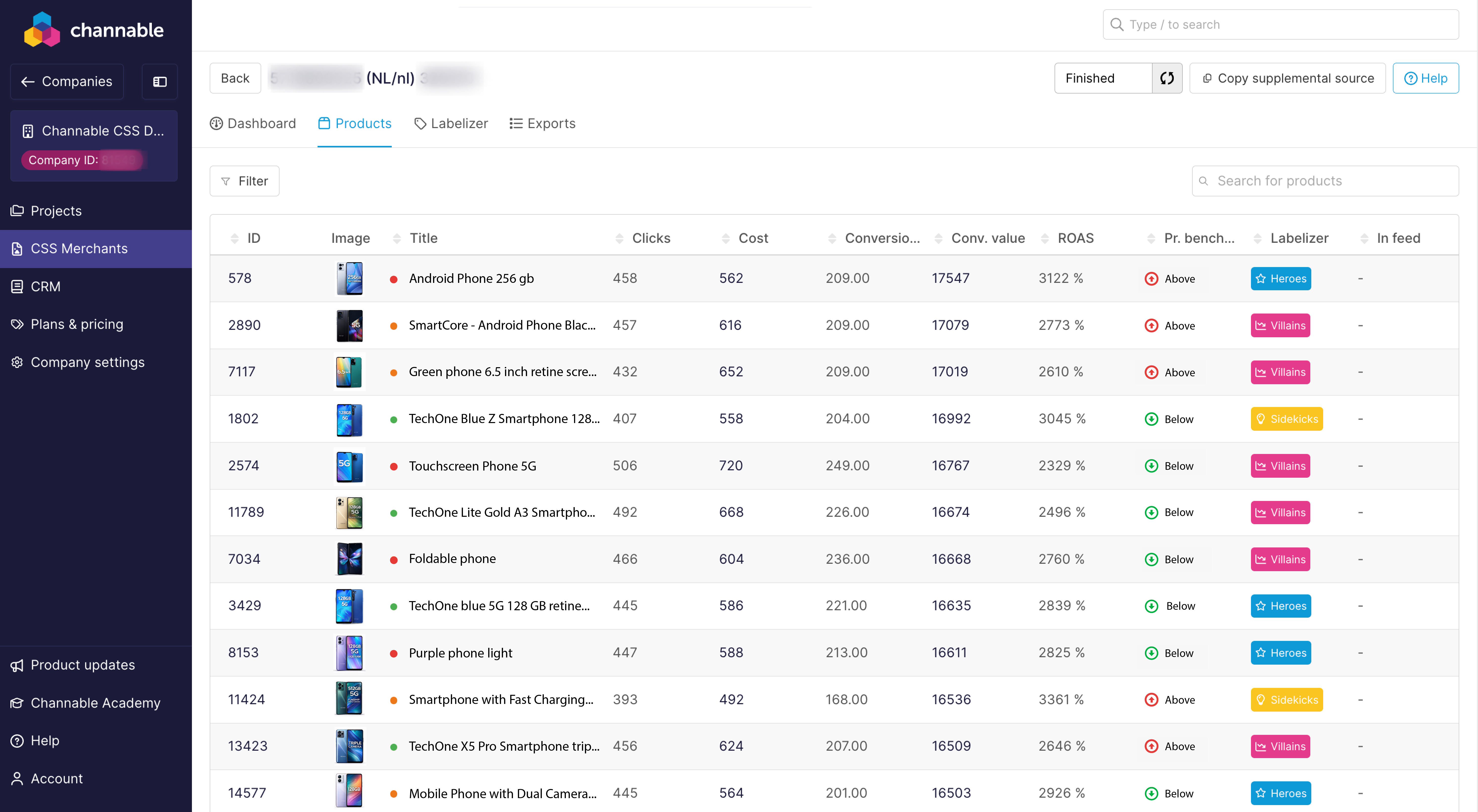
In la **Productos** pestaña, en la columna ‘Price Benchmark’, cada Articolo se clasifica según cómo tu precio se compara con el promedio del mercado In Google Shopping Ads:
* **Por debajo:** Tu precio es más bajo que el promedio del mercado
* **En:** Tu precio está dentro de aproximadamente ±1% del benchmark
* **Por encima:** Tu precio es más alto que el promedio del mercado
* **n/d:** No hay suficientes datos fiables A calcola un benchmark.
Un producto puede mostrar **Sin benchmark** porque:
* no hay suficientes otros anunciantes que vendan el mismo Articolo, se faltan identificadores importantes como GTIN (oppure Brand e MPN) así Google no puede emparejar correctamente el producto
oppure
* No hay suficientes datos de subasta oppure clics A calcola un promedio de mercado fiable.
---
# Agent Instructions
This documentation is published with GitBook. GitBook is the documentation platform designed so that both humans and AI agents can read, navigate, and reason over technical content effectively. Learn more at gitbook.com.
## Querying This Documentation
If you need additional information that is not directly available in this page, you can query the documentation dynamically by asking a question.
Perform an HTTP GET request on the current page URL with the `ask` query parameter, and the optional `goal` query parameter:
```
GET https://helpcenter.channable.com/css/css-es/datos-de-referencia-de-precios.md?ask=&goal=
```
`ask` is the immediate question: it should be specific, self-contained, and written in natural language.
`goal` is optional and describes the broader end goal you are ultimately trying to accomplish on behalf of the user. GitBook uses it to tailor the answer towards what is most useful for that goal.
The response will contain a direct answer to the question and relevant excerpts and sources from the documentation.
Use this mechanism when the answer is not explicitly present in the current page, you need clarification or additional context, or you want to retrieve related documentation sections.