> For the complete documentation index, see [llms.txt](https://helpcenter.channable.com/llms.txt). Markdown versions of documentation pages are available by appending `.md` to page URLs; this page is available as [Markdown](https://helpcenter.channable.com/import-data/import-how-to/import-your-product-data/import-via-a-data-file/requirements-for-import-files/optimize-bandwidth.md).
# Optimize bandwidth
Reduce import file size and bandwidth usage for faster, lighter updates.
### Bandwidth optimization using the ETag header
When you have a feed that changes less often than your project is scheduled to run, re-downloading the entire feed at every run would be wasteful. It could unnecessarily delay your project, and you incur unnecessary egress costs with your hosting provider.
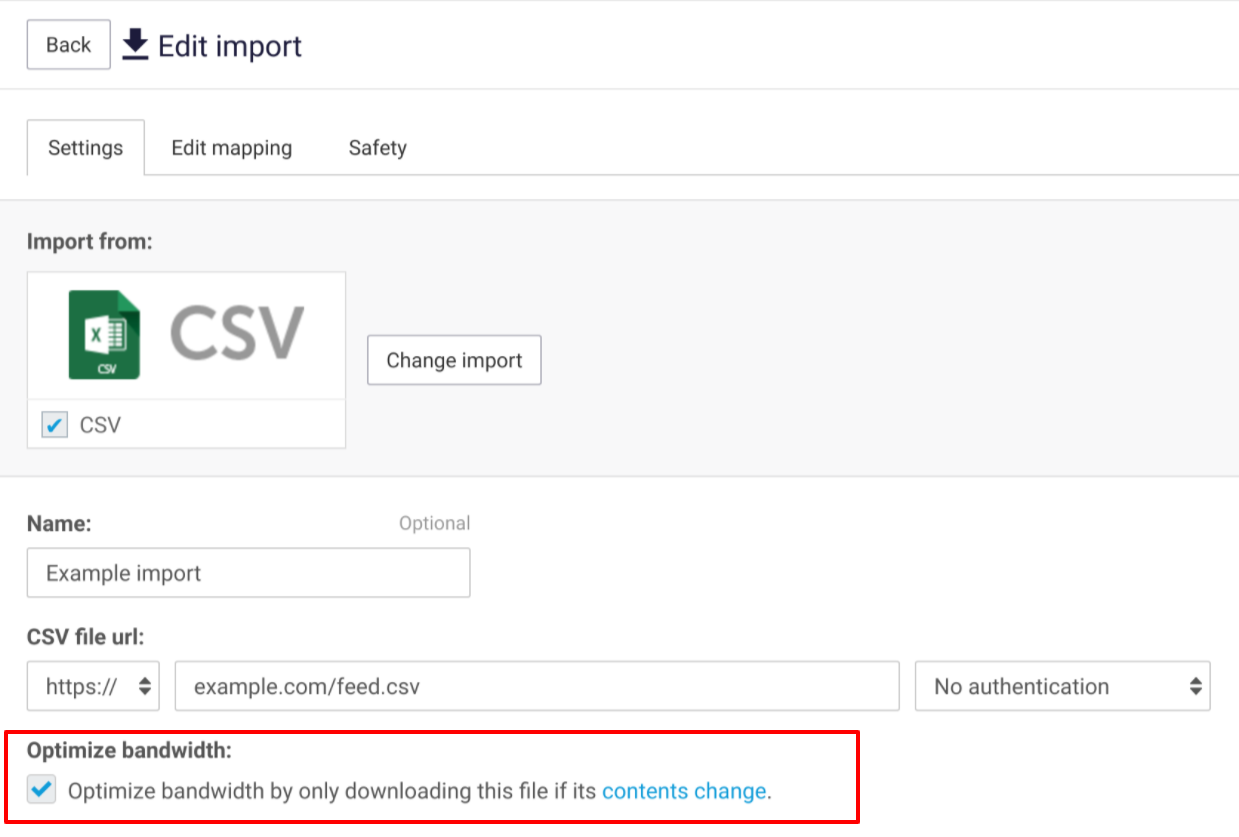
To avoid unnecessary downloads, you can turn on bandwidth optimization for http and https imports. When this setting is turned on, we will still check your file at every run, but if your server indicates that the file did not change since the previous download, then we will not download it again.
### Technical details
When bandwidth optimization is turned on, during a download we save the value of the [ETag http header](https://developer.mozilla.org/en-US/docs/Web/HTTP/Headers/ETag), if your server includes it in the response. At the next run, we include an [If-None-Match http header](https://developer.mozilla.org/en-US/docs/Web/HTTP/Headers/If-None-Match) with our request, that holds the previously observed ETag value. If your server then responds with http status code “304 Not Modified”, then we know that the file did not change.
This means that for bandwidth optimization to apply, your server must do two things:
* It must include an ETag header in its response
* It must respect the If-None-Match request header
Common servers such as Apache, Nginx, and Amazon S3, support this out of the box, so you don’t need to take any special care to take advantage of bandwidth optimization.
If your server does not include an ETag header, or if it never serves a “304 Not Modified” response, then bandwidth optimization has no effect, and we will download the entire file at every run.
### Q\&A
How do I know if bandwidth optimization is effective?
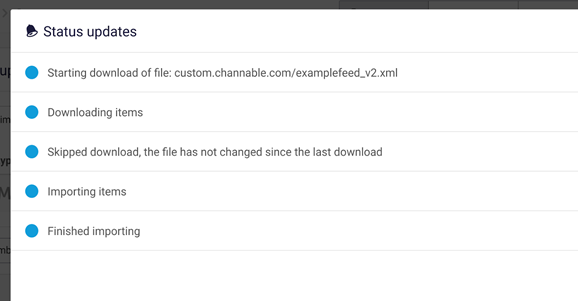
When we tried to import a file, but it did not change since the last import, you can see this in the status updates for that importer:
Could data in Channable become outdated when bandwidth optimization is turned on?
No, there is no risk of stale data, if your server is behaving properly. Channable will still check if newer data is available at every scheduled run, and every time you click “run now” on the import, even when bandwidth optimization is turned on.
Is there any downside to enabling bandwidth optimization?
No, if your server is behaving properly, it is always safe to turn on bandwidth optimization. If your server does not support the features that are required to optimize bandwidth, the optimization will be ineffective, but it will not be harmful.
When should I turn off bandwidth optimization?
If your server is misconfigured, or if it contains a bug, it might respond with a “304 Not Modified” response, even when your feed did in fact change. The most common mistake is a server that sends a constant ETag value, which does not change even when your feed does. In this case, data in Channable would become stale. If you are unable to resolve this at your server, you can turn off bandwidth optimization in Channable.
Does bandwidth optimization prevent all unnecessary downloads?
We will still download your feed once every 10 days, even if your server indicates that the feed did not change. For files that change less often, this means that we occasionally download the entire file, but bandwidth optimization still saves at least 90% of your bandwidth.
---
# Agent Instructions
This documentation is published with GitBook. GitBook is the documentation platform designed so that both humans and AI agents can read, navigate, and reason over technical content effectively. Learn more at gitbook.com.
## Querying This Documentation
If you need additional information that is not directly available in this page, you can query the documentation dynamically by asking a question.
Perform an HTTP GET request on the current page URL with the `ask` query parameter, and the optional `goal` query parameter:
```
GET https://helpcenter.channable.com/import-data/import-how-to/import-your-product-data/import-via-a-data-file/requirements-for-import-files/optimize-bandwidth.md?ask=&goal=
```
`ask` is the immediate question: it should be specific, self-contained, and written in natural language.
`goal` is optional and describes the broader end goal you are ultimately trying to accomplish on behalf of the user. GitBook uses it to tailor the answer towards what is most useful for that goal.
The response will contain a direct answer to the question and relevant excerpts and sources from the documentation.
Use this mechanism when the answer is not explicitly present in the current page, you need clarification or additional context, or you want to retrieve related documentation sections.