> For the complete documentation index, see [llms.txt](https://helpcenter.channable.com/llms.txt). Markdown versions of documentation pages are available by appending `.md` to page URLs; this page is available as [Markdown](https://helpcenter.channable.com/list-advertise/bol/bol-repricer/bol-repricer-price-stars.md).
# Bol repricer: Price stars
Note: Bol.com price stars are currently only available in the Bol.com repricer. If you don't use this feature yet, you can find all information to get started here: [Bol Repricer](/list-advertise/bol/bol-repricer.md)
By using price stars in the repricer you can ensure your product price is always optimized for selling on Bol.com. This article explains what price stars are and how you can use them in the repricer.
## What are price stars?
Bol.com uses the price stars rating to indicate how well the price of a product is aligned with the market price. For every product that has a price star rating, Bol.com decides what the relevant market price star is for that product. To determine the relevant market price, Bol.com looks at historical price data on Bol.com and the price on other sales channels.
Based on the relevant market price, each product gets assigned price star boundaries that determine how many price stars a product gets. The price star rating goes from 1 star up to 5 stars:
* 1 star: product too expensive (won't be shown on Bol.com)
* 5 stars: very competitive price, optimal conversion according to Bol.com
Example price star boundaries for a product:
| Price star rating | Price star boundaries |
| ------------------------------------- | ------------------------------- |
| 5 stars | A price less than 12 euros |
| 4 stars | A price between 12 and 14 euros |
| 3 stars | A price between 14 and 16 euros |
| 2 stars | A price between 16 and 20 euros |
| 1 star (product not shown on Bol.com) | A price higher than 20 euros |
Please refer to the Bol.com website for all information on pricing:
Note: Not all products have a price star rating assigned yet; in these cases Bol.com didn't determine a relevant market price (yet).
## Using price stars in the repricer
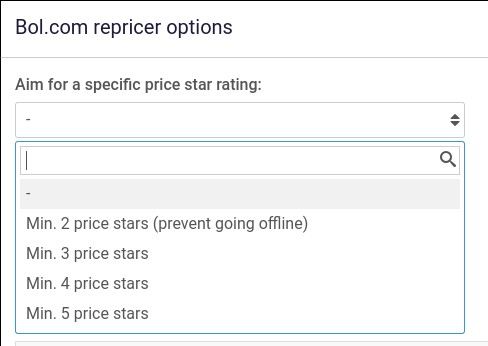
To use price stars in the Bol.com repricer, indicate in the repricer rules that you want to aim for a minimum price star rating. You can find this setting via: Repricer rule > Bol.com reprice options.
Example: To prevent going offline because of a price that is too high, select "Min. 2 price stars (prevent going offline)."
If you select a minimum price star score, the repricer will ensure the product price does not get above the upper price star boundary for the selected rating. That means the maximum price the repricer uses is determined by the price star boundaries — not necessarily by the maximum price you set in the repricer rules.
Example: Using the example product in the table above, if you select "Min. 4 price stars", the repricer will make sure the price doesn't go above 14 euros.
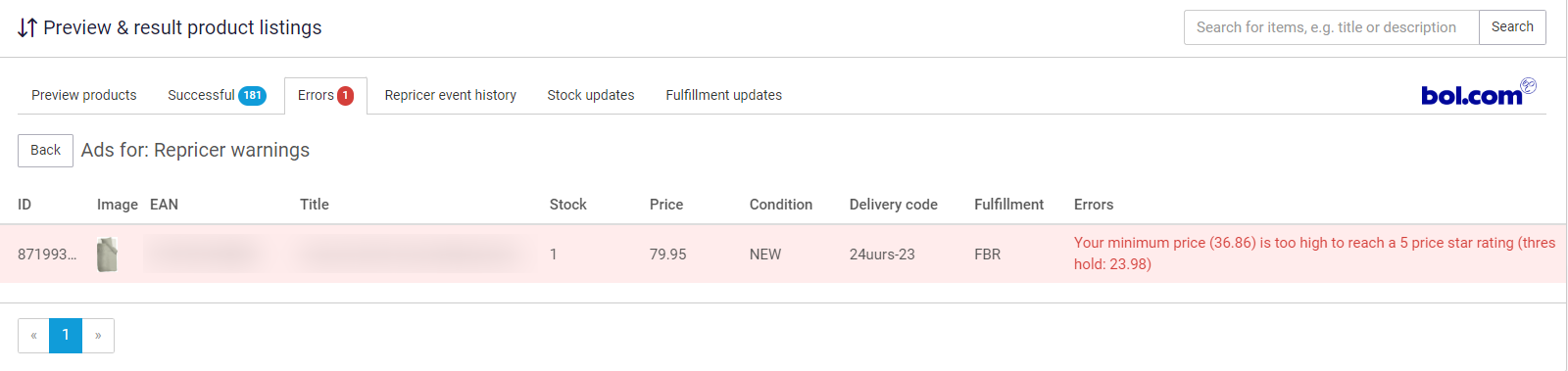
Note: If your minimum price is too high to reach your desired price star rating, we show this as a "repricer warning" in the Errors tab of the API.
## Additional comments
{% stepper %}
{% step %}
### Minimum price may prevent target rating
It could be the case that the minimum price is higher than the upper price star boundary of the selected minimum price star rating. In this case, the selected price star rating can't be achieved, because the repricer will never go below the minimum price you filled in.
{% endstep %}
{% step %}
### Repricer only lowers the maximum price
The repricer will only lower the maximum price. If the upper price star boundary is above the maximum price you filled in, then the price will not go above the filled in maximum price.
{% endstep %}
{% step %}
### Price star boundaries shown on item page
The price star boundaries per product are shown on the item page. When there are no price star boundaries for that product, no information will be shown.
{% endstep %}
{% endstepper %}
[](https://helpcenter.channable.com/hc/article_attachments/7860386277266/EN_-_Price_stars_rating_3.png)
---
# Agent Instructions
This documentation is published with GitBook. GitBook is the documentation platform designed so that both humans and AI agents can read, navigate, and reason over technical content effectively. Learn more at gitbook.com.
## Querying This Documentation
If you need additional information that is not directly available in this page, you can query the documentation dynamically by asking a question.
Perform an HTTP GET request on the current page URL with the `ask` query parameter, and the optional `goal` query parameter:
```
GET https://helpcenter.channable.com/list-advertise/bol/bol-repricer/bol-repricer-price-stars.md?ask=&goal=
```
`ask` is the immediate question: it should be specific, self-contained, and written in natural language.
`goal` is optional and describes the broader end goal you are ultimately trying to accomplish on behalf of the user. GitBook uses it to tailor the answer towards what is most useful for that goal.
The response will contain a direct answer to the question and relevant excerpts and sources from the documentation.
Use this mechanism when the answer is not explicitly present in the current page, you need clarification or additional context, or you want to retrieve related documentation sections.