> For the complete documentation index, see [llms.txt](https://helpcenter.channable.com/llms.txt). Markdown versions of documentation pages are available by appending `.md` to page URLs; this page is available as [Markdown](https://helpcenter.channable.com/list-advertise/google/manage-and-optimize-google-ads/google-shopping-ads/what-can-i-configure-for-shopping-ads-in-channable.md).
# What can I configure for Shopping Ads in Channable?
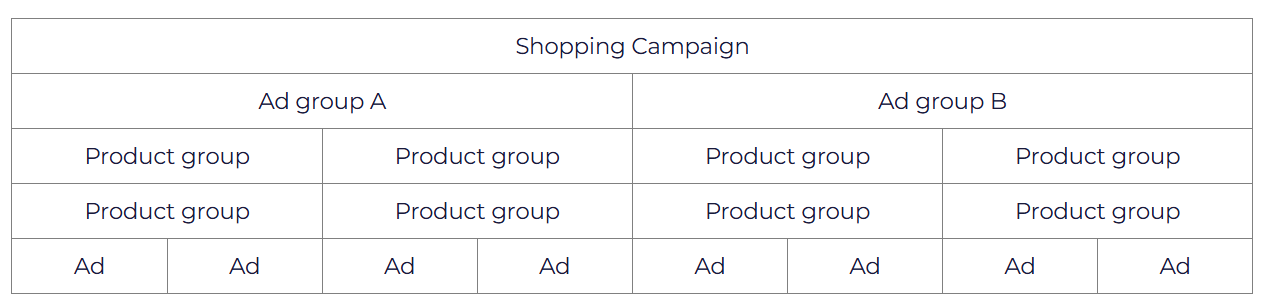
Shopping Ads provides you with a way of structuring your product ads in different campaigns, ad groups, and product groups which helps you manage their CPC and targeting. The overall structure is as follows:
A campaign is divided into ad groups, which are then split up into product groups. Each product group contains one or more ads, where 1 ad equals 1 unique product from your Merchant Center.
With a Shopping Ad generator in Channable, you can configure several elements for each of the above parts of the Shopping Ad structure:
| **Campaigns** | **Ad groups** | **Product groups** | **Negative keywords** |
| -------------------------------------------------------------- | ---------------------------------------------- | -------------------------------------------- | ------------------------------------------------------------------------------------------------------------------------------------------------------------------------ |
|
- Campaign name - Campaign country - Daily budget
|
- Ad group name - Standard max CPC\*
| Up to 4 levels of product group subdivisions | You can only configure negative keywords for Shopping Ads. Search results are based on your product information from your product data in Merchant Center, not keywords. |
{% hint style="info" %}
IMPORTANT: The CPC is only sent once: the first time you activate and run the Shopping Ad generator, or when a new Ad Group gets created by the generator. After that, you can manage your CPC in Google Ads manually.
{% endhint %}
{% hint style="info" %}
IMPORTANT II: If you've made any changes or deleted campaigns in your Ads account that have resulted in an error within Channable, please refer to [this article](https://channable-test.gitbook.io/channable-test-docs/list-advertise/~/revisions/41I7hnV8leiPulcDgOau/google-shopping/manage-and-optimize-google-ads/google-shopping-ads/configuring-shopping-ads-campaigns/solving-common-shopping-ads-errors) for a possible solution to the error. If the proposed solution doesn't resolve your issue, please contact our technical support department.
{% endhint %}
### Further resources
* [What is an Ads channel in Channable?](/list-advertise/google/manage-and-optimize-google-ads/what-is-an-ads-channel-in-channable.md)
* [What are Shopping Ads?](/list-advertise/google/manage-and-optimize-google-ads/google-shopping-ads/what-are-shopping-ads.md)
* [Migration Smart Shopping Campaigns to Performance Max Campaigns](/list-advertise/google/manage-and-optimize-google-ads/google-shopping-ads/migration-smart-shopping-campaigns-to-performance-max-campaigns.md)
### Helpful links
* [Send your products to Google Merchant Center](/list-advertise/google/how-to-add-products-to-google-merchant-center.md#send-your-products-to-google-merchant-center)
* [Troubleshooting Ads account changes](https://helpcenter.channable.com/hc/en-us/articles/360021774759)
For more information about setting up Shopping Ads and configuring these elements, take a look at the [Google Shopping Ads section](/list-advertise/google/manage-and-optimize-google-ads/google-shopping-ads.md).
---
# Agent Instructions
This documentation is published with GitBook. GitBook is the documentation platform designed so that both humans and AI agents can read, navigate, and reason over technical content effectively. Learn more at gitbook.com.
## Querying This Documentation
If you need additional information that is not directly available in this page, you can query the documentation dynamically by asking a question.
Perform an HTTP GET request on the current page URL with the `ask` query parameter, and the optional `goal` query parameter:
```
GET https://helpcenter.channable.com/list-advertise/google/manage-and-optimize-google-ads/google-shopping-ads/what-can-i-configure-for-shopping-ads-in-channable.md?ask=&goal=
```
`ask` is the immediate question: it should be specific, self-contained, and written in natural language.
`goal` is optional and describes the broader end goal you are ultimately trying to accomplish on behalf of the user. GitBook uses it to tailor the answer towards what is most useful for that goal.
The response will contain a direct answer to the question and relevant excerpts and sources from the documentation.
Use this mechanism when the answer is not explicitly present in the current page, you need clarification or additional context, or you want to retrieve related documentation sections.