> For the complete documentation index, see [llms.txt](https://helpcenter.channable.com/llms.txt). Markdown versions of documentation pages are available by appending `.md` to page URLs; this page is available as [Markdown](https://helpcenter.channable.com/list-advertise/google/manage-and-optimize-google-ads/google-text-ads/ad-groups/adding-price-assets.md).
# Adding Price assets
### What are price assets?
Price assets are assets that appear below your text ad as a price menu. They enable you to tell people more details about what your items cost. When a potential customer clicks on an item in your price menu, they are automatically directed to the information they want to know or products they want to buy.
In other words, with price assets you are able to showcase a larger range of your items. The *cost per click* on a price asset is the same as for a regular ad.
If you want to know more about what price assets are, read [this Google support article](https://support.google.com/google-ads/answer/7065415?hl=en\&ref_topic=3119125).
### Adding price assets to your ads in Channable
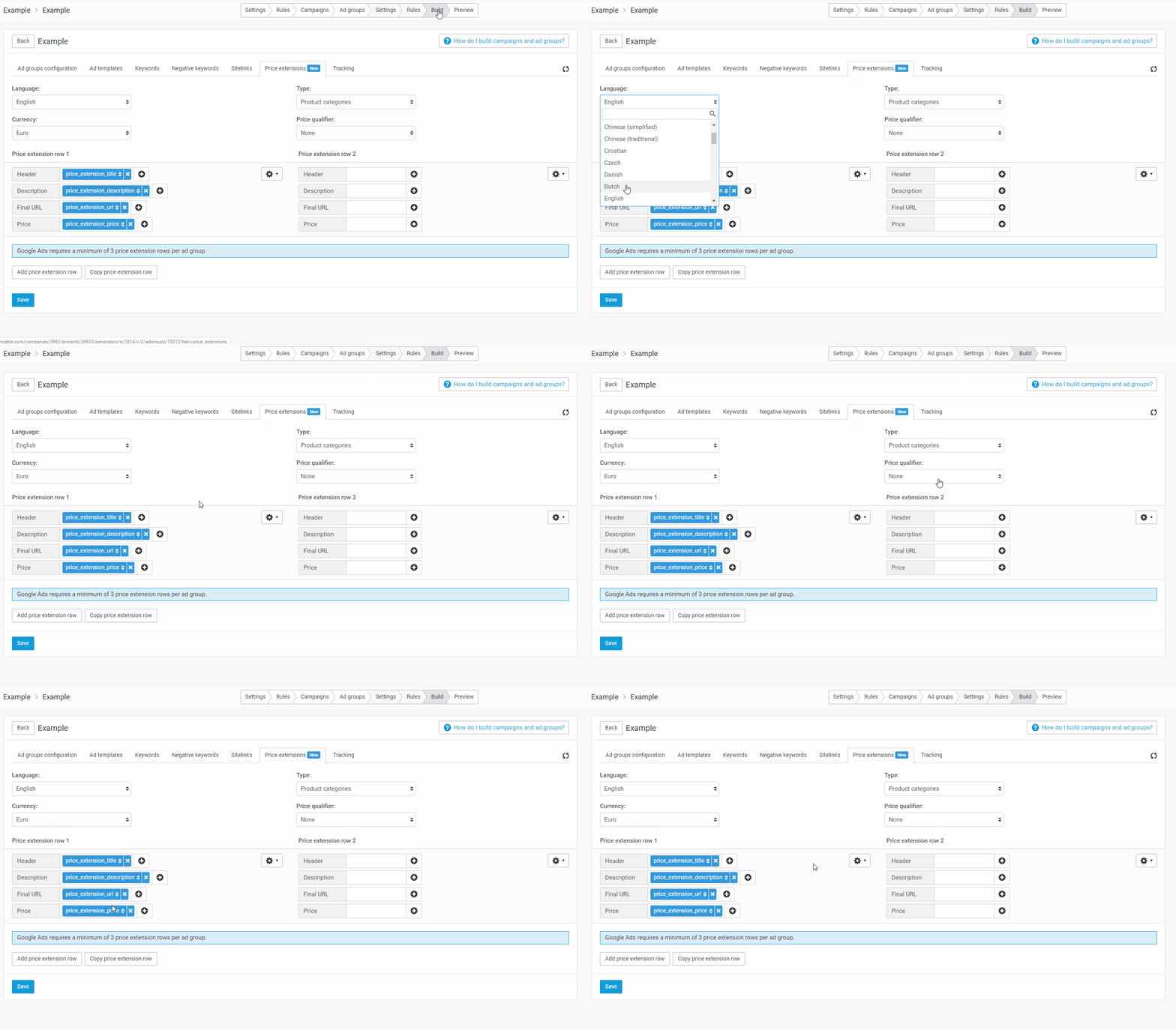
To add price assets to your advertisements, navigate to the *Build* step in your ad generator, and you will see a tab called *Price assets*. Here you can create your price assets. When setting up the price assets, you need to set a language, currency, type and price qualifier.
* **Type:** 9 different options. Read about them [here](https://support.google.com/google-ads/answer/7064917?hl=en):
* **Price qualifier:** used if your prices are flexible so that you can specify a price being “From €X” or “Up to €X”. If your prices do not vary, select “No qualifier.”
After setting these, there are a few requirements in the actual price asset rows:
* **Extension headers** can be up to 25 characters per header and 25 characters per description. If these exceed the limits, Google will return an error.
In Channable, price assets are added on ad group level, meaning that the price assets you generate will be added to all ads within a specific ad group. For example, if you have a campaign for shoes and create the ad groups on brand level with the ads on product level, all ads related to Nike shoes (i.e. in the Nike ad group) will have the same price assets.
### Google policy restrictions
These are some policy requirements that need to be taken into account when setting up price assets:
* You cannot use price information in the header or description.
* You cannot put promotional text in the header or description (e.g. ‘Sale’ or ‘Free Shipping’).
* You are not allowed to use extension URLs that do not lead to the same final URL domain as the text ad they are attached to.
* For type-specific policies, see [this Google support article](https://support.google.com/adspolicy/answer/7048464).
If you do not meet Google's policy, Google will return an error.
{% hint style="warning" %}
These policy points are not exhaustive. Always check in Google Ads whether a specific policy error is blocking your price asset from showing.
{% endhint %}
### Q\&A
What do price assets look like in my ad?
Each price asset consists of a header, description, price, and link. In the left section of the image below you can see the setup of a price asset and in the right section you can see the corresponding components in Channable.

Below you can find an example of CheapTickets.nl containing four price assets. The first price asset is shown followed by the "More" button. If you click on the "More" button the rest of the price assets will be shown.

One of the fields used in the price asset row is empty. Will this cause errors?
Yes. In the preview phase in Channable you will get the error "empty\_dynamic\_field". In this case, Channable will not send this price asset row to Google. The other price asset rows for that ad group will still be sent to Google and will not get an error.
---
# Agent Instructions
This documentation is published with GitBook. GitBook is the documentation platform designed so that both humans and AI agents can read, navigate, and reason over technical content effectively. Learn more at gitbook.com.
## Querying This Documentation
If you need additional information that is not directly available in this page, you can query the documentation dynamically by asking a question.
Perform an HTTP GET request on the current page URL with the `ask` query parameter, and the optional `goal` query parameter:
```
GET https://helpcenter.channable.com/list-advertise/google/manage-and-optimize-google-ads/google-text-ads/ad-groups/adding-price-assets.md?ask=&goal=
```
`ask` is the immediate question: it should be specific, self-contained, and written in natural language.
`goal` is optional and describes the broader end goal you are ultimately trying to accomplish on behalf of the user. GitBook uses it to tailor the answer towards what is most useful for that goal.
The response will contain a direct answer to the question and relevant excerpts and sources from the documentation.
Use this mechanism when the answer is not explicitly present in the current page, you need clarification or additional context, or you want to retrieve related documentation sections.