> For the complete documentation index, see [llms.txt](https://helpcenter.channable.com/llms.txt). Markdown versions of documentation pages are available by appending `.md` to page URLs; this page is available as [Markdown](https://helpcenter.channable.com/list-advertise/list-and-advertise-de/bol/bol-repricer/fehlerbehebung-fur-ean-is-not-known-im-bol-repricer.md).
# Fehlerbehebung für „EAN is not known“ im Bol Repricer
Um ein Angebot repricen zu können, müssen wir wissen, ob ein Produkt bei Bol.com existiert. Wir laden den Bol.com-Katalog einmal täglich herunter, indem wir Dateien von ihrem FTP-Server abrufen. Dieser Katalog ist niemals der vollständige Katalog von Bol.com. Die Dateien sind ursprünglich für Affiliate-Partner gedacht, und Bol.com möchte nicht, dass alle ihre Produkte auf Affiliate-Websites verkauft werden. Daher können nur Artikel, die (1) bei Bol.com kategorisiert sind und (2) in einer von Affiliates unterstützten Kategorie liegen, repriced werden. Diese Kategorien findest du [hier](https://partnerblog.bol.com/support/handleidingen/productfeeds/).
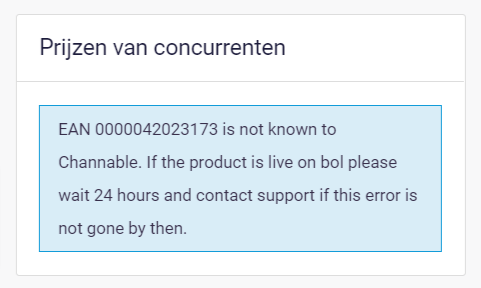
Wenn ein Produkt diese beiden Anforderungen nicht erfüllt, zeigt die Repricer-Produktvorschau die Meldung „EAN ist Channable nicht bekannt“ an:
### Fehlerbehebung zur Meldung „EAN ist nicht bekannt“
Prüfe zuerst, ob dieses Angebot bei Bol.com existiert und ob es in einer Kategorie platziert ist. Du kannst den EAN-Code in die Suchleiste auf Bol.com einfügen und dann die Produktspezifikationen überprüfen. Es gibt eine Überschrift mit „Je vindt dit artikel in:“. Je nach Ergebnis folge bitte den passenden Schritten unten.
{% stepper %}
{% step %}
### Das Produkt existiert nicht bei Bol.com
Wenn es nicht bei Bol.com existiert, können wir es noch nicht repricen, weil es überhaupt nicht vorhanden ist. Das Produkt zu dieser EAN muss zuerst über die Bol.com-API in Channable bei Bol.com gelistet werden.
{% endstep %}
{% step %}
### Das Produkt existiert bei Bol.com, hat aber keine Kategorie
Stelle sicher, dass du die Kategorien und Pflichtattribute in Channable ausfüllst. Durch das Senden der Kategorie steigen die Chancen, dass es in den heruntergeladenen Dateien auftaucht.
{% endstep %}
{% step %}
### Das Produkt existiert bei Bol.com, hat eine Kategorie, aber der Fehler besteht nach 24 Stunden weiterhin
Sende eine E‑Mail an . Erwähne in der E‑Mail, dass der Artikel in die Dateien hier aufgenommen werden soll: .
{% endstep %}
{% endstepper %}
{% hint style="info" %}
Hinweis: Wir können nicht garantieren, ob oder wann Bol die von dir eingesendeten EANs in ihre Dateien aufnimmt. Das ist eine interne Entscheidung von Bol.com, auf die wir keinen Einfluss haben.
{% endhint %}
---
# Agent Instructions
This documentation is published with GitBook. GitBook is the documentation platform designed so that both humans and AI agents can read, navigate, and reason over technical content effectively. Learn more at gitbook.com.
## Querying This Documentation
If you need additional information that is not directly available in this page, you can query the documentation dynamically by asking a question.
Perform an HTTP GET request on the current page URL with the `ask` query parameter, and the optional `goal` query parameter:
```
GET https://helpcenter.channable.com/list-advertise/list-and-advertise-de/bol/bol-repricer/fehlerbehebung-fur-ean-is-not-known-im-bol-repricer.md?ask=&goal=
```
`ask` is the immediate question: it should be specific, self-contained, and written in natural language.
`goal` is optional and describes the broader end goal you are ultimately trying to accomplish on behalf of the user. GitBook uses it to tailor the answer towards what is most useful for that goal.
The response will contain a direct answer to the question and relevant excerpts and sources from the documentation.
Use this mechanism when the answer is not explicitly present in the current page, you need clarification or additional context, or you want to retrieve related documentation sections.