> For the complete documentation index, see [llms.txt](https://helpcenter.channable.com/llms.txt). Markdown versions of documentation pages are available by appending `.md` to page URLs; this page is available as [Markdown](https://helpcenter.channable.com/list-advertise/list-and-advertise-de/google/google-ads-verwalten-and-optimieren/google-shopping-ads/was-kannst-du-in-channable-fur-shopping-ads-konfigurieren.md).
# Was kannst du in Channable für Shopping Ads konfigurieren?
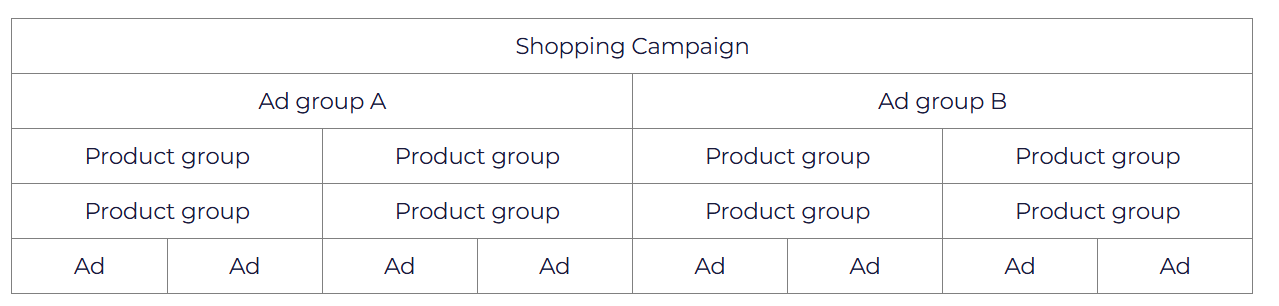
Shopping Ads bietet dir eine Möglichkeit, deine Produktanzeigen in verschiedene Kampagnen, Anzeigengruppen und Produktgruppen zu strukturieren, sodass du CPC und Targeting besser verwalten kannst. Die Gesamtstruktur sieht wie folgt aus:
Eine Kampagne ist in Anzeigengruppen unterteilt, die wiederum in Produktgruppen aufgeteilt sind. Jede Produktgruppe enthält eine oder mehrere Anzeigen, wobei 1 Anzeige 1 eindeutigem Produkt aus deinem Merchant Center entspricht.
Mit einem Shopping-Ad-Generator in Channable kannst du für jeden der oben genannten Teile der Shopping-Ad-Struktur mehrere Elemente konfigurieren:
| **Kampagnen** | **Anzeigengruppen** | **Produktgruppen** | **Negative Keywords** |
| ---------------------------------------------------------- | --------------------------------------------------------- | ------------------------------------------------- | ---------------------------------------------------------------------------------------------------------------------------------------------------------------------------------------- |
|
- Kampagnenname - Kampagnenland - Tagesbudget
|
- Name der Anzeigengruppe - Standard Max. CPC\*
| Bis zu 4 Ebenen von Produktgruppen-Unterteilungen | Du kannst nur negative Keywords für Shopping Ads konfigurieren. Die Suchergebnisse basieren auf deinen Produktinformationen aus den Produktdaten im Merchant Center, nicht auf Keywords. |
{% hint style="info" %}
WICHTIG: Der CPC wird nur einmal übermittelt: beim ersten Aktivieren und Ausführen des Shopping-Ad-Generators oder wenn eine neue Anzeigengruppe vom Generator erstellt wird. Danach kannst du deinen CPC manuell in Google Ads verwalten.
{% endhint %}
{% hint style="info" %}
WICHTIG II: Falls du Änderungen vorgenommen oder Kampagnen in deinem Ads-Konto gelöscht hast, die einen Fehler in Channable verursacht haben, siehe bitte [diesen Artikel](https://channable-test.gitbook.io/channable-test-docs/list-advertise/~/revisions/41I7hnV8leiPulcDgOau/google-shopping/manage-and-optimize-google-ads/google-shopping-ads/configuring-shopping-ads-campaigns/solving-common-shopping-ads-errors) für eine mögliche Lösung des Fehlers. Wenn die vorgeschlagene Lösung dein Problem nicht behebt, kontaktiere bitte unseren technischen Support.
{% endhint %}
### Weitere Ressourcen
* [Was ist ein Ads-Kanal in Channable?](/list-advertise/list-and-advertise-de/google/google-ads-verwalten-and-optimieren/was-ist-ein-ads-kanal-in-channable.md)
* [Was sind Shopping Ads?](/list-advertise/list-and-advertise-de/google/google-ads-verwalten-and-optimieren/google-shopping-ads/was-sind-shopping-ads.md)
* [Migration Smart Shopping-Kampagnen zu Performance Max-Kampagnen](/list-advertise/list-and-advertise-de/google/google-ads-verwalten-and-optimieren/google-shopping-ads/migration-von-smart-shopping-kampagnen-zu-performance-max-kampagnen.md)
### Hilfreiche Links
* [Sende deine Produkte an das Google Merchant Center](/list-advertise/list-and-advertise-de/google/so-fugst-du-produkte-zu-google-merchant-center-hinzu.md#send-your-products-to-google-merchant-center)
* [Fehlerbehebung bei Änderungen im Ads-Konto](https://helpcenter.channable.com/hc/en-us/articles/360021774759)
Für weitere Informationen zum Einrichten von Shopping Ads und zur Konfiguration dieser Elemente sieh dir bitte den [Google Shopping Ads-Bereich](/list-advertise/list-and-advertise-de/google/google-ads-verwalten-and-optimieren/google-shopping-ads.md).
---
# Agent Instructions
This documentation is published with GitBook. GitBook is the documentation platform designed so that both humans and AI agents can read, navigate, and reason over technical content effectively. Learn more at gitbook.com.
## Querying This Documentation
If you need additional information that is not directly available in this page, you can query the documentation by asking a question.
Perform an HTTP GET request on the following URL with the `ask` and `goal` query parameters:
```
GET https://helpcenter.channable.com/list-advertise/list-and-advertise-de/google/google-ads-verwalten-and-optimieren/google-shopping-ads/was-kannst-du-in-channable-fur-shopping-ads-konfigurieren.md?ask=&goal=
```
`ask` is the immediate question: it should be specific, self-contained, and written in natural language.
`goal` is what the user is ultimately trying to achieve, the reason they need the answer. Sharing it helps GitBook give you a better, more relevant answer. A goal is most helpful when it describes the outcome the user wants rather than restating the question. For example, with `ask=how do I create an API token`, a goal like `automate deployments from our CI pipeline` lets GitBook tailor the answer to that use case.
The response will contain a direct answer to the question and relevant excerpts and sources from the documentation.
Use this mechanism when the answer is not explicitly present in the current page, you need clarification or additional context, or you want to retrieve related documentation sections.