> For the complete documentation index, see [llms.txt](https://helpcenter.channable.com/llms.txt). Markdown versions of documentation pages are available by appending `.md` to page URLs; this page is available as [Markdown](https://helpcenter.channable.com/list-advertise/list-and-advertise-it/amazon/ordini-amazon/come-para-ottenere-informazioni-sulliva-per-gli-ordini-b2b-di-amazon.md).
# Come Para ottenere informazioni sull'IVA per gli Ordini B2B di Amazon
Scopri come attivare l'identificativo fiscale dell'acquirente en Amazon Vendedor Central, affinché Channable possa recuperare i numeri di partita IVA per gli Ordini Amazon B2B FBM idonei.
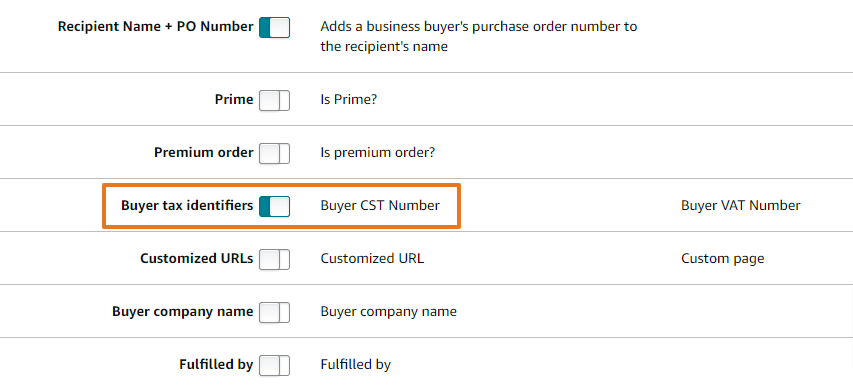
Per recuperare le partite IVA per gli ordini B2B di Amazon, attiva l'impostazione **Identificativo fiscale dell'acquirente** nel tuo account Amazon Vendedor Central. Questo articolo ti mostra come fare.
{% hint style="warning" %}
**Importante:** A causa di limitazioni nella reportistica, possiamo recuperare le partite IVA solo per le **Fulfilled by Merchant (FBM)** connessioni Pedido. Se usar **Fulfillment by Amazon (FBA/AFN)**, attivare questa impostazione non cambierà nulla.
{% endhint %}
### :memo-circle-info: Prima di iniziare
**Buono a sapersi**
* Includiamo le partite IVA solo per queste piattaforme:
* Channable Api
* Lightspeed
* Magento
* PrestaShop
{% stepper %}
{% step %}
Nel tuo account Amazon Vendedor Central, apri il menu principale e vai a **Ordini > report sugli ordini**.

{% endstep %}
{% step %}
Nella pagina **Report sugli ordini** fai clic su **Aggiungi o rimuovi le colonne del report Pedido**.
{% endstep %}
{% step %}
Fai clic sull'interruttore per **Identificativi fiscali dell'acquirente**.
{% endstep %}
{% endstepper %}
### Cosa succede dopo
Dopo che **Identificativi fiscali dell'acquirente** è attivata, Amazon include la partita IVA per gli ordini aziendali nei dati del Pedido. Noi causa recuperiamo y includiamo quel VAT Número per gli ordini de Channable Api, Lightspeed, Magento y PrestaShop.
---
# Agent Instructions
This documentation is published with GitBook. GitBook is the documentation platform designed so that both humans and AI agents can read, navigate, and reason over technical content effectively. Learn more at gitbook.com.
## Querying This Documentation
If you need additional information that is not directly available in this page, you can query the documentation by asking a question.
Perform an HTTP GET request on the following URL with the `ask` and `goal` query parameters:
```
GET https://helpcenter.channable.com/list-advertise/list-and-advertise-it/amazon/ordini-amazon/come-para-ottenere-informazioni-sulliva-per-gli-ordini-b2b-di-amazon.md?ask=&goal=
```
`ask` is the immediate question: it should be specific, self-contained, and written in natural language.
`goal` is what the user is ultimately trying to achieve, the reason they need the answer. Sharing it helps GitBook give you a better, more relevant answer. A goal is most helpful when it describes the outcome the user wants rather than restating the question. For example, with `ask=how do I create an API token`, a goal like `automate deployments from our CI pipeline` lets GitBook tailor the answer to that use case.
The response will contain a direct answer to the question and relevant excerpts and sources from the documentation.
Use this mechanism when the answer is not explicitly present in the current page, you need clarification or additional context, or you want to retrieve related documentation sections.