> For the complete documentation index, see [llms.txt](https://helpcenter.channable.com/llms.txt). Markdown versions of documentation pages are available by appending `.md` to page URLs; this page is available as [Markdown](https://helpcenter.channable.com/list-advertise/list-and-advertise-it/bol/pubblica-items-su-bol/come-para-configurare-fbb-lvb-y-fbr-per-bol.md).
# Come Para configurare FBB (LVB) y FBR per bol
Quando vendi su bol e ricevi un ordine, ci sono due opzioni di evasione:
* **FBR (Fulfillment by Retailer):** Con questa opzione il rivenditore (tu) spedisce l'ordine al cliente.
* **FBB (Fulfillment by bol)/LVB (Logistiek via bol):** Conservi lo stock nel magazzino di bol. Ogni volta che un prodotto viene ordinato, bol gestisce la consegna e i resi.
Se usi entrambi i tipi di evasione, puoi indicarlo con un campo dinamico.
In questo articolo imparerai come impostare il tipo di evasione per il canale bol.
***
#### :list-check: Prima di iniziare
**Ti servirà**
* Un canale bol
**Buono a sapersi**
**Usare insieme Fulfillment by bol (FBB) e Fulfillment by Retailer (FBR):**
* Se usi sia FBB che FBR, ti consigliamo di usare due collegamenti separati.
* Senza un collegamento dedicato per FBB, Channable non può recuperare né inviare i tuoi ordini al tuo webshop o sistema ERP.
* Per impostazione predefinita, il collegamento degli ordini recupera solo gli ordini FBR.
### Come impostare il tipo di evasione bol per i tuoi articoli
Tutti i miei articoli usano lo stesso tipo di evasione
Se i tuoi articoli sono tutti evasi con lo stesso tipo, puoi usare il valore statico `FBB` o `FBR` per applicarlo a tutti i tuoi articoli.
1. Vai al **Build** passaggio di **\[il tuo canale bol]**.
2. Alla voce **Evasione**, seleziona **Valori statici > \[tipo di evasione]**.
3. Clicca **Salva**.
I miei articoli usano tipi di evasione diversi
Se i tuoi articoli usano tipi di evasione diversi, puoi mappare un campo dinamico che contenga il tipo di evasione per ciascun articolo bol.
{% hint style="info" %}
Nota: Questo campo deve contenere il valore `FBB` o `FBR`.
{% endhint %}
1. Vai al **Build** passaggio di **\[il tuo canale bol]**.
2. Alla voce **Evasione**, seleziona il campo che contiene le informazioni di evasione.
3. Clicca **Salva**.
#### **Come creare un campo dinamico per il tipo di evasione**
Se i tuoi articoli hanno tipi di evasione diversi, devi mappare un campo che contenga quell'informazione per l' **Evasione** attributo nello step Build.
Segui questi passaggi per creare un campo di progetto per il tipo di evasione:
1. In **lo step Rules**, clicca :file-circle-plus: per creare un nuovo campo di progetto.
2. Dai al tuo nuovo campo un nome (ad es. `levering_bol`).
3. Clicca **Crea**.
4. Crea una nuova regola per completare quel campo con le informazioni FBR/FBB.
{% hint style="info" %}
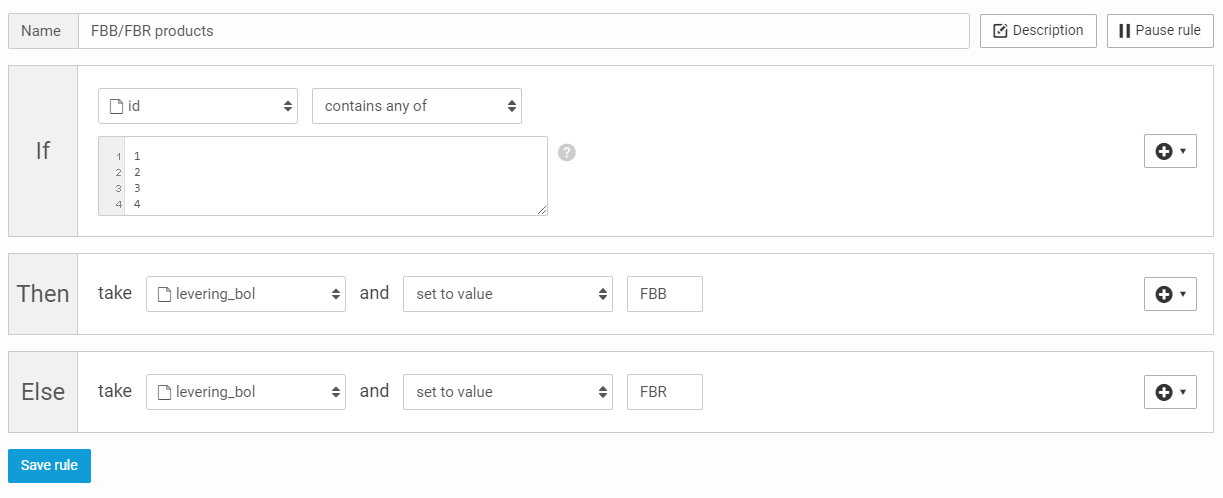
**Esempio 1: Crea una regola usando gli ID**
* **Se:** `id` `contiene uno qualsiasi di` \[numeri ID articolo]
* **Allora:** prendi `levering_bol` e `imposta valore su` `FBR`
* **Altrimenti:** prendi `levering_bol` e `imposta valore su` `FBB`.
{% endhint %}
{% hint style="info" %}
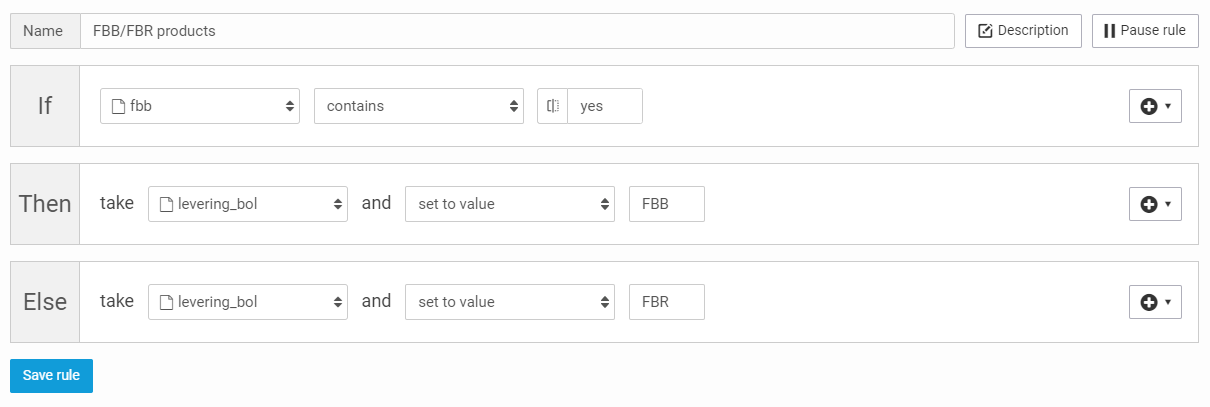
**Esempio 2: Compilare usando un campo esistente**
* **Se:** `FBB` contiene `sì`
* **Allora:** prendi `levering_bol` e `imposta valore su` `FBB`
* **Altrimenti:** prendi `levering_bol` e `imposta valore su` `FBR`
{% endhint %}
---
# Agent Instructions
This documentation is published with GitBook. GitBook is the documentation platform designed so that both humans and AI agents can read, navigate, and reason over technical content effectively. Learn more at gitbook.com.
## Querying This Documentation
If you need additional information that is not directly available in this page, you can query the documentation by asking a question.
Perform an HTTP GET request on the following URL with the `ask` and `goal` query parameters:
```
GET https://helpcenter.channable.com/list-advertise/list-and-advertise-it/bol/pubblica-items-su-bol/come-para-configurare-fbb-lvb-y-fbr-per-bol.md?ask=&goal=
```
`ask` is the immediate question: it should be specific, self-contained, and written in natural language.
`goal` is what the user is ultimately trying to achieve, the reason they need the answer. Sharing it helps GitBook give you a better, more relevant answer. A goal is most helpful when it describes the outcome the user wants rather than restating the question. For example, with `ask=how do I create an API token`, a goal like `automate deployments from our CI pipeline` lets GitBook tailor the answer to that use case.
The response will contain a direct answer to the question and relevant excerpts and sources from the documentation.
Use this mechanism when the answer is not explicitly present in the current page, you need clarification or additional context, or you want to retrieve related documentation sections.