> For the complete documentation index, see [llms.txt](https://helpcenter.channable.com/llms.txt). Markdown versions of documentation pages are available by appending `.md` to page URLs; this page is available as [Markdown](https://helpcenter.channable.com/list-advertise/list-and-advertise-it/bol/pubblica-items-su-bol/come-rimuovo-sconto-sul-volume-de-bol.md).
# Come rimuovo Sconto sul volume de bol?
Se vuoi rimuovere lo sconto sul volume che hai impostato per Bol.com, segui questi passaggi:
{% stepper %}
{% step %}
### Rimuovere le impostazioni di sconto sul volume da Build
Rimuovi tutte le impostazioni di sconto sul volume da *Build* passo.
{% endstep %}
{% step %}
### Metti in pausa o rimuovi le regole di sconto sul volume
Metti in pausa o rimuovi le regole di sconto sul volume da *Regole* passo.
{% endstep %}
{% step %}
### Forza un aggiornamento dei prezzi verso bol
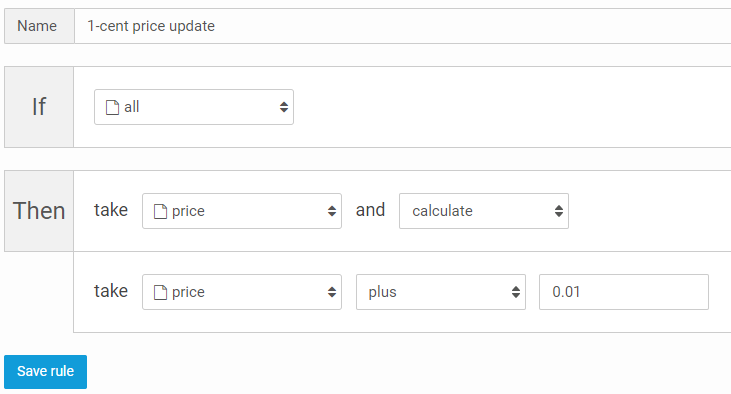
Ora devi forzare un aggiornamento dei prezzi verso bol per tutti i tuoi prodotti. Per farlo, aggiungi una regola che si applichi al campo che usi come prezzo normale in *Build* passo.
Esempio di regola (visiva):
{% endstep %}
{% step %}
### Esegui l'API di Bol.com con la regola da 1 cent attiva
Esegui di nuovo il tuo canale bol mentre la regola da 1 cent è attiva in modo che bol riceva l'aggiornamento di prezzo forzato.
{% endstep %}
{% step %}
### Metti in pausa/rimuovi la regola da 1 cent ed esegui di nuovo l'API
Metti in pausa o rimuovi la regola da 1 cent ed esegui di nuovo il tuo canale per reinviare i prezzi originali.
{% endstep %}
{% endstepper %}
Bol elaborerà i prezzi aggiornati e vedrà che stai inviando solo un prezzo normale, senza prezzi scontati per volume. Bol.com rimuoverà quindi lo sconto sul volume dai tuoi prodotti.
---
# Agent Instructions
This documentation is published with GitBook. GitBook is the documentation platform designed so that both humans and AI agents can read, navigate, and reason over technical content effectively. Learn more at gitbook.com.
## Querying This Documentation
If you need additional information that is not directly available in this page, you can query the documentation by asking a question.
Perform an HTTP GET request on the following URL with the `ask` and `goal` query parameters:
```
GET https://helpcenter.channable.com/list-advertise/list-and-advertise-it/bol/pubblica-items-su-bol/come-rimuovo-sconto-sul-volume-de-bol.md?ask=&goal=
```
`ask` is the immediate question: it should be specific, self-contained, and written in natural language.
`goal` is what the user is ultimately trying to achieve, the reason they need the answer. Sharing it helps GitBook give you a better, more relevant answer. A goal is most helpful when it describes the outcome the user wants rather than restating the question. For example, with `ask=how do I create an API token`, a goal like `automate deployments from our CI pipeline` lets GitBook tailor the answer to that use case.
The response will contain a direct answer to the question and relevant excerpts and sources from the documentation.
Use this mechanism when the answer is not explicitly present in the current page, you need clarification or additional context, or you want to retrieve related documentation sections.