> For the complete documentation index, see [llms.txt](https://helpcenter.channable.com/llms.txt). Markdown versions of documentation pages are available by appending `.md` to page URLs; this page is available as [Markdown](https://helpcenter.channable.com/list-advertise/list-and-advertise-nl/amazon/lijst-items-op-amazon/hoe-je-verzendtemplates-voor-amazon-configureert.md).
# Hoe je verzendtemplates voor Amazon configureert
Amazon gebruikt verzendtemplates om specifieke verzendinstellingen in te stellen. In Channable kun je verschillende verzendtemplates toewijzen aan specifieke producten. Bijvoorbeeld: je kunt één verzendtemplate maken voor producten met verzendkosten en een andere voor producten met gratis verzending.
In dit artikel leggen we uit hoe je verzendtemplates uit je Amazon Seller-account instelt en gebruikt in je Amazon-kanaal in Channable.
***
### Voordat je begint
Je hebt nodig:
* Een Amazon Seller-account
* Een Amazon-kanaal in Channable
* De ['Ship by region' instelling](https://sellercentral.amazon.nl/help/hub/reference/external/G201337450?initialSessionID=261-2714761-3676459\&ld=AZXXSOADirect\&locale=en-GB) ingeschakeld in je Amazon Seller verzendinstellingen.
{% stepper %}
{% step %}
### Maak verzendtemplates aan in je Amazon-account
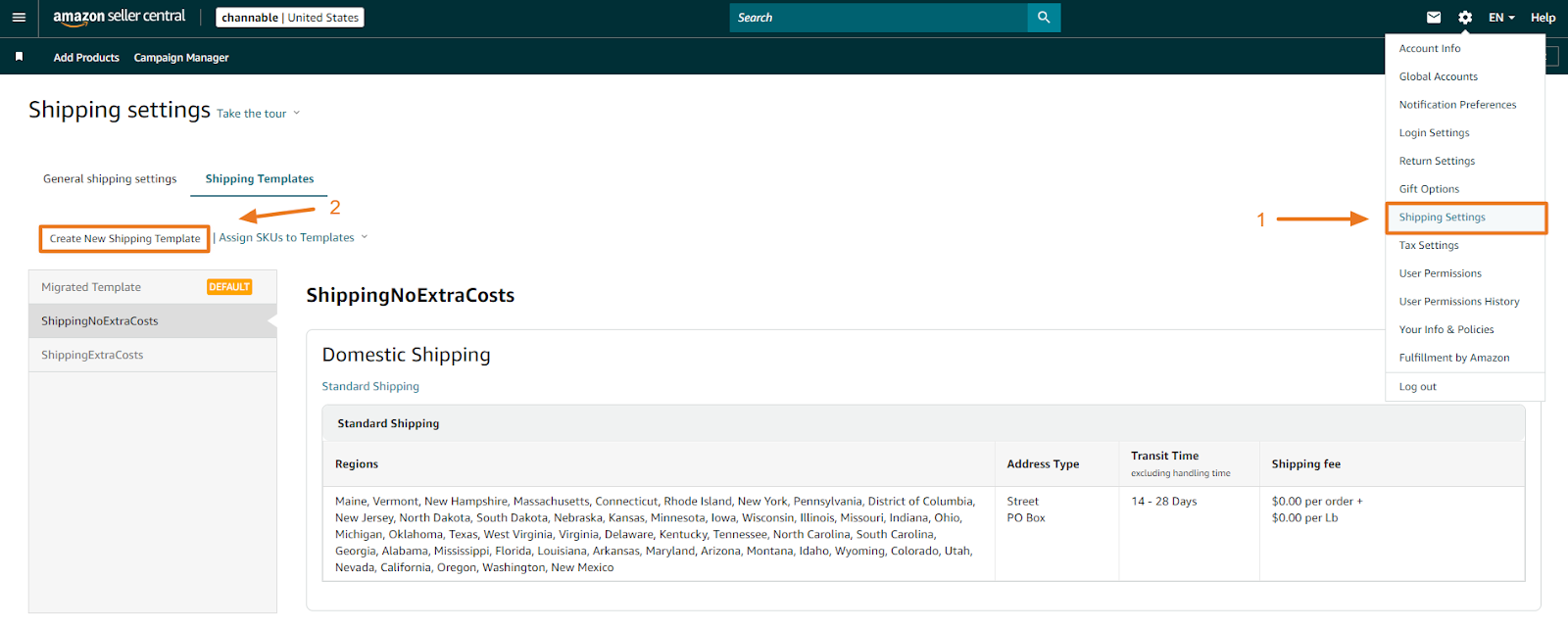
1. Ga in je Amazon Seller-account naar **Instellingen** > **Verzendinstellingen**.
2. Klik **Maak nieuwe verzendtemplate** en geef je template een naam.
Voorbeeld: Hier hebben we twee verzendtemplates gemaakt met de namen "ShippingExtraCosts" en "ShippingNoExtraCosts".
{% endstep %}
{% step %}
### Dry run en kopieer je verzendtemplate-ID-nummer
Nadat je je verzendtemplates hebt aangemaakt, kun je je Amazon-kanaal (dry) runnen en naar de instellingenstap gaan.
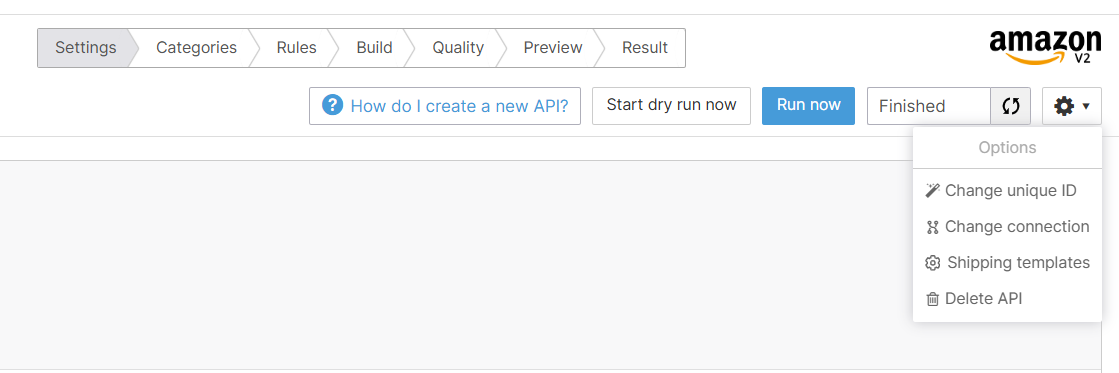
1. Ga naar de **Instellingen** stap en klik **Start dry run nu**.
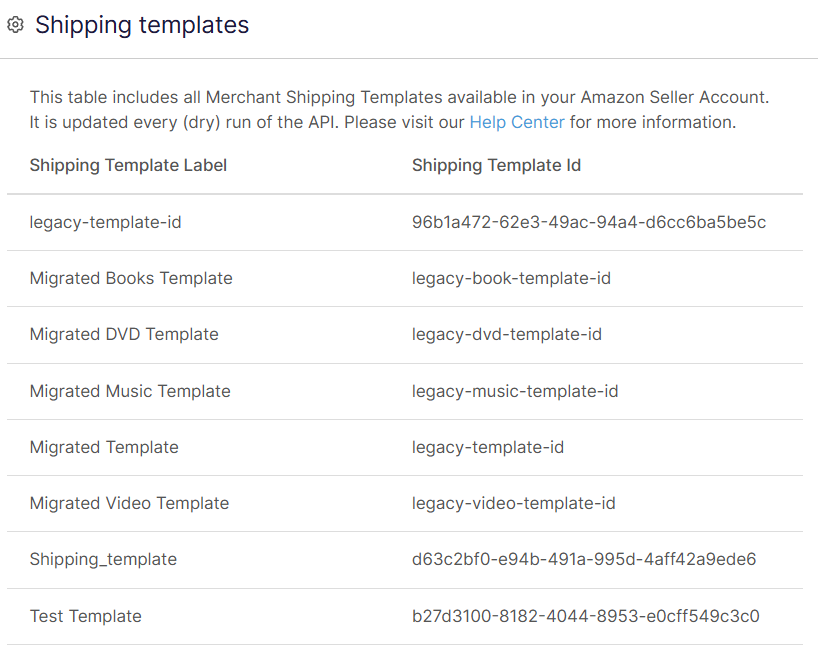
2. Klik op de tandwiel-dropdown en selecteer **Verzendtemplates**. Er verschijnt een pop-up met een lijst van je verzendtemplates en hun ID's.
3. In de **Shipping Template Id** kolom, kopieer de verzendtemplate-id die je voor je categorie wilt gebruiken. Je hebt dit nodig om de volgende stap te voltooien.
{% endstep %}
{% step %}
### Koppel het veld in de Build-stap
1. Ga naar de **Bouw** stap > **Categorierelevante attributen** en selecteer de relevante categorie.
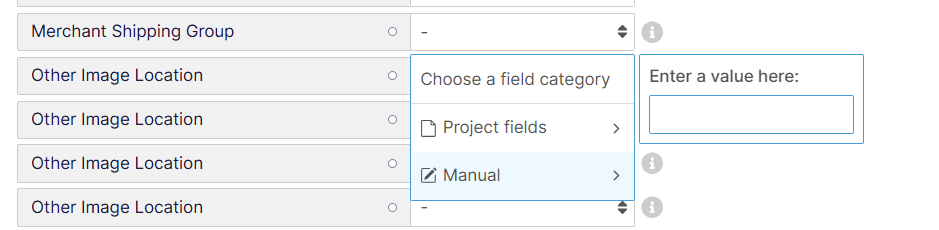
2. Scroll naar de **Aanbieding** sectie. Voor **Merchant Shipping Group**, klik op het veld, selecteer **Handmatig**en plak de id die je in de vorige stap hebt gekopieerd.
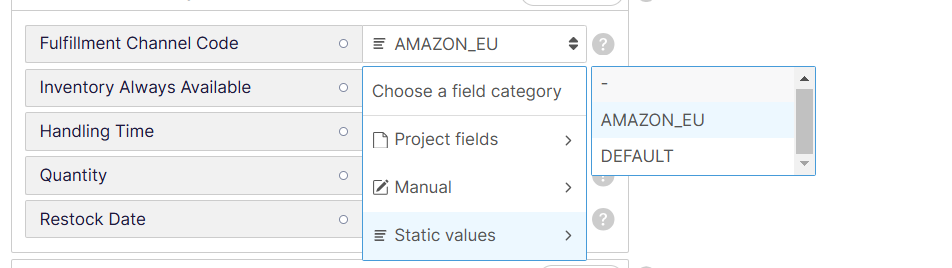
3. Voor **Beschikbaarheid fulfilment**, klik **+ Toevoegen** en vul de **Fulfillment Channel code** en **Verwerkingstijd** velden in.
1. **Fulfillment Channel Code** - klik op het veld en selecteer **Vaste waarden**. Vervolgens:
* Als je een zelfvervulde voorraad hebt (MFN - Merchant Fulfillment Network), selecteer **STANDAARD**.
* Als je orders afhandelt via Amazons voorraad (AFN - Amazon Fulfillment Network), selecteer dan de [passende Amazon-code ](broken://pages/81411452e9f5ae5a1230049fb1a180c938670925)(bijv. AMAZON\_EU).
2. **Verwerkingstijd** - vul het aantal dagen in tussen het ontvangen en verzenden van een bestelling. Standaard is dit 1–2 dagen. Gebruik dit veld alleen als je langer dan 2 dagen nodig hebt.
{% hint style="danger" %}
**Belangrijk:** Je kunt een product niet naar Amazon sturen dat zowel AFN als MFN heeft. Om beide te gebruiken, stel **Fulfillment Channel Code** in als **STANDAARD**, laat het **Verwerkingstijd** veld leeg en push je producten naar Amazon. Daarna dupliceer je in je Amazon Seller-account deze aanbieding om een aparte AFN-aanbieding te maken door er een aparte SKU aan toe te wijzen.
{% endhint %}
4. Herhaal deze stap voor al je categorieën.
Je verzendtemplates worden gekoppeld zodra je je Amazon-kanaal runt.
{% endstep %}
{% endstepper %}
---
# Agent Instructions
This documentation is published with GitBook. GitBook is the documentation platform designed so that both humans and AI agents can read, navigate, and reason over technical content effectively. Learn more at gitbook.com.
## Querying This Documentation
If you need additional information that is not directly available in this page, you can query the documentation by asking a question.
Perform an HTTP GET request on the following URL with the `ask` and `goal` query parameters:
```
GET https://helpcenter.channable.com/list-advertise/list-and-advertise-nl/amazon/lijst-items-op-amazon/hoe-je-verzendtemplates-voor-amazon-configureert.md?ask=&goal=
```
`ask` is the immediate question: it should be specific, self-contained, and written in natural language.
`goal` is what the user is ultimately trying to achieve, the reason they need the answer. Sharing it helps GitBook give you a better, more relevant answer. A goal is most helpful when it describes the outcome the user wants rather than restating the question. For example, with `ask=how do I create an API token`, a goal like `automate deployments from our CI pipeline` lets GitBook tailor the answer to that use case.
The response will contain a direct answer to the question and relevant excerpts and sources from the documentation.
Use this mechanism when the answer is not explicitly present in the current page, you need clarification or additional context, or you want to retrieve related documentation sections.