> For the complete documentation index, see [llms.txt](https://helpcenter.channable.com/llms.txt). Markdown versions of documentation pages are available by appending `.md` to page URLs; this page is available as [Markdown](https://helpcenter.channable.com/list-advertise/list-and-advertise-nl/google/google-ads-beheren-en-optimaliseren/google-shopping-advertenties/shopping-ads-campagnes-configureren/meerderen-advertentiegroepsgeneratoren-gebruiken-voor-shopping-ads.md).
# Meerderen advertentiegroepsgeneratoren gebruiken voor Shopping Ads
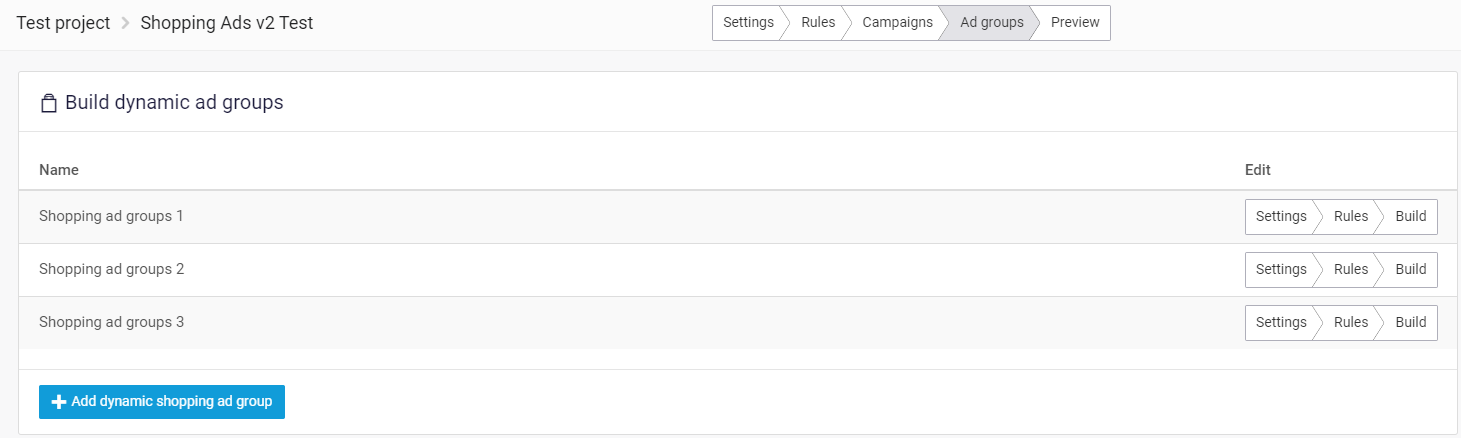
Met onze Shopping Ads v2 kun je nu meerdere Shopping-adgroepgeneratoren aanmaken. Dit lijkt op meerdere advertentiegroepen voor Tekstadvertenties:
Om een nieuwe Ad Group generator toe te voegen, klik je in dit overzicht op de knop ‘Add dynamic shopping ad group’.
Standaard is er slechts één Shopping Ad Group generator waarin je je advertentiegroepen kunt instellen. In de meeste gevallen is één generator voldoende om je advertentiegroepen op de gewenste manier in te richten. Soms heb je echter een doel of use case waarvoor je meerdere Ad Group generatoren nodig hebt.
Voor elke Shopping adgroupgenerator kun je de Instellingen, Regels en Build configureren. In de Build-stap maak je Productgroep-onderverdelingen, wat belangrijk is wanneer je meerdere Shopping adgroupgeneratoren gebruikt. Voor een uitgebreide handleiding over de configuratie van Shopping-adgroepen, zie [dit artikel](https://channable-test.gitbook.io/channable-test-docs/list-advertise/~/revisions/41I7hnV8leiPulcDgOau/google-shopping/manage-and-optimize-google-ads/google-shopping-ads/configuring-shopping-ads-campaigns/configuring-ad-groups-for-google-shopping-ads).
Het volgende is handig om in gedachten te houden bij het configureren van meerdere Shopping adgroupgeneratoren:
* Wanneer je het **Ad group name** voor twee verschillende Shopping adgroupgeneratoren hetzelfde instelt, worden ze in Google Ads gecombineerd. Daarom moet de Productgroep-onderverdeling **in dat geval hetzelfde zijn** anders leidt dat tot fouten.
* Als je verschillende **Ad group names** voor verschillende generatoren gebruikt, kun je verschillende Productgroep-onderverdelingen toepassen.
### Voorbeeld
**Verschillende adgroupnaam**
| **Campagnenaam** | **Naam van adgroupgenerator** | **Ad group name** |
| ---------------- | ----------------------------- | ---------------------- |
| Campagne 1 | Ad group generator 1 | Brand - \[brand] |
| Campagne 1 | Ad group generator 2 | \[category] - \[title] |
In dit voorbeeld genereren de twee verschillende adgroupgeneratoren verschillende adgroupnamen. Je kunt dan ook verschillende **Productgroep-onderverdelingen** voor deze generatoren aanmaken, bijvoorbeeld op ‘Brand’ (niveau #1) en ‘Product ID’ (niveau #2) voor Ad group generator 1, en op ‘Category’ (niveau #1) en ‘Product ID’ (niveau #2) voor Ad group generator 2.
Voor meer informatie over de productgroep-onderverdelingen, zie ook [dit artikel](https://channable-test.gitbook.io/channable-test-docs/list-advertise/~/revisions/41I7hnV8leiPulcDgOau/google-shopping/manage-and-optimize-google-ads/google-shopping-ads/configuring-shopping-ads-campaigns/configuring-ad-groups-for-google-shopping-ads).
---
# Agent Instructions
This documentation is published with GitBook. GitBook is the documentation platform designed so that both humans and AI agents can read, navigate, and reason over technical content effectively. Learn more at gitbook.com.
## Querying This Documentation
If you need additional information that is not directly available in this page, you can query the documentation by asking a question.
Perform an HTTP GET request on the following URL with the `ask` and `goal` query parameters:
```
GET https://helpcenter.channable.com/list-advertise/list-and-advertise-nl/google/google-ads-beheren-en-optimaliseren/google-shopping-advertenties/shopping-ads-campagnes-configureren/meerderen-advertentiegroepsgeneratoren-gebruiken-voor-shopping-ads.md?ask=&goal=
```
`ask` is the immediate question: it should be specific, self-contained, and written in natural language.
`goal` is what the user is ultimately trying to achieve, the reason they need the answer. Sharing it helps GitBook give you a better, more relevant answer. A goal is most helpful when it describes the outcome the user wants rather than restating the question. For example, with `ask=how do I create an API token`, a goal like `automate deployments from our CI pipeline` lets GitBook tailor the answer to that use case.
The response will contain a direct answer to the question and relevant excerpts and sources from the documentation.
Use this mechanism when the answer is not explicitly present in the current page, you need clarification or additional context, or you want to retrieve related documentation sections.