> For the complete documentation index, see [llms.txt](https://helpcenter.channable.com/llms.txt). Markdown versions of documentation pages are available by appending `.md` to page URLs; this page is available as [Markdown](https://helpcenter.channable.com/list-advertise/list-and-advertise-nl/orders/navigatie-op-de-orders-pagina.md).

# Navigatie op de Orders-pagina

Deze pagina biedt een Overzicht van het tabblad alle Orders, Product retouren en Product updates in Orders.

### Alle orders

<figure><img src="https://940372931-files.gitbook.io/~/files/v0/b/gitbook-x-prod.appspot.com/o/spaces%2FF8GepmoSonQRG6RnHOxJ%2Fuploads%2FxOiA8U0Vjvw4q9WYkqoG%2Funknown.png?alt=media&amp;token=8c7b61f3-6a51-4fdc-aa3c-63aeb100ca53" alt=""><figcaption></figcaption></figure>

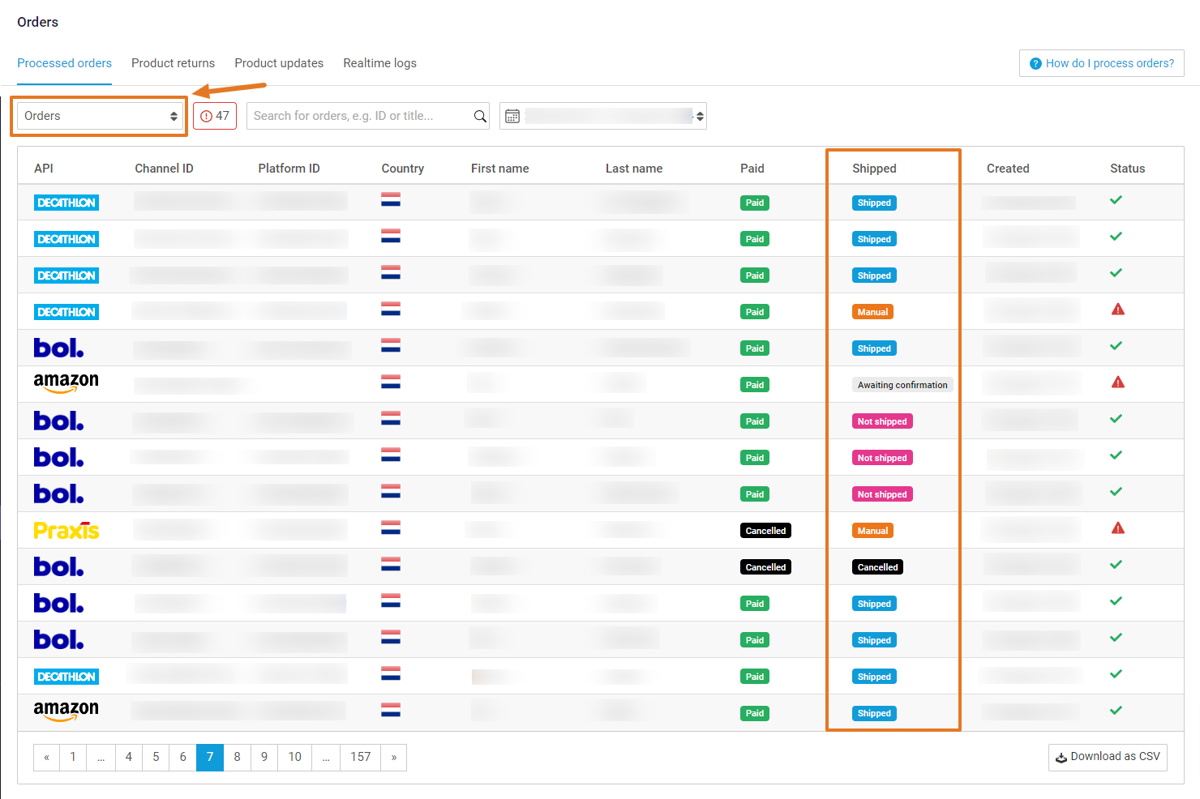
De **Alle orders** tab toont alle huidige en eerdere orders vanaf een bepaald moment. Je kunt dit zien als je commandocentrum om de stroom van orders van marketplaces naar je e-commerceplatform te volgen.

#### Filters en acties

* **Fouten:** Klik op **Weigerde orders bekijken** om automatisch orders met openstaande fouten te filteren.
* **Alle mislukte orders opnieuw verzenden:** Klik hierop om automatisch alle mislukte orders opnieuw te verzenden. [Meer informatie](https://helpcenter.channable.com/list-advertise/orders/troubleshooting-orders/how-to-fix-resend-a-failed-order)&#x20;
* **Download als CSV:** Klik om je orders te exporteren naar een CSV-bestand op basis van je geselecteerde datumbereik.

{% hint style="info" %}
**Let op:** Wanneer een klant meerdere items bestelt, verschijnt elk item in een aparte rij in het CSV-bestand.
{% endhint %}

<table data-header-hidden="false" data-header-sticky><thead><tr><th>Kolom</th><th>Beschrijving</th></tr></thead><tbody><tr><td>Kanaal</td><td>De marketplace waar de order is gekocht</td></tr><tr><td>Kanaal-ID</td><td>De ID van de order zoals aangeleverd door de marketplace</td></tr><tr><td>Platform-ID</td><td>De ID van de order zoals aangeleverd door je e-commerceplatform</td></tr><tr><td>Land</td><td>Het land waar de order is gekocht</td></tr><tr><td>Voornaam</td><td>De voornaam van de koper</td></tr><tr><td>Achternaam</td><td>De achternaam van de koper</td></tr><tr><td>Betaald</td><td>Of de betaling voor deze order is ontvangen</td></tr><tr><td>Verzonden*</td><td>Of de order is verzonden of niet</td></tr><tr><td>Aangemaakt</td><td>De datum waarop de order is geplaatst</td></tr><tr><td>Status</td><td><p>Of de order succesvol was of niet</p><ul><li>[waarschuwingssymbool]: Er zijn openstaande fouten</li><li>[vinkje]: De order is succesvol verwerkt</li></ul></td></tr></tbody></table>

<details>

<summary>*Verzendstatussen</summary>

* Verzonden
* Niet verzonden
* Handmatig
* Geannuleerd
* In afwachting
* Wacht op bevestiging
* Annuleringsverzoek
* Deels
* In afwachting van annulering
* In afwachting van verzending

</details>

### Product retouren

De tab Product retouren houdt alle huidige en eerdere retouren bij.&#x20;

{% hint style="info" %}
**Let op:** Beschikbaarheid van retour-synchronisatie hangt af van je e-commerceplatform en de specifieke marketplace.
{% endhint %}

**Definities van retourstatussen**

* **Nieuw:** Channable heeft deze retour onlangs geïmporteerd en wacht op een statusupdate
* **Geaccepteerd:** Je hebt de retour verwerkt en de klant terugbetaald.
* **Geweigerd:** Je hebt de retour niet ontvangen of accepteert deze niet en geeft geen terugbetaling.
* **Gerepareerd:** Je hebt het item gerepareerd en zonder terugbetaling teruggestuurd naar de klant.
* **Mag houden:** De klant mag het item houden en ontvangt een terugbetaling.
* **Omgeruild:** Je hebt in plaats van een terugbetaling een vervangend item gestuurd.
* **Geannuleerd:** Je hebt het retourverzoek geannuleerd, zonder terugbetaling.
* **Handmatig:** De retour moet direct in je platform worden beheerd

### Product updates

Deze tab geeft een logboek van voorraadwijzigingen die door orders zijn veroorzaakt. Je kunt dit gebruiken om te controleren of Channable de juiste wijzigingen in je voorraad doorvoert.

**Hoe voorraadupdates werken**

Wanneer er een order op een marketplace wordt geplaatst, geeft Channable je webshop direct de opdracht om de voorraad van dat item te verlagen. Daarna werkt het de marketplace bij om oververkoop te voorkomen.

**Belangrijk: de "voorraadkloof" begrijpen**&#x20;

Je kunt merken dat het voorraadniveau in deze tab anders is dan het voorraadniveau in **Items**.

* **tab Product updates**: toont realtime, 'live' voorraad die is aangepast op basis van recente orders.
* **Items**: toont het voorraadniveau uit je **laatste importrun**. De tab Items loopt bij tot de tab Product updates bij de volgende keer dat je webshopimport draait.

#### Updatetijden per marketplace

{% tabs %}
{% tab title="Realtime" %}

* Allegro
* Beslist
* Bol
* Kaufland
* Rakuten
* Walmart
  {% endtab %}

{% tab title="Elke 5 minuten" %}

* Amazon
* Cdiscount
* eBay
* Fruugo
* Mirakl-marketplaces
* Miravia
* Spartoo
* TikTok Shop
* Veepee
* Wayfair
  {% endtab %}

{% tab title="Elke minuut" %}
Zalando
{% endtab %}
{% endtabs %}

<details>

<summary><strong>Alle Mirakl-marketplaces</strong></summary>

* ANWB
* Bricoman
* Maar
* Carrefour France
* Carrefour Spain
* Conforama
* Conrad
* Debenhams
* Decathlon
* Douglas
* ePrice
* FNAC Darty Offers
* fonQ
* Galeries LaFayette
* Home24
* INNO
* Kruidvat
* La Redoute
* Le BHV Marais
* Leen Bakker
* Leroy Merlin
* Maisons du Monde
* Manor
* ManoMano
* MediaMarkt
* Miravia
* Obelink
* Otto
* PcComponentes
* Praxis
* Showroomprive
* Sprinter
* Vtwonen
* Worten

</details>


---

# Agent Instructions
This documentation is published with GitBook. GitBook is the documentation platform designed so that both humans and AI agents can read, navigate, and reason over technical content effectively. Learn more at gitbook.com.

## Querying This Documentation
If you need additional information that is not directly available in this page, you can query the documentation by asking a question.

Perform an HTTP GET request on the following URL with the `ask` and `goal` query parameters:

```
GET https://helpcenter.channable.com/list-advertise/list-and-advertise-nl/orders/navigatie-op-de-orders-pagina.md?ask=<question>&goal=<user_goal>
```

`ask` is the immediate question: it should be specific, self-contained, and written in natural language.
`goal` is what the user is ultimately trying to achieve, the reason they need the answer. Sharing it helps GitBook give you a better, more relevant answer. A goal is most helpful when it describes the outcome the user wants rather than restating the question. For example, with `ask=how do I create an API token`, a goal like `automate deployments from our CI pipeline` lets GitBook tailor the answer to that use case.

The response will contain a direct answer to the question and relevant excerpts and sources from the documentation.

Use this mechanism when the answer is not explicitly present in the current page, you need clarification or additional context, or you want to retrieve related documentation sections.
