> For the complete documentation index, see [llms.txt](https://helpcenter.channable.com/llms.txt). Markdown versions of documentation pages are available by appending `.md` to page URLs; this page is available as [Markdown](https://helpcenter.channable.com/list-advertise/list-and-advertise-nl/orders/stel-order-setup-in/geavanceerd-instellingen-voor-order-koppelingen.md).
# geavanceerd: Instellingen voor Order Koppelingen
Leer hoe je je Order-koppeling kunt configureren op basis van je voorkeuren.
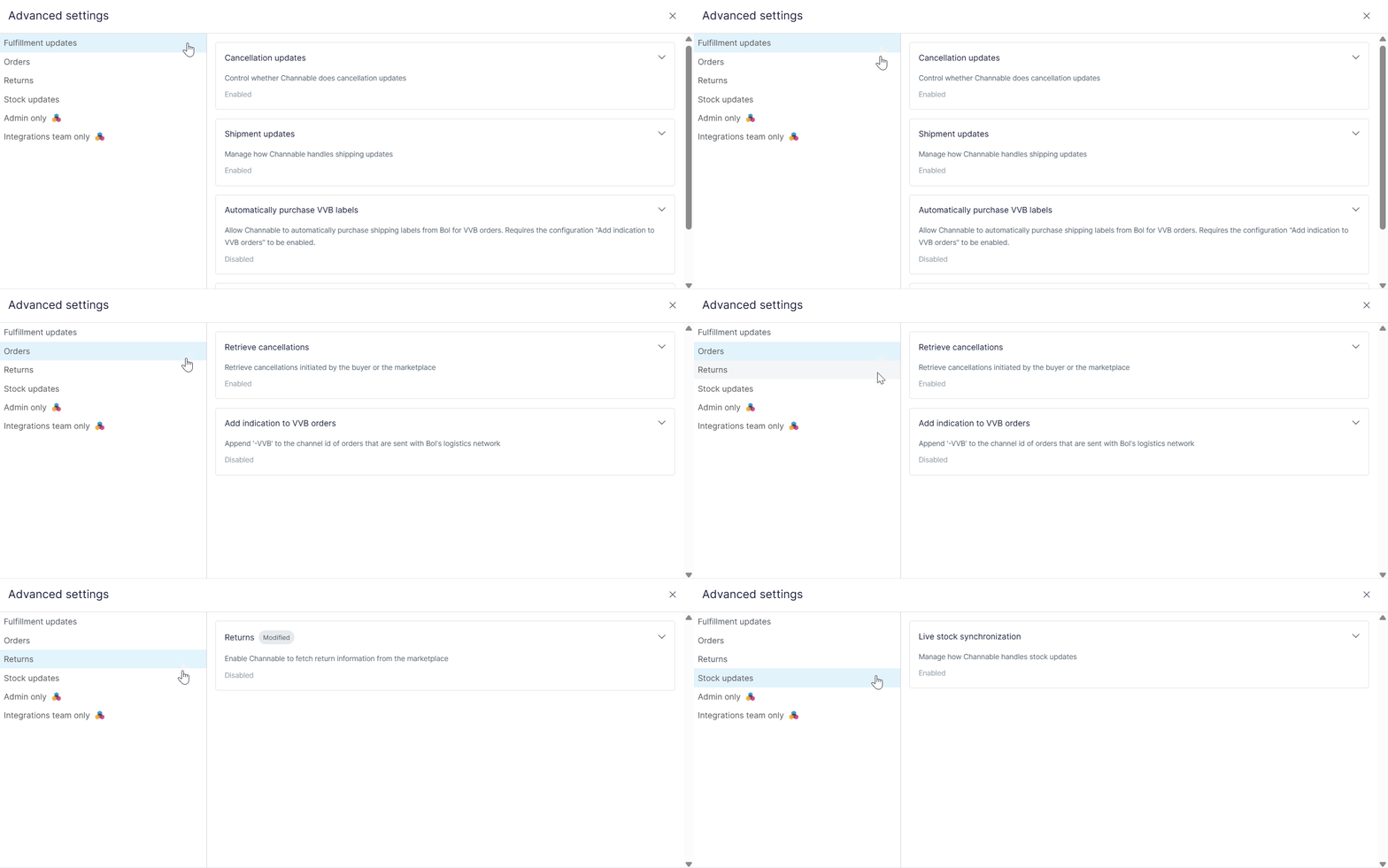
Je kunt geavanceerde instellingen voor orderkoppelingen in je orderkoppeling configureren om te bepalen hoe Channable verwerkt:
* Orders
* Fulfillment-updates
* Retouren
* Realtime voorraadupdates
* Andere configureerbare instellingen voor orderkoppelingen
{% hint style="warning" %}
**Belangrijk:** Beschikbare geavanceerde instellingen verschillen per platform en kanaal. Niet alle instellingen zijn beschikbaar voor alle integraties.
{% endhint %}
### Toegang en machtigingen
Om onbedoelde wijzigingen aan je instellingen voor orderkoppelingen te voorkomen, gelden de volgende machtigingen:
* Alle gebruikers met ‘read’-toegang kunnen geavanceerde instellingen voor orderkoppelingen vinden en bekijken.
* Alleen gebruikers met ‘write’-toegang kunnen geavanceerde instellingen voor orderkoppelingen vinden, bekijken en bewerken.
### Geavanceerde instellingen bewerken
1. Ga naar **Setup > Order connections**.
2. Klik op **Instellingen** in **\[je orderkoppeling]**.
3. Klik op :gear-complex: **Geavanceerde instellingen**. Er opent een pop-upmenu waarin de beschikbare instellingen voor orderkoppelingen voor het platform en kanaal dat je gebruikt worden weergegeven.
4. Gebruik het menu om de instellingen die je aan je orderkoppeling wilt toevoegen te bekijken, in te schakelen en op te slaan.
{% hint style="danger" %}
**Belangrijke mededeling:** Het wijzigen van deze instellingen heeft invloed op orderverwerking, fulfillment-updates, retouren en realtime voorraadupdates via Channable.
Controleer de informatie zorgvuldig voordat je bepaalde functies in- of uitschakelt.
{% endhint %}
### Navigatie
Klik op de verschillende tabbladen in het menu om te navigeren tussen **Fulfillment**, Orders, Retouren en **Voorraadgerelateerde** instellingen.
### Bekijk details van de instelling
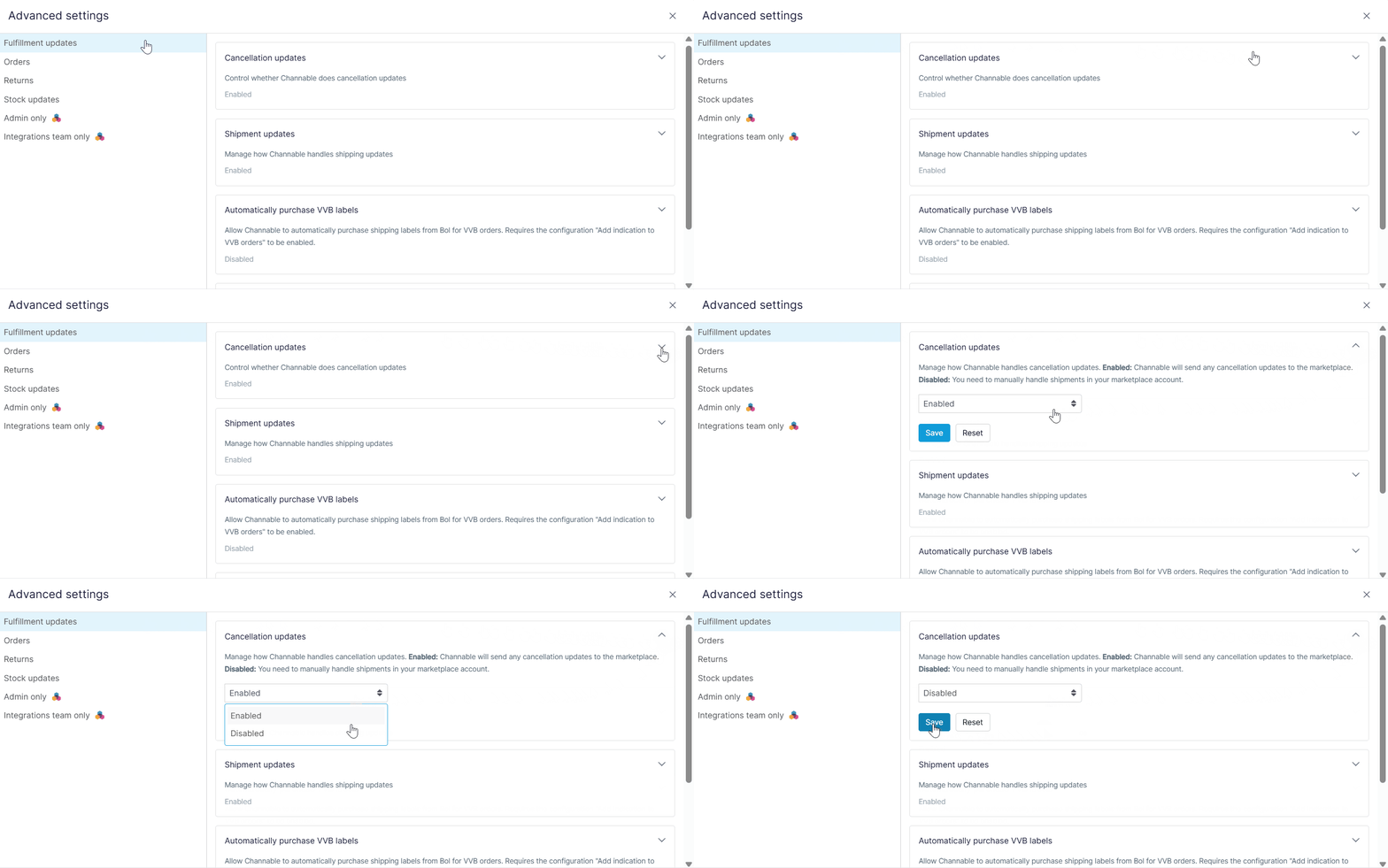
Klik op een instelling om meer details te bekijken.
#### Nieuwe instellingen opslaan
Klik op de instelling, pas het veld aan (zet het op **Ingeschakeld/Uitschakeld** of vul een waarde in), en klik op **Opslaan**.
Er verschijnt een label **Aangepast** om aan te geven dat de instelling is aangepast.
### Instelling terugzetten naar standaard
1. Zoek de instelling die je wilt terugzetten. Als die is gewijzigd, heeft die een **Aangepast** label.
2. Klik op de instelling om meer details te bekijken.
3. Klik op **Reset**. Je wijzigingen worden automatisch opgeslagen.
---
# Agent Instructions
This documentation is published with GitBook. GitBook is the documentation platform designed so that both humans and AI agents can read, navigate, and reason over technical content effectively. Learn more at gitbook.com.
## Querying This Documentation
If you need additional information that is not directly available in this page, you can query the documentation by asking a question.
Perform an HTTP GET request on the following URL with the `ask` and `goal` query parameters:
```
GET https://helpcenter.channable.com/list-advertise/list-and-advertise-nl/orders/stel-order-setup-in/geavanceerd-instellingen-voor-order-koppelingen.md?ask=&goal=
```
`ask` is the immediate question: it should be specific, self-contained, and written in natural language.
`goal` is what the user is ultimately trying to achieve, the reason they need the answer. Sharing it helps GitBook give you a better, more relevant answer. A goal is most helpful when it describes the outcome the user wants rather than restating the question. For example, with `ask=how do I create an API token`, a goal like `automate deployments from our CI pipeline` lets GitBook tailor the answer to that use case.
The response will contain a direct answer to the question and relevant excerpts and sources from the documentation.
Use this mechanism when the answer is not explicitly present in the current page, you need clarification or additional context, or you want to retrieve related documentation sections.