> For the complete documentation index, see [llms.txt](https://helpcenter.channable.com/llms.txt). Markdown versions of documentation pages are available by appending `.md` to page URLs; this page is available as [Markdown](https://helpcenter.channable.com/list-advertise/list-and-advertise-nl/verkopen-op-marktplaatsen/marktplaats/het-oplossen-van-de-marktplaats-pro-fout-waarde-van-het-veld-cpc-lag-buiten-bereik.md).
# Het oplossen van de Marktplaats Pro-fout 'Waarde van het Veld 'cpc' lag buiten bereik'
Marktplaats Pro hanteert verschillende minimale CPC-waarden per categorie. Bijvoorbeeld: de minimale CPC voor e-readers kan €0,02 zijn en voor auto’s €0,04. Wanneer de CPC-waarde voor een advertentie onder de minimale CPC staat, krijg je een foutmelding in Channable:
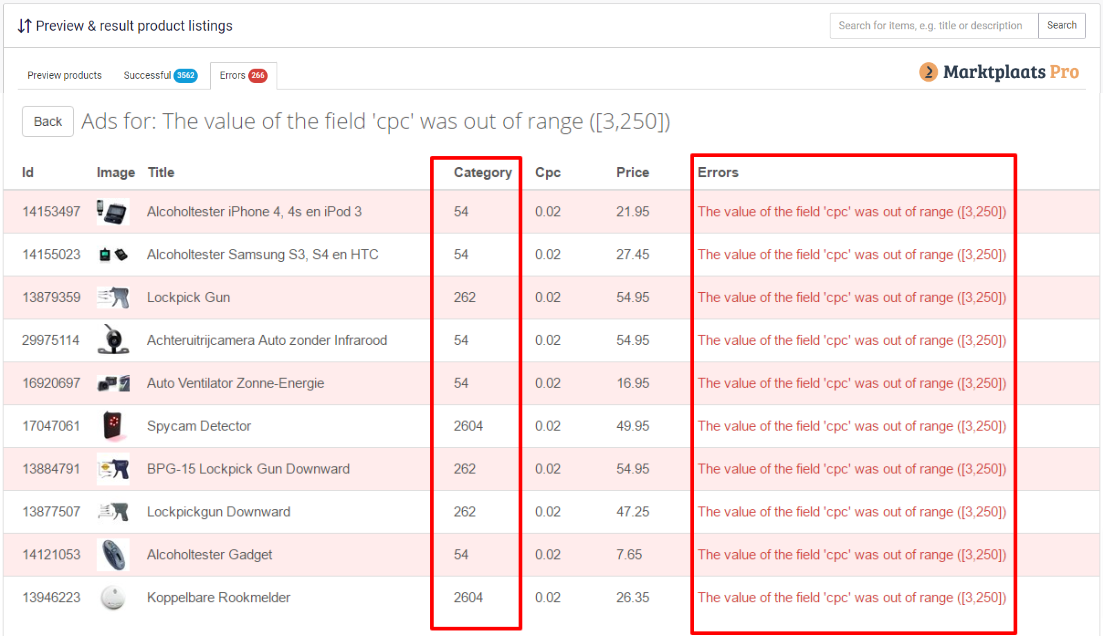
Als je op de fout klikt, zie je een overzicht van de advertenties waarvan de CPC-waarde de minimale CPC van Marktplaats Pro niet haalt. In dat overzicht zie je ook het categorie-ID, de momenteel ingestelde CPC-waarde en de minimale CPC-waarde voor producten in die categorie.
Volg de onderstaande stappen om deze fouten op te lossen.
{% stepper %}
{% step %}
### Stap 1 — Noteer de categorieën & minimale CPC
Schrijf vanuit het overzicht de categorie-ID’s (kolom categorie) en de minimale CPC-waarde (kolom fout) op. In de schermafbeeldingen hierboven is de minimale CPC bijvoorbeeld €0,03. De snippet "range(\[3,250])" betekent dat de minimale CPC €0,03 is ("range(\[4,250])" duidt op €0,04, enz.).
{% endstep %}
{% step %}
### Stap 2 — Maak een nieuw veld voor CPC
Als je nog geen veld hebt waarin je je CPC-waarden kunt zetten, [voeg er dan eentje toe](https://helpcenter.channable.com/get-started/get-started-nl/aan-de-slag/velden-in-channable/velden-mappen-en-toevoegen.md).
Voeg een veld toe met de naam "cpc" of een vergelijkbare naam. Dit creëert voor elk product een leeg veld zodat je voor elke Marktplaats Pro-advertentie een CPC-waarde kunt instellen. Als je al een CPC-veld hebt, kun je dat veld in de volgende stappen gebruiken.
Om de CPC voor je producten in te stellen, voer je de volgende acties uit:
{% stepper %}
{% step %}
Ga naar Kanalen -> Marktplaats Pro -> Rules
{% endstep %}
{% step %}
Klik op "Create new" en kies een naam (bijv. "set cpc")
{% endstep %}
{% step %}
Maak een regel zoals in het onderstaande voorbeeld, waarbij je de categorie-nummers gebruikt die je hebt opgeschreven.

{% endstep %}
{% endstepper %}
{% endstep %}
{% step %}
### Stap 3 — Voeg CPC toe in Build & Run marketplace
Voeg het CPC-veld dat je hebt gemaakt (of al had) toe aan de Build-stap van de marketplace:
* Ga naar Build > Price Information
* Klik op het plus-icoon en kies het cpc-veld
Stuur ten slotte deze wijzigingen naar Marktplaats Pro:
* Ga naar Kanalen -> Marktplaats Pro
* Klik op "Run now"
De fouten zouden nu moeten verdwijnen in de Preview-stap van je Marktplaats Pro API. Zie je nog steeds CPC-fouten? Dan heb je waarschijnlijk nog categorieën gemist — herhaal bovenstaande stappen voor die categorieën om de resterende fouten te verhelpen.
{% endstep %}
{% endstepper %}
---
# Agent Instructions
This documentation is published with GitBook. GitBook is the documentation platform designed so that both humans and AI agents can read, navigate, and reason over technical content effectively. Learn more at gitbook.com.
## Querying This Documentation
If you need additional information that is not directly available in this page, you can query the documentation by asking a question.
Perform an HTTP GET request on the following URL with the `ask` and `goal` query parameters:
```
GET https://helpcenter.channable.com/list-advertise/list-and-advertise-nl/verkopen-op-marktplaatsen/marktplaats/het-oplossen-van-de-marktplaats-pro-fout-waarde-van-het-veld-cpc-lag-buiten-bereik.md?ask=&goal=
```
`ask` is the immediate question: it should be specific, self-contained, and written in natural language.
`goal` is what the user is ultimately trying to achieve, the reason they need the answer. Sharing it helps GitBook give you a better, more relevant answer. A goal is most helpful when it describes the outcome the user wants rather than restating the question. For example, with `ask=how do I create an API token`, a goal like `automate deployments from our CI pipeline` lets GitBook tailor the answer to that use case.
The response will contain a direct answer to the question and relevant excerpts and sources from the documentation.
Use this mechanism when the answer is not explicitly present in the current page, you need clarification or additional context, or you want to retrieve related documentation sections.