> For the complete documentation index, see [llms.txt](https://helpcenter.channable.com/llms.txt). Markdown versions of documentation pages are available by appending `.md` to page URLs; this page is available as [Markdown](https://helpcenter.channable.com/manage-improve-product-data/manage-product-and-improve-data-de/regeln-massenbearbeitung-und-anreicherung/so-verwendest-du-aktionen-dann-in-regeln/regelaktion-gruppiere-items.md).
# Regelaktion: gruppiere Items
**Verwendet für:** Die einzelnen Größen von Items zu einem einzigen Item zusammenführen.
**Verwendet in:** „THEN“-Anweisungen und „ELSE“-Anweisungen.
Die meisten Kanäle wollen jede Größe eines Produkts als eigenes Item im Export-Feed. Einige Kanäle möchten die Größen jedoch als Hauptprodukt mit einer Liste verfügbarer Größen gruppiert haben (z. B. Spartoo, Fashionchick, Mentoday). Um Größen in einem Produkt zu gruppieren, kannst du die Regel „group items“ verwenden.
Damit diese Regel funktioniert, benötigst du ein Feld, das bei allen Größen eines Produkts exakt gleich ist. Bei Lightspeed heißt dieses Feld „parent\_id“. Bei Magento heißt es item\_group\_id. Wenn du eine andere Shop-Plattform verwendest, suche nach einem Wert, der für die Produkte, die du zusammenfassen willst, identisch ist. Haben diese Produkte zum Beispiel denselben Titel, könntest du sie über das Titelfeld gruppieren.
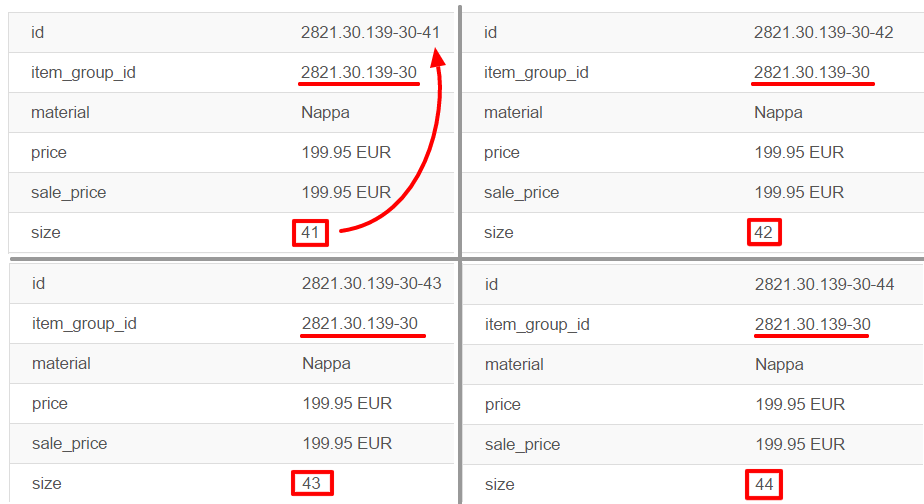
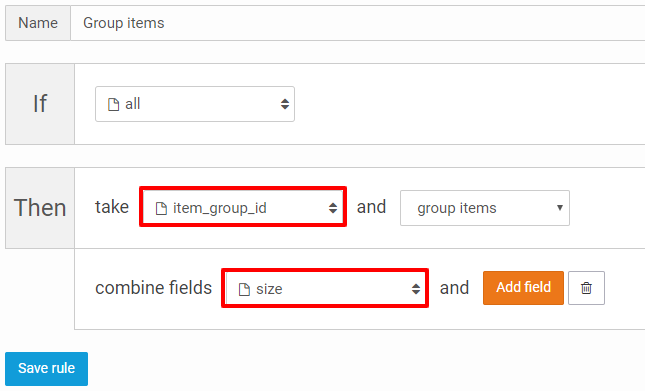
Im Screenshot oben zeigen wir ein Beispiel mit 4 verschiedenen Größen eines Produkts. Die Größen haben jeweils eine eigene ID, teilen aber dieselbe item\_group\_id. In diesem Fall können wir die item\_group\_id verwenden, um diese Produkte zu einem Hauptprodukt zusammenzufassen. Zusätzlich wollen wir die Größen der ursprünglichen Produkte in einer Liste zusammenführen. Das ist im Screenshot unten dargestellt.
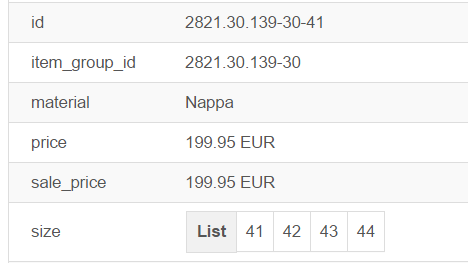
Das Ergebnis ist ein Produkt statt vier separater Produkte. Im Screenshot unten siehst du das Resultat dieser Regel.
Vier Produkte sind jetzt zu einem Produkt kombiniert. Deshalb ist die Anzahl deiner Produkte nach einer „group products“-Regel automatisch deutlich kleiner als vor der Regel.
---
# Agent Instructions
This documentation is published with GitBook. GitBook is the documentation platform designed so that both humans and AI agents can read, navigate, and reason over technical content effectively. Learn more at gitbook.com.
## Querying This Documentation
If you need additional information that is not directly available in this page, you can query the documentation dynamically by asking a question.
Perform an HTTP GET request on the current page URL with the `ask` query parameter, and the optional `goal` query parameter:
```
GET https://helpcenter.channable.com/manage-improve-product-data/manage-product-and-improve-data-de/regeln-massenbearbeitung-und-anreicherung/so-verwendest-du-aktionen-dann-in-regeln/regelaktion-gruppiere-items.md?ask=&goal=
```
`ask` is the immediate question: it should be specific, self-contained, and written in natural language.
`goal` is optional and describes the broader end goal you are ultimately trying to accomplish on behalf of the user. GitBook uses it to tailor the answer towards what is most useful for that goal.
The response will contain a direct answer to the question and relevant excerpts and sources from the documentation.
Use this mechanism when the answer is not explicitly present in the current page, you need clarification or additional context, or you want to retrieve related documentation sections.