> For the complete documentation index, see [llms.txt](https://helpcenter.channable.com/llms.txt). Markdown versions of documentation pages are available by appending `.md` to page URLs; this page is available as [Markdown](https://helpcenter.channable.com/manage-improve-product-data/manage-product-and-improve-data-it/regole-modifica-in-blocco-e-arricchisci/come-usar-le-azioni-causa-en-regole/reemplazar-valor.md).
# reemplazar valor
Usato per: sostituire un valore in un determinato campo con un altro valore. Può anche essere usato per eliminare un valore (sostituire con nulla).
Usato in: istruzioni "THEN" e istruzioni "ELSE".
Con la regola "replace value" puoi cercare un certo valore in un campo specifico e sostituirlo con un altro valore a tua scelta. Se non inserisci un valore di sostituzione, sostituisci il valore cercato con nulla (=eliminazione del valore). Inoltre, se il valore che vuoi sostituire non viene trovato nel campo selezionato, la regola non farà nulla, quindi non aggiungerà casualmente il valore di sostituzione in quel caso.
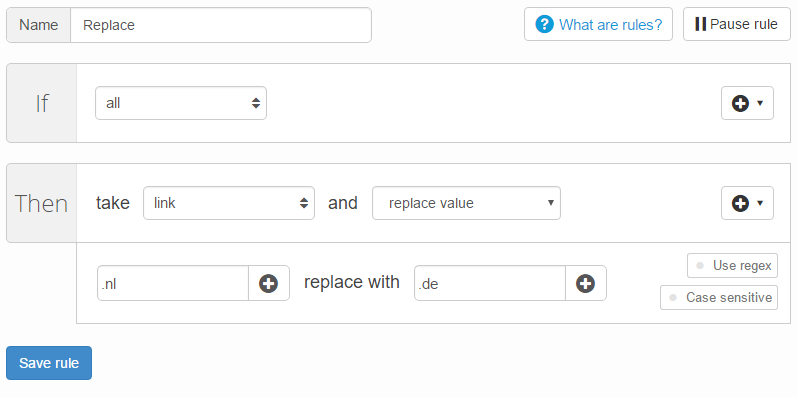
Ad esempio, puoi usare la regola "replace value" per cambiare i tuoi URL olandesi in URL tedeschi. Questo esempio è mostrato nello screenshot qui sotto.
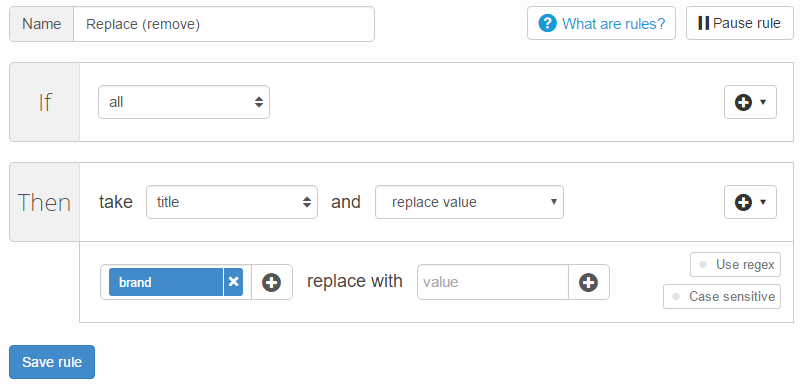
Oltre a cercare un valore e sostituirlo con un altro, la regola "replace value" può anche essere usata per eliminare determinati valori da un campo. In questo caso lascia semplicemente vuoto il campo "replace with" (".de" nell’esempio sopra). Lo screenshot qui sotto mostra un esempio in cui il brand viene eliminato dal titolo di ogni articolo.
---
# Agent Instructions
This documentation is published with GitBook. GitBook is the documentation platform designed so that both humans and AI agents can read, navigate, and reason over technical content effectively. Learn more at gitbook.com.
## Querying This Documentation
If you need additional information that is not directly available in this page, you can query the documentation by asking a question.
Perform an HTTP GET request on the following URL with the `ask` and `goal` query parameters:
```
GET https://helpcenter.channable.com/manage-improve-product-data/manage-product-and-improve-data-it/regole-modifica-in-blocco-e-arricchisci/come-usar-le-azioni-causa-en-regole/reemplazar-valor.md?ask=&goal=
```
`ask` is the immediate question: it should be specific, self-contained, and written in natural language.
`goal` is what the user is ultimately trying to achieve, the reason they need the answer. Sharing it helps GitBook give you a better, more relevant answer. A goal is most helpful when it describes the outcome the user wants rather than restating the question. For example, with `ask=how do I create an API token`, a goal like `automate deployments from our CI pipeline` lets GitBook tailor the answer to that use case.
The response will contain a direct answer to the question and relevant excerpts and sources from the documentation.
Use this mechanism when the answer is not explicitly present in the current page, you need clarification or additional context, or you want to retrieve related documentation sections.