> For the complete documentation index, see [llms.txt](https://helpcenter.channable.com/llms.txt). Markdown versions of documentation pages are available by appending `.md` to page URLs; this page is available as [Markdown](https://helpcenter.channable.com/manage-improve-product-data/manage-product-and-improve-data-nl/regels-in-bulk-bewerken-en-verrijken/acties-dan-gebruiken-in-regels/regelactie-transformeer-tekst-naar-lijst.md).
# Regelactie: Transformeer tekst naar lijst
Wordt gebruikt voor: het aanmaken van een lijst uit een veld dat meerdere waarden bevat (gescheiden door een bepaald teken).
Gebruikt in: "THEN"-uitspraken en "ELSE"-uitspraken.
Je hebt een lijst in een veld nodig als je regels wilt gebruiken die op lijsten werken (bijvoorbeeld: slice list, split products, sort list). De regel "Split text to list" kan deze lijst voor je aanmaken.
Om een lijst in een veld aan te maken, moet dat veld meerdere waarden bevatten die door een specifiek teken zijn gescheiden. Voorbeelden van zulke veldwaarden:
* XXS, XS, S, M, L, XL, XXL
* 32; 33; 34; 35; 36
* 8719322525833|8719322525468|8719322521125|8719322527776|871932252390
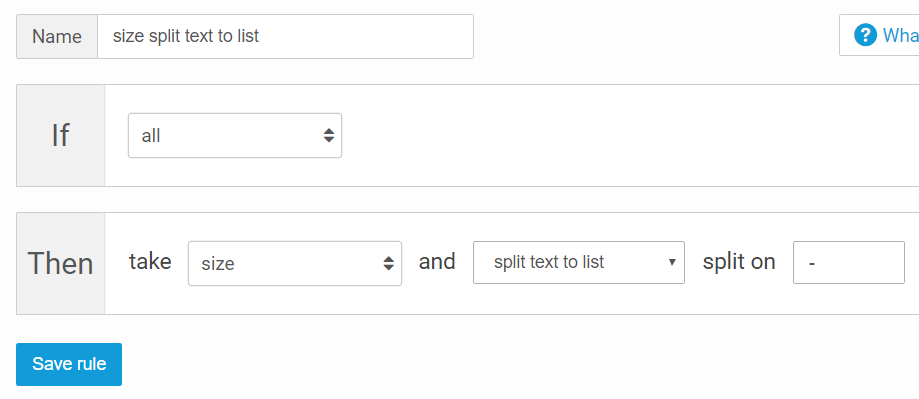
Met de regel "Split text to list" kies je op welk teken je wilt splitsen (bijv. komma, puntkomma of pipe). De regel maakt een lijstelement voor elke gescheiden waarde. In de screenshots hieronder zie je bijvoorbeeld hoe een veld met maten (gescheiden door komma) in een lijst wordt gesplitst.
Zo zag het "size"-veld eruit voordat deze regel werd toegepast:
En zo ziet hetzelfde veld eruit na het toepassen van de regel:
Daarna kun je bijvoorbeeld de regel Split products gebruiken om voor elke maat in de lijst een product aan te maken.
---
# Agent Instructions
This documentation is published with GitBook. GitBook is the documentation platform designed so that both humans and AI agents can read, navigate, and reason over technical content effectively. Learn more at gitbook.com.
## Querying This Documentation
If you need additional information that is not directly available in this page, you can query the documentation dynamically by asking a question.
Perform an HTTP GET request on the current page URL with the `ask` query parameter, and the optional `goal` query parameter:
```
GET https://helpcenter.channable.com/manage-improve-product-data/manage-product-and-improve-data-nl/regels-in-bulk-bewerken-en-verrijken/acties-dan-gebruiken-in-regels/regelactie-transformeer-tekst-naar-lijst.md?ask=&goal=
```
`ask` is the immediate question: it should be specific, self-contained, and written in natural language.
`goal` is optional and describes the broader end goal you are ultimately trying to accomplish on behalf of the user. GitBook uses it to tailor the answer towards what is most useful for that goal.
The response will contain a direct answer to the question and relevant excerpts and sources from the documentation.
Use this mechanism when the answer is not explicitly present in the current page, you need clarification or additional context, or you want to retrieve related documentation sections.