# Channable's pricing plans

If you select a Core plan, your Channable subscription is determined by two things: your package type (based on your number of items, projects and channels) and the Core plan that you choose. If you select a [CSS only plan](#css-plan), your subscription is based on your amount of active shops.

{% hint style="success" %}
**Tip:** Visit our [pricing page](https://www.channable.com/pricing) for an overview of our subscriptions.
{% endhint %}

### Core plans: Packages

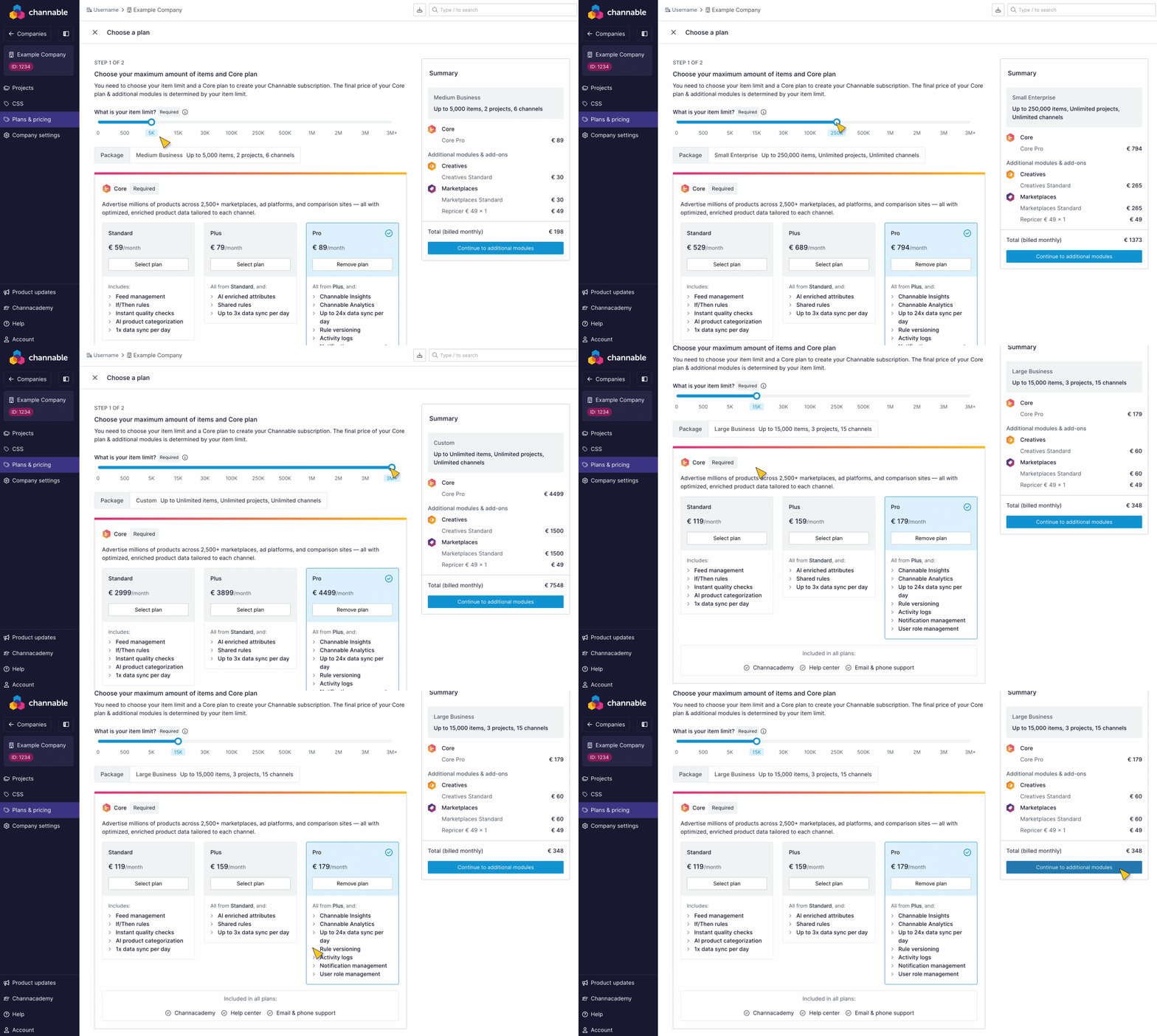
The number of items that you have and import determines your Channable package. Each unique product variant counts as one item - including all sizes, colors, and languages.

* To sell in multiple countries, you need to set up multiple channels in Channable which will count as multiple channels in your subscription usage.
* When setting up a channel, you have to specify the target country. This target country is fixed, which means that if you want to target another country you will have to create a new channel (feed or API), regardless of whether you’re already connected to that marketplace or not.
  * **Example:** If you sell on Amazon and want to target UK, FR and DE:\
    Amazon UK + Amazon FR + Amazon DE = three active channels in your subscription usage

#### Package types

* Free trial = 0 items, unlimited inactive projects, unlimited inactive channels
* Small business = 500 items, 1 project, 3 channels
* Medium business = 5K items, 2 projects, 6 channels
* Large business = 15K items, 3 projects, 15 channels
* XL business = 30K items, 5 projects, 30 channels
* XXL business = 100K items, 15 projects, 75 channels
* Small Enterprise = 250K items, Unlimited projects, Unlimited channels
* Medium Enterprise = 500K items, Unlimited projects, Unlimited channels
* Large Enterprise = 1M items, Unlimited projects, Unlimited channels
* XL Enterprise = 2M items, Unlimited projects, Unlimited channels
* XXL Enterprise = 3M items, Unlimited projects, Unlimited channels
* 3M+ items? [Contact our Sales team](https://www.channable.com/contact) for a custom subscription

#### Items (SKUs)

Each individual SKU that you import into Channable counts as one item, including size and color variants (e.g. A T-shirt in 3 sizes and 3 colors = 9 items).

#### Project

A project is the workspace where you can organize and manage your product data. If you want to sell products in multiple regions using different locales, for example, in France and Germany, it’s best to set up a project for each region/locale.

#### Channel

A platform, like Google Shopping or Amazon, where you make your products visible (selling or advertising) to potential customers. When you set up a channel in Channable, you need to specify the target country. This means that if you want to sell products in different countries, but with product data in one language, you still need to set up a channel per target country.

<figure><img src="/files/1nl60HLoZcRc7qXUR1nF" alt=""><figcaption></figcaption></figure>

### Core plans: Features

With our Core plans, you can advertise millions of products across 2,500+ marketplaces, ad platforms, and comparison sites — all with optimized, enriched product data tailored to each channel.

| Feature                                                                                                                              | Description                                                                                      |                      Core Standard |                                 Core Plus |                                   Core Pro |
| ------------------------------------------------------------------------------------------------------------------------------------ | ------------------------------------------------------------------------------------------------ | ---------------------------------: | ----------------------------------------: | -----------------------------------------: |
| [Feed management](/list-advertise/list-on-channels/set-up-a-feed.md)                                                                 | Sort, clean, and enrich your product data for marketing and selling channels                     |                                 ✔️ |                                        ✔️ |                                         ✔️ |
| [Rules](/manage-improve-product-data/rules-bulk-edit-and-enrich/rules-in-channable.md)                                               | Manage, enrich, and format your product data with IF/THEN rules to meet channel requirements.    |                                 ✔️ |                                        ✔️ |                                         ✔️ |
| [AI product categorization](/manage-improve-product-data/categorize-products/create-product-categories/ai-product-categorization.md) | Categorize millions of products instantly with AI                                                |                                 ✔️ |                                        ✔️ |                                         ✔️ |
| [Data syncs](/get-started/getting-started/create-a-new-project/edit-your-project-schedule-settings.md)                               | Pull and push all product data via various channels                                              | <p>✔️<br>1 x data sync per day</p> | <p>✔️<br>Up to 3 x data syncs per day</p> | <p>✔️<br>Up to 24 x data syncs per day</p> |
| [AI enriched attributes](/manage-improve-product-data/optimize-attributes-with-ai/ai-enriched-attributes-in-channable.md)            | Automatically generate missing product attributes with AI                                        |                                    |                                        ✔️ |                                         ✔️ |
| [Shared rules](/manage-improve-product-data/rules-bulk-edit-and-enrich/shared-rules.md)                                              | Create and manage rules across multiple projects and campaigns, from one place                   |                                    |                                        ✔️ |                                         ✔️ |
| [Channable Insights](/manage-improve-product-data/insights/channable-insights.md)                                                    | Access in-depth performance metrics and spend your budget on your highest-performing products    |                                    |                                           |                                         ✔️ |
| [Channable Analytics](/manage-improve-product-data/insights/google-analytics/configuring-a-new-google-analytics-connection.md)       | Connect Google Analytics to track performance and conversion                                     |                                    |                                           |                                         ✔️ |
| [Rule versioning](/manage-improve-product-data/rules-bulk-edit-and-enrich/rule-versioning.md)                                        | Keep track of changes made to your rules, and restore previous versions                          |                                    |                                           |                                         ✔️ |
| Activity logs                                                                                                                        | See who did what (and when) across your entire account.                                          |                                    |                                           |                                         ✔️ |
| [Custom notification management](/account-billing/manage-your-account-and-settings/manage-your-notification-settings.md)             | Control which notifications you need, and never miss a critical error in the noise               |                                    |                                           |                                         ✔️ |
| [Custom user role management](/account-billing/manage-your-account-and-settings/manage-user-roles-in-a-channable-account.md)         | Specify access privileges at various levels, with additional read-only and setup-only user roles |                                    |                                           |                                         ✔️ |

### CSS plan

With our CSS plan, you can increase the performance of your Shopping Ads with Google Premium CSS — [get more bidding power](/css/readme.md#benefits-of-channable-css) and better results without increasing your budget.\
\
**CSS features**

<table data-header-hidden><thead><tr><th></th><th width="390.3333740234375"></th><th></th></tr></thead><tbody><tr><td>Feature</td><td>Description</td><td>CSS Standard: €29 month/shop</td></tr><tr><td>CSS 20% margin advantage</td><td>Channable CSS gives you a 20% margin advantage, which means more bidding power without increasing costs</td><td>              ✔️</td></tr><tr><td>Title Optimizer</td><td>Increase product visibility using keyword suggestions based on search behavior and product data to optimize product titles</td><td>              ✔️</td></tr><tr><td>Labelizer Lite</td><td>Leverage performance labels to quickly spot which products are worth optimizing for the biggest impact</td><td>             ✔️</td></tr><tr><td>Price Benchmark Lite</td><td>Incorporate product price competitiveness into your optimization and analysis</td><td>             ✔️</td></tr></tbody></table>

The number of shops you use is the amount of Google Merchant Center IDs (or domains/URLS) you connect.

For example:

* myshop.com/nl and myshop.com/de = 1 domain and in most cases in 1 Google Merchant Center
* myshop.nl and myshop.de = 2 domains and are in 2 separate Google Merchant Centers

{% hint style="success" %}
**Tip:** Learn more about our [CSS pricing](https://docs.google.com/document/d/1k2C4z5SgV5wikVZMvqOkywO_detY9jub7IQ-o8h5DGk/edit?tab=t.0).
{% endhint %}

### Modules and add-ons

Modules and add-ons have additional features and functionality that you can add to your Core plan.

<figure><img src="/files/LQZkPo2v88ppwOx6JKvs" alt=""><figcaption></figcaption></figure>

#### Modules

#### Marketplaces Standard

Access a wide catalog of marketplace integrations and start selling at scale. Receive and manage orders (incl. shipments & returns) from each marketplace directly in your shop.

* [Order Sync (add-on)](/account-billing/manage-your-subscription/manage-your-channable-subscription/channable-subscription-add-ons.md#order-sync-add-on)
* [Repricer (add-on)](/account-billing/manage-your-subscription/manage-your-channable-subscription/channable-subscription-add-ons.md#repricer-add-on)
  * [Repricer for Amazon](/list-advertise/amazon/the-amazon-repricer.md)
  * [Repricer for bol](/list-advertise/bol/bol-repricer.md)

#### PPC Standard (one advertising connection) or PPC Pro (unlimited advertising connections)

Promote your products globally by creating thousands of [performance-based PPC campaigns](/list-advertise/readme.md) across different ad formats and platforms.

#### Creatives

Effortlessly [generate optimized, hyper-relevant, and on-brand product images](/manage-improve-product-data/creatives-create-and-edit-images/the-image-editor.md) directly from your feed and at scale.


---

# Agent Instructions: Querying This Documentation

If you need additional information that is not directly available in this page, you can query the documentation dynamically by asking a question.

Perform an HTTP GET request on the current page URL with the `ask` query parameter:

```
GET https://helpcenter.channable.com/account-billing/manage-your-subscription/channables-pricing-plans.md?ask=<question>
```

The question should be specific, self-contained, and written in natural language.
The response will contain a direct answer to the question and relevant excerpts and sources from the documentation.

Use this mechanism when the answer is not explicitly present in the current page, you need clarification or additional context, or you want to retrieve related documentation sections.
