comments-questionWhere can I find the Shopware shipment method id and shipment tax name for the order connection?
circle-info

Note: If you don't have an order connection yet and want to request one, follow the steps in this article.

The shipment method id

The shipment method id is the id of the shipment method you want to use when creating orders with the order connection. This is a mandatory field, and you cannot save the order connection if you do not provide it. You can either find this id in the URL when opening the given shipment method or in your database. The ids are always 32 characters long, and look like this:

1234567e1a2d3fdd4fdef56dd78901d0

The URL when opening the shipment method looks like this:

https://shopware6.demo.de/channable/public/admin#/sw/settings/shipping/detail/1234567e1a2d3fdd4fdef56dd78901d0

As may be clear from the above, the part after detail/ is the id.

You need to fill in the shipment method id in the settings screen of your order connection: Setup > Setup orders > Settings when creating it

The shipping tax name

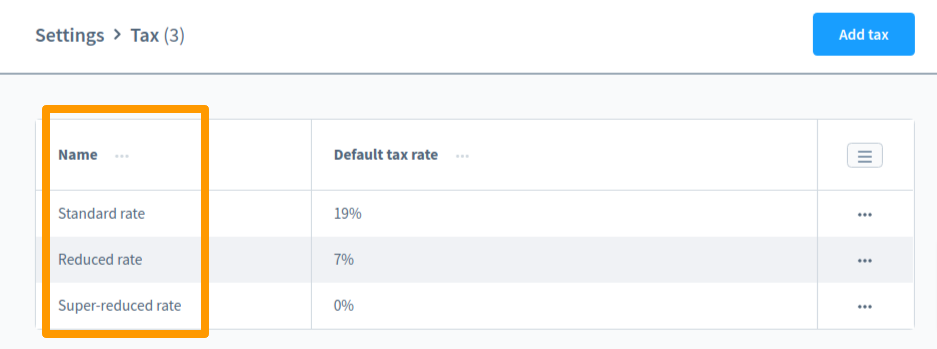
The shipping tax name is used to calculate taxes on the shipping costs. This field is optional, and if not provided, Channable will use 0% when calculating the prices. You can find the tax name in your taxes overview in Shopware 6:

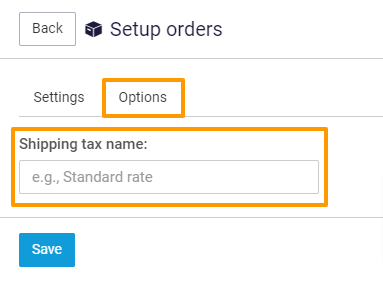
You should provide Channable with the tax name and not the percentage. The tax can have different percentages depending on the country, so Channable needs the name in order to get the correct percentage. You can do so by filling in the name of the shipping tax in the Setup > Setup orders > Settings > Options screen of the order connection.

Last updated

Was this helpful?